
1. Introduction
This manual provides comprehensive instructions for the proper setup, operation, and maintenance of your Albrecht AE Desktop 1300 Scanner Antenna. Please read this manual thoroughly before using the product to ensure optimal performance and longevity.
2. Product Overview
The Albrecht AE Desktop 1300 is a compact scanner station antenna designed for wideband reception across the 25 - 1300 MHz frequency range. Its design makes it suitable for indoor use or balcony installations. The antenna features a magnetic base for stable placement and comes with eight radial elements.
Key Features:
- Frequency Range: 25 - 1300 MHz
- Impedance: 50 Ohm
- Connector Type: BNC
- Base: Magnetic
- Antenna Length: Approximately 100 cm
- Radials: 8 pieces, each 41 cm long

3. Package Contents
Please verify that all items listed below are present in your package:
- 1x Albrecht AE Desktop 1300 Antenna (main mast with radiating elements)
- 1x Magnetic Base with integrated coaxial cable (approx. 4m length) and BNC connector
- 8x Radial Elements (approx. 41 cm each)
- 1x Hex Key (for assembly)
4. Setup Instructions
Follow these steps to assemble and set up your antenna:
4.1. Assembling the Radials
- Carefully unpack all components.
- Locate the magnetic base and the eight radial elements.
- Insert each of the eight radial elements into the designated slots around the base of the antenna. Ensure they are securely fastened, using the provided hex key if necessary, to prevent loosening.


4.2. Antenna Placement
For optimal reception, place the antenna in an elevated position, clear of obstructions. The magnetic base allows for stable placement on suitable metallic surfaces. It is designed for indoor use or on a balcony.
- Choose a location with minimal interference from electronic devices.
- Ensure the antenna is upright and stable.
4.3. Connecting to Your Receiver
- Locate the coaxial cable attached to the antenna's magnetic base.
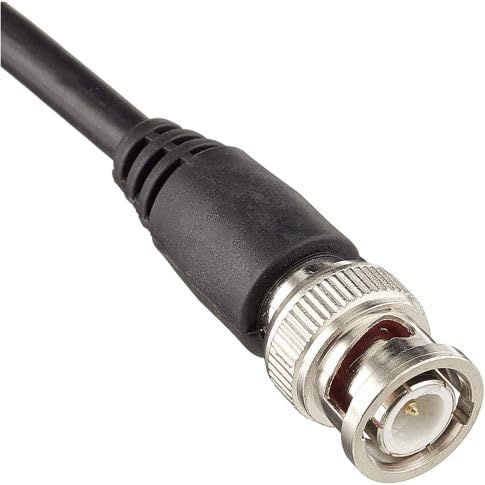
- Connect the BNC connector at the end of the coaxial cable to the antenna input port on your scanner or receiver. Ensure the connection is firm.
5. Operating Instructions
Once the antenna is assembled and connected, your scanner or receiver is ready for operation. The Albrecht AE Desktop 1300 is a passive antenna and does not require external power.
- Turn on your scanner/receiver and tune to the desired frequency within the 25 - 1300 MHz range.
- Adjust the position of the antenna slightly if reception is poor, as local conditions can affect signal strength.
6. Maintenance
The Albrecht AE Desktop 1300 antenna requires minimal maintenance to ensure continued performance.
- Cleaning: Periodically wipe the antenna elements and base with a soft, dry cloth to remove dust. Do not use abrasive cleaners or solvents.
- Inspection: Regularly check the radial elements and cable for any signs of damage or corrosion. Ensure all connections remain secure.
- Environmental Protection: While suitable for balcony use, prolonged exposure to extreme weather conditions (heavy rain, snow, direct sunlight) may reduce its lifespan. Consider bringing it indoors during severe weather.
7. Troubleshooting
If you experience issues with your antenna, consider the following:
- Poor Reception:
- Ensure the antenna is placed in an elevated position, away from large metallic objects or other electronic devices that may cause interference.
- Check all cable connections to ensure they are secure.
- Try repositioning the antenna to a different location.
- Verify that your scanner/receiver is functioning correctly and tuned to the correct frequency.
- No Signal:
- Confirm the BNC connector is fully inserted into your receiver's antenna input.
- Inspect the coaxial cable for any visible damage (cuts, kinks).
- Ensure all radial elements are properly attached.
8. Specifications
| Feature | Specification |
|---|---|
| Brand | Albrecht |
| Model | AE Desktop 1300 (2040290) |
| Frequency Range | 25 - 1300 MHz |
| Impedance | 50 Ohm |
| Connector Type | BNC |
| Antenna Type | Scanner Station Antenna |
| Base Type | Magnetic Base |
| Antenna Length | 100 cm |
| Radial Length | 8 x 41 cm |
| Power Source | Electrically Wired (Passive) |
| Product Dimensions | 41L x 41W x 100H cm |
| Weight | 1.64 kg (package weight) |
9. Warranty and Support
Warranty information for the Albrecht AE Desktop 1300 antenna is typically provided by the manufacturer or the point of purchase. Please refer to the documentation included with your product or visit the official Albrecht website for details regarding warranty coverage and customer support. For returns or exchanges, please consult the retailer's policy where the product was purchased.


