
1. Introduction
This manual provides detailed instructions for the safe installation, operation, and maintenance of the Square D H361 Heavy Duty Safety Switch. This device is designed for robust performance in demanding electrical applications. Please read this manual thoroughly before attempting any installation or operation to ensure safety and proper function.
2. Safety Information
WARNING: Risk of electric shock, explosion, or arc flash. Only qualified personnel should install, operate, service, and maintain this equipment. Failure to follow these instructions will result in death or serious injury.
- Always de-energize the equipment before working on or near it.
- Use a properly rated voltage sensing device to confirm power is off.
- Do not use this equipment for life-support applications.
- Ensure all connections are tight and secure.
- Use only fuses of the correct type and rating as specified for this safety switch.
- The use of incompatible electrical components can lead to catastrophic failure and safety risks.
Circuit Breaker Compatibility
It is critical to understand that not all circuit breakers are interchangeable. Using an incorrect circuit breaker in a load center can lead to severe electrical hazards, including fire and equipment damage. Always ensure that any circuit breakers used in conjunction with your electrical system are specifically designed and listed for use with your load center.
Official video from Schneider Electric discussing the importance of using compatible circuit breakers in electrical systems to prevent catastrophic failures.
3. Product Overview
The Square D H361 is a heavy-duty, single-throw safety switch designed for reliable power disconnection. It features a robust steel enclosure and a 3-pole configuration, suitable for 600VAC/DC applications with a 30 Amp current rating. Key features include a quick-make, quick-break operating mechanism, a dual cover interlock for enhanced safety, and a color-coded indicator handle for clear status indication.
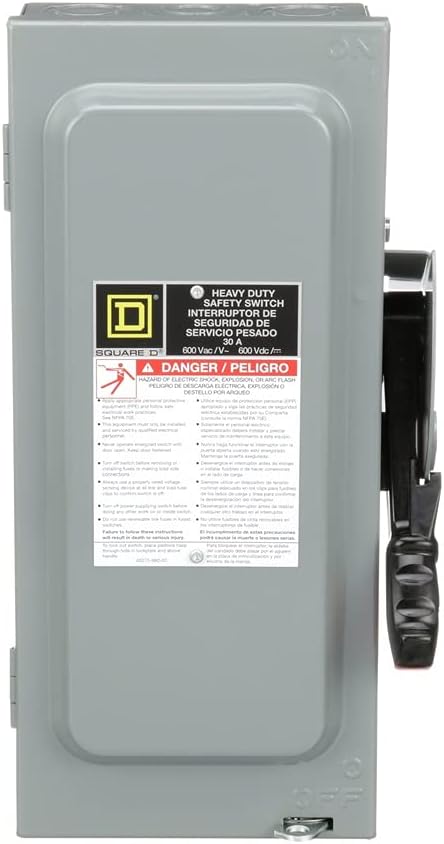
Figure 3.1: Front view of the Square D H361 Safety Switch, showing the main enclosure and operating handle.
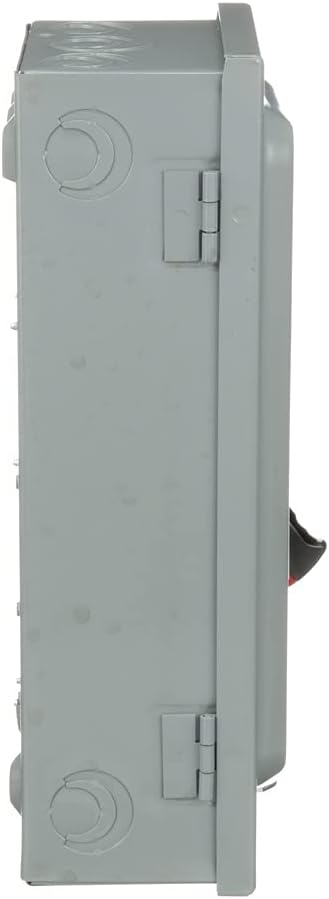
Figure 3.2: Side view of the Square D H361 Safety Switch, illustrating the depth and mounting points.
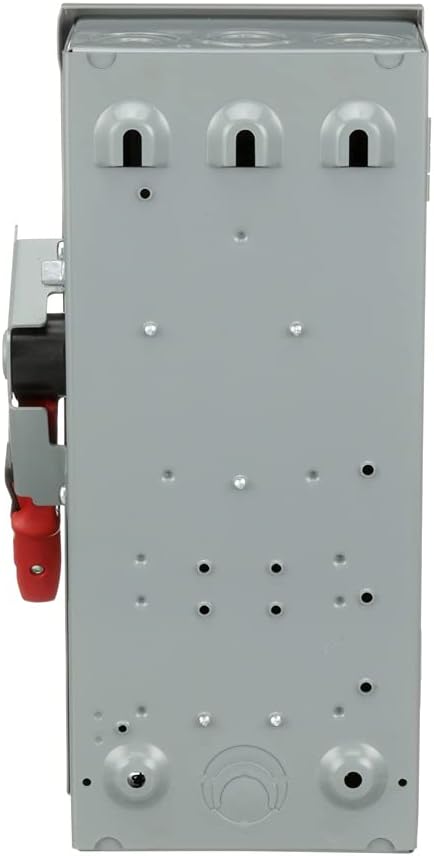
Figure 3.3: Back view of the Square D H361 Safety Switch, showing the mounting plate and conduit knockouts.

Figure 3.4: Right side view of the Square D H361 Safety Switch, highlighting the operating handle mechanism.
4. Setup and Installation
Installation of the Square D H361 Safety Switch must be performed by a qualified electrician in accordance with all national and local electrical codes. This device is designed for surface mounting.
4.1 Mounting
- Select a suitable, flat, and stable surface for mounting.
- Ensure adequate clearance around the switch for ventilation, operation, and maintenance.
- Securely fasten the switch enclosure to the mounting surface using appropriate hardware.
4.2 Wiring
- All wiring must comply with applicable electrical codes and the switch's specifications.
- The switch utilizes lugs for connector type and screw terminals for secure wire connections.
- Ensure proper wire gauge is used for the 30 Amp current rating and 600V operating voltage.
- This is a fusible disconnect. Install appropriate H, J, K, L, or R type fuses as required for overcurrent protection.
- Verify all connections are tight to prevent loose contacts and potential hazards.
5. Operating Instructions
The Square D H361 Safety Switch is operated via a robust handle mechanism. It features a quick-make, quick-break action to ensure rapid contact separation or closure, minimizing arc exposure.
5.1 Turning Power ON/OFF
- To turn the power ON, firmly push the operating handle to the 'ON' position. The color-coded indicator will show 'ON'.
- To turn the power OFF, firmly pull the operating handle to the 'OFF' position. The color-coded indicator will show 'OFF'.
5.2 Dual Cover Interlock
The dual cover interlock mechanism prevents the enclosure door from being opened when the switch is in the 'ON' position, enhancing user safety. It also prevents the switch from being turned 'ON' if the door is not fully closed and latched.
6. Maintenance
Regular maintenance ensures the longevity and safe operation of your safety switch. All maintenance procedures must be performed by qualified personnel with the power disconnected.
- Periodic Inspection: Visually inspect the switch for any signs of damage, corrosion, or loose connections. Check the operating handle for smooth movement.
- Cleaning: Keep the exterior of the enclosure clean and free from dust and debris. Do not use abrasive cleaners or solvents.
- Fuse Replacement: If a fuse blows, identify and correct the cause of the overcurrent before replacing it. Always replace fuses with the exact type and rating (H, J, K, L, or R) specified for the switch. Ensure power is OFF before replacing fuses.
- Tightening Connections: Periodically check and re-tighten all electrical connections to ensure optimal performance and prevent overheating.
7. Troubleshooting
If you experience issues with your Square D H361 Safety Switch, consider the following general troubleshooting steps. Always ensure power is disconnected before inspecting the switch.
- No Power Output:
- Verify the operating handle is in the 'ON' position.
- Check if any fuses have blown. Replace blown fuses with the correct type and rating after identifying and resolving the cause of the overcurrent.
- Ensure the main power supply to the safety switch is active.
- Handle Not Moving Smoothly:
- Inspect for any physical obstructions or debris around the handle mechanism.
- If the issue persists, contact a qualified electrician for inspection and repair. Do not force the handle.
- Enclosure Door Not Closing/Opening:
- Ensure the switch handle is in the 'OFF' position to open the door.
- Check for any obstructions preventing the door from closing or latching properly.
For complex issues or if you are unsure about any troubleshooting step, contact a qualified electrician or Schneider Electric customer support.
8. Specifications
| Feature | Specification |
|---|---|
| Model Number | SQDH361 |
| Brand | Schneider Electric (Square D) |
| Current Rating | 30 Amps |
| Operating Voltage | 600 Volts AC/DC |
| Number of Poles | 3 |
| Switch Type | Single Throw Heavy Duty Safety Switch, Fusible Disconnect |
| Enclosure Material | Steel |
| NEMA Rating | NEMA 1 |
| Mounting Type | Surface Mounting |
| Fuse Types Accepted | H, J, K, L, R |
| Short Circuit Current Rating | 10 kA (H or K), 200 kA (R, J or L) |
| Connector Type | Lugs |
| Terminal Type | Screw |
| Actuator Type | Hinge Lever |
| Contact Material | Copper |
| International Protection Rating | IP54 |
| Dimensions (L x W x H) | 4.87 x 7.55 x 14.6 inches |
| Item Weight | 14.9 ounces |
| UPC | 785901481843 |
9. Warranty Information
The Square D H361 Safety Switch comes with an 18-month warranty from the date of purchase. This warranty covers defects in materials and workmanship under normal use and service. For specific terms and conditions, please refer to the official warranty statement provided with your product or contact Schneider Electric customer support.
Please retain your proof of purchase for warranty claims.
10. Support and Contact Information
For technical assistance, product inquiries, or support, please contact Schneider Electric directly. You can find contact information on the official Schneider Electric website or through your local distributor.
Website: www.se.com/us/en/
Always provide your product model number (SQDH361) when seeking support to ensure efficient service.


