
Hotone NLA-4
Hotone Thunder Bass Mini Bass Guitar Amplifier Head User Manual
Model: NLA-4 | Brand: Hotone
Introduction
This manual provides essential information for the safe and effective operation, maintenance, and troubleshooting of your Hotone Thunder Bass Mini Bass Guitar Amplifier Head. Please read this manual thoroughly before using the product.
The Hotone Thunder Bass amplifier head is designed to deliver a powerful bass tone in a compact and portable form factor. It features a simplified control layout for ease of use, including a 3-band EQ for tone shaping, and various input/output options for versatile connectivity.
Setup
1. Unpacking and Inspection
Carefully remove the amplifier from its packaging. Inspect the unit for any signs of damage that may have occurred during shipping. Retain the packaging materials for future transport or storage.
2. Connecting Power
Connect the included 18V DC power supply adapter to the 18V DC input jack on the rear panel of the amplifier. Ensure the adapter is securely connected before plugging it into a power outlet. Use only the specified 18V DC center-negative power supply.
3. Connecting Your Instrument
Plug your bass guitar into the INPUT (1/4" mono jack) on the front panel of the amplifier using a standard instrument cable.

Figure 1: Front Panel Controls and Input. (1) INPUT: 1/4" mono jack for bass guitar.
4. Connecting to a Speaker Cabinet
Connect the amplifier to a speaker cabinet using the SPEAKER OUTPUT (1/4" mono jack) on the rear panel. The amplifier is designed to automatically fit cabinets with impedances ranging from 4-16 ohms.
5. Connecting Headphones or Line Out
For silent practice or direct recording, connect headphones or a line-level device to the PHONES/LINE OUTPUT (1/8" stereo jack) on the rear panel.
6. Using the FX Loop
To integrate external effects pedals, use the FX LOOP SEND and FX LOOP RETURN (1/4" mono jacks) on the rear panel. The FX Loop is positioned between the pre-amp and power amp sections.
7. Connecting an External Music Player (AUX IN)
Connect an external music player (e.g., smartphone, MP3 player) to the AUX IN (1/8" stereo jack) on the rear panel to play along with backing tracks.

Figure 2: Rear Panel Connections. (1) 18V DC Input, (2) PHONES/LINE OUTPUT, (3) AUX IN, (4) FX LOOP RETURN, (5) SPEAKER OUTPUT, (6) FX LOOP SEND.
Operating Instructions
1. Power On/Off
Locate the ON/OFF toggle switch on the front panel. Flip the switch to the "ON" position to power on the amplifier. The indicator light will illuminate. Flip to "OFF" to power down.
2. Volume and Gain Controls
- GAIN: Controls the input gain level. Higher settings increase the signal strength and can introduce overdrive.
- VOLUME: Controls the overall output volume of the amplifier.
Start with the VOLUME control at a low setting and gradually increase it to a comfortable listening level. Adjust the GAIN to achieve your desired amount of clean tone or overdrive.
3. 3-Band EQ Controls
The Thunder Bass features a responsive 3-band equalizer to shape your tone:
- BASS: Controls the low frequency response.
- MIDDLE: Controls the mid frequency response.
- TREBLE: Controls the high frequency response.
Experiment with these controls to find the perfect tone for your bass and playing style. Adjusting the MIDDLE control can significantly impact the presence and clarity of your sound.
4. Product Demonstration Video
Watch this video for a demonstration of the Hotone Thunder Bass amplifier's sound characteristics across various musical styles, including funk, world, rock, and blues. It showcases the amplifier's ability to produce strong, classic tones, smooth overdrive, and bright, powerful slap sounds.
Video 1: Hotone Thunder Bass Mini Bass Guitar Amplifier Head Demonstration.
Maintenance
- Cleaning: Use a soft, dry cloth to clean the exterior of the amplifier. Do not use abrasive cleaners, waxes, or solvents.
- Storage: When not in use for extended periods, store the amplifier in a cool, dry place, away from direct sunlight and extreme temperatures.
- Ventilation: Ensure the amplifier has adequate ventilation during operation. Do not block the ventilation slots.
- Cable Management: Avoid kinking or excessive bending of cables. Store cables neatly to prevent damage.
Troubleshooting
| Problem | Possible Cause | Solution |
|---|---|---|
| No Sound Output |
|
|
| Distorted Sound |
|
|
| Hum or Noise |
|
|
Specifications
- Model: NLA-4 (Thunder Bass)
- Output Wattage: 5 Watts
- Power Source: 18V DC (Adapter included)
- Speaker Output Impedance: 4-16 ohms (auto-fitting)
- Controls: Volume, Gain, Bass, Middle, Treble
- Inputs: 1/4" Instrument Input, 1/8" AUX IN
- Outputs: 1/4" Speaker Output, 1/8" Phones/Line Output
- Effects Loop: Yes (Send/Return)
- Material: Metal chassis
- Item Weight: Approximately 1 pound (0.45 kg)
- Product Dimensions (L x W x H): 4.72 x 2.76 x 2.36 inches (120 x 70 x 60 mm)
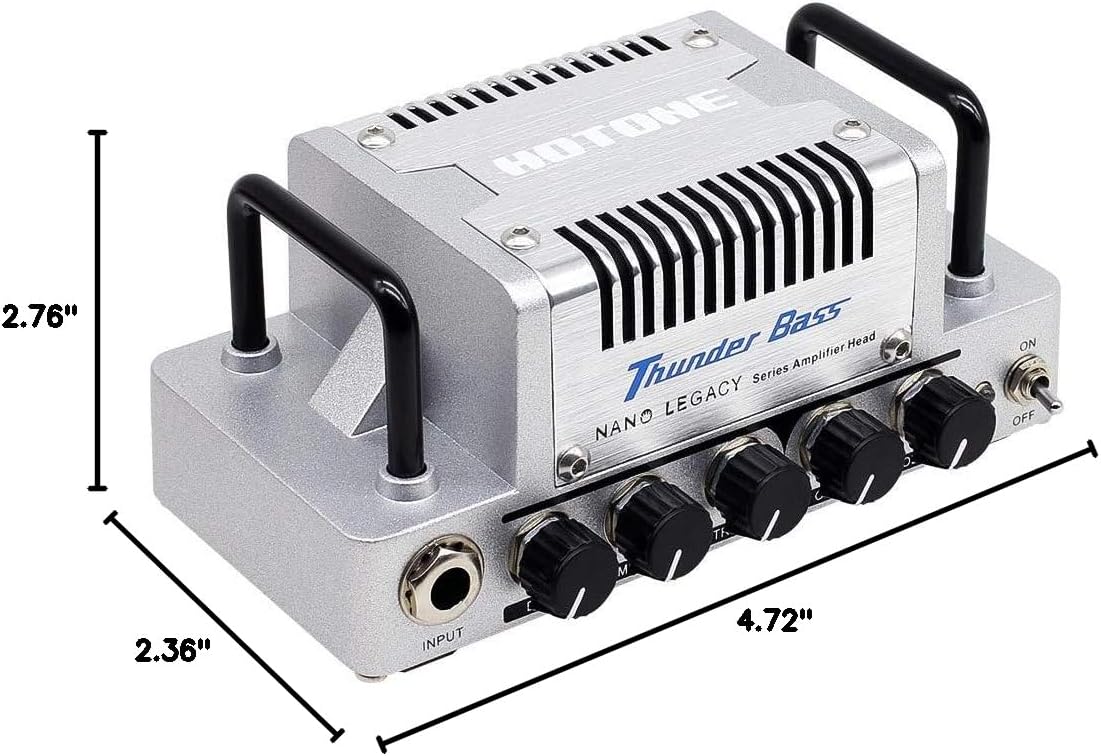
Figure 3: Product Dimensions.
Warranty and Support
The Hotone Thunder Bass Mini Bass Guitar Amplifier Head is covered by a manufacturer's warranty. For detailed warranty information, technical support, or service inquiries, please refer to the warranty card included with your product or visit the official Hotone website. Keep your purchase receipt as proof of purchase.
Ask a question about this manual
Ask about setup, troubleshooting, compatibility, parts, safety, or missing instructions. Manuals+ will review the question and use this page’s manual context to help answer it.