
1. Introduction
This manual provides essential instructions for the installation, operation, and maintenance of the Copeland 943-0155-00 Controller. This device is designed for precise control in industrial and scientific applications, specifically for temperature regulation. Please read this manual thoroughly before using the controller to ensure safe and efficient operation.
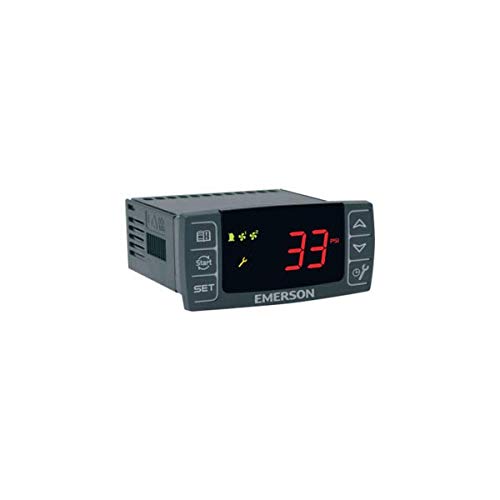
Figure 1: Copeland 943-0155-00 Controller. This image displays the front view of the Copeland 943-0155-00 Controller, showing its display and control buttons.
2. Safety Information
Always observe the following safety precautions to prevent injury and damage to the controller or connected equipment:
- Electrical Hazard: Ensure power is disconnected before installation or maintenance. Only qualified personnel should perform electrical connections.
- Proper Grounding: The controller must be properly grounded to prevent electrical shock.
- Environmental Conditions: Do not expose the controller to excessive moisture, dust, or extreme temperatures outside its specified operating range.
- Intended Use: Use the controller only for its intended purpose as a temperature controller.
- Ventilation: Ensure adequate ventilation around the unit to prevent overheating.
3. Setup and Installation
Follow these general steps for installing the Copeland 943-0155-00 Controller. Refer to specific wiring diagrams provided with the product packaging for detailed electrical connections.
- Mounting: Securely mount the controller in a suitable enclosure or panel, ensuring it is protected from environmental factors.
- Power Connection: Connect the main power supply to the designated terminals. Verify voltage and current ratings match the controller's requirements.
- Sensor Connection: Connect the temperature sensor(s) to the appropriate input terminals. Ensure correct polarity if applicable.
- Output Connections: Connect the controlled device (e.g., heater, cooler) to the output terminals. Observe maximum load ratings.
- Grounding: Connect the controller to a reliable earth ground.
- Initial Power-Up: After all connections are verified, apply power to the controller. Observe the display for initial readings and error codes.
4. Operating Instructions
The Copeland 943-0155-00 Controller features an intuitive interface for setting and monitoring temperature. Specific button functions and menu navigation will be detailed in the full product documentation.
- Power On/Off: The controller typically powers on automatically when connected to a power source.
- Set Point Adjustment: Use the designated UP/DOWN or SET buttons to adjust the desired temperature set point.
- Mode Selection: Access the menu to select operating modes (e.g., heating, cooling, PID control) if available.
- Parameter Configuration: Advanced parameters such as hysteresis, alarm limits, and calibration may be accessible through a configuration menu.
- Monitoring: The display will show the current temperature reading and other relevant status indicators.
5. Maintenance
Regular maintenance ensures the longevity and accurate performance of your controller.
- Cleaning: Periodically clean the controller's exterior with a soft, dry cloth. Do not use abrasive cleaners or solvents.
- Inspection: Regularly inspect wiring connections for signs of wear, corrosion, or looseness.
- Sensor Check: Verify the temperature sensor is clean and free from obstructions.
- Firmware Updates: Check the manufacturer's website for any available firmware updates, if applicable.
- Calibration: If accuracy drifts, professional recalibration may be required.
6. Troubleshooting
Before contacting technical support, review the following common issues and their potential solutions:
| Problem | Possible Cause | Solution |
|---|---|---|
| Controller not powering on | No power supply; incorrect wiring | Check power connections and source; verify wiring diagram. |
| Inaccurate temperature reading | Faulty sensor; incorrect sensor type; sensor placement | Inspect sensor and wiring; ensure correct sensor type is used; reposition sensor. |
| Output not activating | Incorrect set point; faulty output wiring; load issue | Adjust set point; check output wiring; test the connected load independently. |
| Display shows error code | Internal fault; sensor error | Refer to the full product manual for specific error code meanings and solutions. |
7. Specifications
Key technical specifications for the Copeland 943-0155-00 Controller:
- Model: 943-0155-00
- Manufacturer: COPELAND
- Item Weight: 1 pounds
- ASIN: B00OL535OS
- First Available: December 18, 2017
- Function: Controller (Temperature Controller)
8. Warranty and Support
For warranty information and technical support, please refer to the documentation included with your purchase or visit the official Copeland website. Keep your purchase receipt as proof of purchase for warranty claims.
Contact Information: Please refer to the manufacturer's official website or the product packaging for the most current contact details for customer service and technical assistance.


