
DEWALT DCR006
DEWALT DCR006 Bluetooth Jobsite Speaker User Manual
Model: DCR006 | Brand: DEWALT
Introduction
Thank you for choosing the DEWALT DCR006 Bluetooth Jobsite Speaker. This speaker is designed to provide robust audio performance and versatility in various work environments. It features Bluetooth connectivity, auxiliary input, and a USB charging port, powered by either AC/DC or DEWALT 12V/20V MAX battery packs. This manual provides essential information for safe and effective use of your speaker.
Important Safety Instructions
Always follow basic safety precautions when using electrical appliances to reduce the risk of fire, electric shock, and personal injury.
- Read all instructions before operating the speaker.
- Do not expose the speaker to rain or wet conditions.
- Do not use the speaker near water, such as bathtubs, sinks, or swimming pools.
- Clean only with a dry cloth.
- Do not block any ventilation openings. Install in accordance with the manufacturer's instructions.
- Do not install near any heat sources such as radiators, heat registers, stoves, or other apparatus (including amplifiers) that produce heat.
- Protect the power cord from being walked on or pinched, particularly at plugs, convenience receptacles, and the point where they exit from the apparatus.
- Only use attachments/accessories specified by the manufacturer.
- Unplug this apparatus during lightning storms or when unused for long periods of time.
- Refer all servicing to qualified service personnel. Servicing is required when the apparatus has been damaged in any way, such as power-supply cord or plug is damaged, liquid has been spilled or objects have fallen into the apparatus, the apparatus has been exposed to rain or moisture, does not operate normally, or has been dropped.
- Use only with the battery pack specified by DEWALT.
Product Overview
The DEWALT DCR006 is a compact and durable Bluetooth speaker designed for jobsite use. It features a rugged rubber housing for enhanced durability.

Figure 1: Front view of the DEWALT DCR006 Bluetooth Jobsite Speaker, showing the speaker grille and control panel.

Figure 2: Angled view of the DEWALT DCR006 Bluetooth Jobsite Speaker, highlighting its compact design and robust construction.
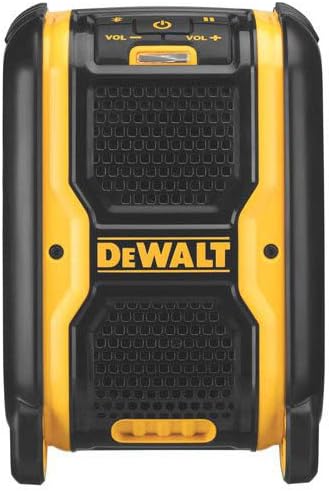
Figure 3: Side view of the DEWALT DCR006 Bluetooth Jobsite Speaker, showing the battery compartment area.
Controls and Ports:
- Power Button: Turns the speaker on or off.
- Volume Up/Down Buttons: Adjusts the speaker's output volume.
- Bluetooth Pairing Button: Initiates Bluetooth pairing mode.
- Play/Pause Button: Controls media playback.
- Track Skip Buttons: Skips to the next or previous track.
- Auxiliary Input (AUX IN): For connecting devices via a 3.5mm audio cable.
- USB Charging Port: For charging external devices (5V/2.1A output).
- AC/DC Power Ports: For connecting to wall power or a DC power source.
- Battery Compartment: Located on the side, compatible with DEWALT 12V or 20V MAX battery packs.
Setup
Powering the Speaker:
The DCR006 speaker can be powered by an AC adapter or a DEWALT 12V/20V MAX battery pack.
- Using AC Power:
- Connect the provided AC power adapter to the AC power port on the speaker.
- Plug the adapter into a standard wall outlet.
- Using a DEWALT Battery Pack:
- Open the battery compartment cover on the side of the speaker.
- Slide a charged DEWALT 12V or 20V MAX battery pack into the compartment until it clicks into place.
- Close the battery compartment cover securely.
The speaker will automatically draw power from the connected source. If both AC power and a battery are connected, the speaker will prioritize AC power and charge the battery (if applicable and the battery is a charging type).
Operating Instructions
1. Powering On/Off:
- Press and hold the Power Button for approximately 2 seconds to turn the speaker on or off.
- A power indicator light will illuminate when the speaker is on.
2. Bluetooth Pairing:
Connect your mobile device wirelessly to the DCR006 speaker via Bluetooth.
- Ensure the speaker is powered on.
- Press and hold the Bluetooth Pairing Button for approximately 2 seconds. The Bluetooth indicator light will flash, indicating pairing mode.
- On your mobile device, enable Bluetooth and search for available devices.
- Select "DEWALT DCR006" from the list of devices.
- Once paired, the Bluetooth indicator light on the speaker will turn solid, and you will hear an audible confirmation.
- You can now play audio from your device through the speaker.
3. Auxiliary Input (AUX IN):
For devices without Bluetooth, use the auxiliary input.
- Connect one end of a 3.5mm audio cable (not included) to the AUX IN port on the speaker.
- Connect the other end of the cable to the headphone jack or audio output of your device.
- The speaker will automatically switch to auxiliary mode.
- Adjust the volume on both your device and the speaker.
4. USB Charging Port:
The USB port provides power to charge compatible external devices.
- Connect your device's USB charging cable to the USB port on the speaker.
- Ensure the speaker is powered on.
- The speaker will begin charging your device. Note that charging speed may vary depending on the device and the speaker's power source.
5. Volume Control:
- Press the Volume Up (+) or Volume Down (-) buttons to adjust the speaker's volume.
Maintenance
- Cleaning: Wipe the speaker with a soft, damp cloth. Do not use abrasive cleaners or solvents. Ensure all ports are dry before use.
- Storage: Store the speaker in a clean, dry environment when not in use. Remove battery packs if storing for extended periods.
- Battery Care: Follow the instructions provided with your DEWALT 12V/20V MAX battery packs for proper charging and storage.
Troubleshooting
| Problem | Possible Cause | Solution |
|---|---|---|
| Speaker does not turn on. | No power source connected or battery is depleted. | Connect to AC power or insert a charged DEWALT 12V/20V MAX battery pack. |
| No sound from speaker. | Volume too low, incorrect input source, or device not connected properly. | Increase speaker and device volume. Ensure correct input (Bluetooth/AUX) is selected. Re-pair Bluetooth or re-connect AUX cable. |
| Bluetooth device will not pair. | Speaker not in pairing mode, device too far, or previously paired. | Ensure speaker is in Bluetooth pairing mode (flashing light). Move device closer to speaker. Forget "DEWALT DCR006" on your device and try pairing again. |
| USB charging not working. | Speaker not powered on, or device not compatible. | Ensure speaker is powered on. Check device compatibility and cable connection. |
Specifications
| Brand | DEWALT |
| Model | DCR006 |
| Speaker Maximum Output Power | 6 Watts |
| Connectivity Technology | Auxiliary, Bluetooth, USB |
| Input Voltage | 20 Volts (compatible with 12V/20V MAX batteries) |
| Housing Material | Rubber |
| Speaker Type | Outdoor |
| Recommended Uses | Workplaces, outdoor activities, portable music playback, mobile device charging |
| Color | Yellow/Black |
| Maximum Range (Bluetooth) | 100 Feet |
| Control Method | Tactile Buttons |
| Item Dimensions (L x W x H) | 15.2cm x 25.4cm x 30.2cm (6in x 10in x 11.9in) |
| Power Source | Battery (DEWALT 12V/20V MAX) or AC Adapter |
| Contents of the Box | Speaker, AC Power Adapter |

Figure 4: Dimensions of the DEWALT DCR006 Bluetooth Jobsite Speaker.
Warranty and Support
The DEWALT DCR006 Bluetooth Jobsite Speaker comes with a 3-year limited warranty. This warranty covers defects in materials and workmanship. For detailed warranty information, please refer to the warranty card included with your product or visit the official DEWALT website.
For technical support, service, or replacement parts, please contact DEWALT customer service. Contact information can typically be found on the DEWALT website or on the product packaging.
Related documentsDCR006


Ask a question about this manual
Ask about setup, troubleshooting, compatibility, parts, safety, or missing instructions. Manuals+ will review the question and use this page’s manual context to help answer it.