
1. Introduction
This manual provides instructions for the installation, operation, and maintenance of the Schlage ND-Series Grade 1 Cylindrical Passage Lock, model ND10S RHO 626. This lock is designed for heavy-duty commercial applications requiring a passage function, where both levers are always unlocked.
The Schlage ND-Series is engineered for durability and performance, exceeding ANSI/BHMA Grade 1 cycle test requirements.
2. Components Included
- Schlage ND Series Satin Chrome Lever
- Cylindrical lock chassis
- Latch mechanism
- Mounting hardware
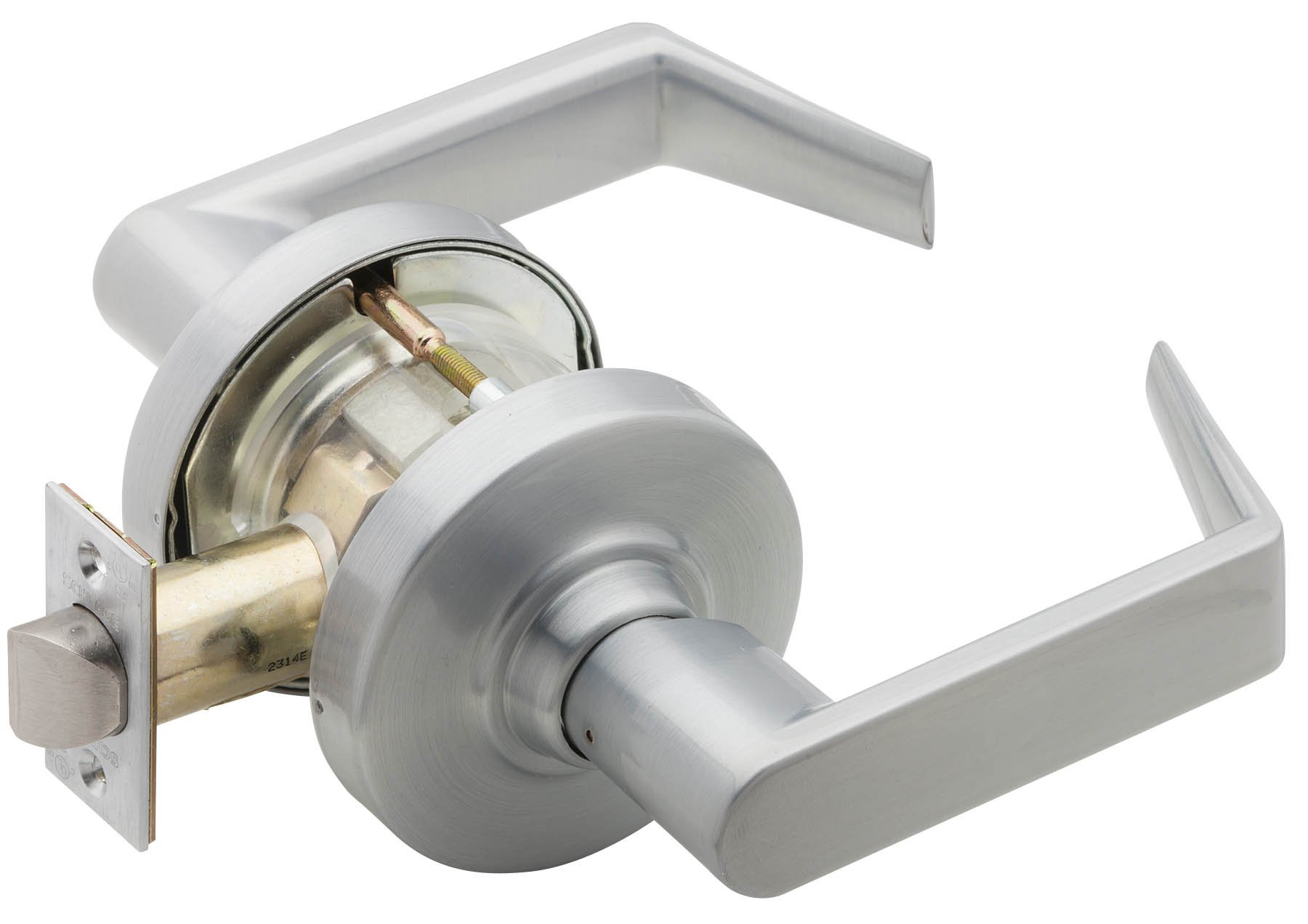
Image: Overview of the Schlage ND-Series cylindrical passage lock, displaying the complete assembly including the levers, cylindrical body, and the latch bolt.
3. Setup and Installation
The ND-Series locks are designed for easier installation. Proper installation ensures optimal performance and longevity.
3.1. Tools Required
- Phillips head screwdriver
- Measuring tape
- Pencil
- Drill (if preparing a new door)
3.2. Door Preparation
Ensure the door is prepared according to ANSI A156.2 standards for cylindrical locks. Verify backset and bore hole dimensions.
3.3. Installing the Latch
- Insert the latch into the edge bore hole of the door.
- Secure the latch with the provided screws. Ensure the latch bolt faces the door frame.
3.4. Installing the Lock Chassis
- Align the lock chassis with the cross bore hole, ensuring the spindle engages with the latch mechanism.
- Insert the exterior lever assembly.
- Insert the interior lever assembly.
- Secure the assemblies with the through-bolts. Tighten evenly to prevent binding.

Image: Detailed view of the lock's internal components and mounting hardware, illustrating how the cylindrical chassis connects to the latch mechanism during installation.
4. Operating Instructions
The Schlage ND-Series Passage Function lock (ND10S) is designed for areas where free access is always required.
4.1. Passage Function
- Both the interior and exterior levers are always unlocked.
- Turning either lever retracts the latch bolt, allowing the door to open.
- The door can be opened from either side at any time.
4.2. Closing the Door
Simply push the door shut. The spring latch will engage with the strike plate, holding the door closed.
5. Maintenance
Regular maintenance ensures the longevity and smooth operation of your Schlage ND-Series lock.
5.1. Cleaning
- Clean the lock's exterior with a soft, damp cloth. Avoid abrasive cleaners or solvents, which can damage the finish.
- For satin chrome finish, use a mild soap solution if necessary, then wipe dry.
5.2. Lubrication
- Periodically apply a small amount of graphite lubricant or a silicone-based spray to the latch bolt mechanism and inside the lever hubs.
- Do not use oil-based lubricants, as they can attract dust and debris.
5.3. Inspection
- Check all mounting screws for tightness annually.
- Inspect levers for any signs of looseness or wear.
- Ensure the latch bolt operates smoothly without sticking.
6. Troubleshooting
This section addresses common issues you might encounter with your Schlage ND-Series lock.
6.1. Levers are loose or wobbly
- Cause: Mounting screws or through-bolts are loose.
- Solution: Tighten all visible mounting screws and through-bolts. Ensure they are tightened evenly.
6.2. Latch bolt does not retract smoothly
- Cause: Debris in the mechanism, lack of lubrication, or misalignment.
- Solution: Clean the latch area and apply a suitable lubricant. Check for proper alignment of the lock chassis and strike plate.
6.3. Door does not latch properly
- Cause: Misalignment of the strike plate or latch bolt.
- Solution: Adjust the strike plate on the door frame to ensure proper engagement with the latch bolt. Check if the latch bolt is fully extending.
6.4. Lock feels stiff
- Cause: Accumulation of dirt or lack of lubrication.
- Solution: Clean the internal mechanism as much as accessible and lubricate with graphite or silicone spray.
7. Specifications
- Model: ND10S RHO 626
- Function: Passage (Both levers always unlocked)
- Grade: ANSI/BHMA Grade 1
- Material: Pressure cast zinc lever, wrought brass or bronze rose
- Finish: Satin Chrome
- Recommended Uses: Schools, hospitals, offices, retail spaces, colleges, universities, and other commercial applications
- Special Feature: Heavy Duty, Exceeds ANSI A156.2, Series 4000 Grade 1 locked lever torque requirements, Vandlgard technology
- UPC: 043156549610
- Manufacturer Model Number: S00027328460
For detailed dimensions and templates, refer to the official Schlage product documentation available on their website.
8. Warranty Information
Schlage products are backed by a limited warranty. For specific warranty terms and conditions applicable to your ND-Series lock, please refer to the official warranty statement provided with your purchase or visit the official Schlage website.
Warranty coverage typically includes defects in material and workmanship under normal use. Keep your proof of purchase for warranty claims.
9. Customer Support
If you require further assistance or have questions not covered in this manual, please contact Schlage customer support.
- Website: www.schlage.com
- Phone: Refer to the Schlage website for regional contact numbers.
When contacting support, please have your product model (ND10S RHO 626) and purchase information ready.