
RYOBI RB18L25
Ryobi RB18L13 18V 2.5Ah Lithium Battery User Manual
Model: RB18L25
Introduction
This manual provides essential information for the safe and efficient use of your Ryobi RB18L13 18V 2.5Ah Lithium Battery. This battery features IntelliCell technology for individual cell monitoring and balancing, optimizing performance and durability. It is designed for compatibility with a wide range of Ryobi 18V ONE+ tools.
Important Safety Warnings
WARNING: Always read and understand all safety warnings and instructions provided with your battery and the tool it powers. Failure to follow these warnings may result in electric shock, fire, and/or serious injury.
- Do not immerse the battery in water or other liquids.
- Do not store or use the battery in temperatures exceeding 50°C (122°F).
- Do not incinerate the battery, even if it is severely damaged or completely worn out. It can explode in a fire.
- Do not short-circuit the battery terminals.
- Do not attempt to open, disassemble, or service the battery pack.
- Use only with specified charging devices and tools.
- Keep the battery away from children.
- Dispose of used batteries responsibly according to local regulations.
- In case of leakage, avoid contact with skin and eyes. If contact occurs, wash immediately with water and seek medical attention.
Setup
Initial Charging
Before first use, fully charge the battery using a compatible Ryobi 18V ONE+ charger. Refer to your charger's instruction manual for specific charging procedures. The battery is equipped with a 4-stage energy meter to indicate charge level.
Battery Installation
Align the battery with the battery port on your Ryobi 18V ONE+ tool. Slide the battery into place until it clicks securely. Ensure the battery is fully seated before operating the tool.

Figure 1: The Ryobi RB18L13 18V 2.5Ah Lithium Battery. This image shows the battery pack with its green and black casing, indicating the 18V and 2.5Ah specifications, and the 4-stage energy meter button.
Operating Instructions
Powering Tools
Once installed, the battery powers compatible Ryobi 18V ONE+ tools. Refer to your specific tool's manual for operating instructions. The IntelliCell technology monitors and balances individual cells within the battery, optimizing runtime and extending battery life.

Figure 2: A Ryobi 18V battery attached to a pruning tool, demonstrating its use in a garden setting. The user is wearing safety glasses and gloves while operating the tool.
Checking Battery Charge Level
Press the button on the 4-stage energy meter located on the battery pack. The illuminated LEDs will indicate the remaining charge:
- Four LEDs: 75-100% charge
- Three LEDs: 50-75% charge
- Two LEDs: 25-50% charge
- One LED: 0-25% charge (recharge soon)
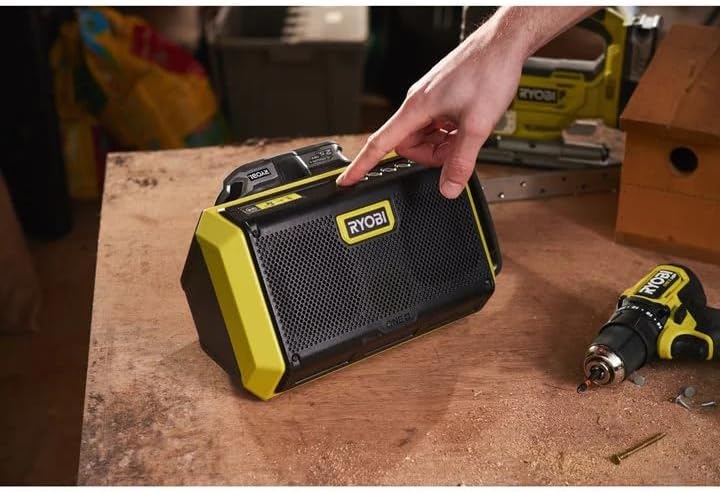
Figure 3: A Ryobi 18V battery inserted into a portable radio, illustrating its versatility across various Ryobi ONE+ devices. A hand is shown pressing a button on the radio.
Maintenance
Cleaning
Keep the battery pack clean and free of debris. Use a dry, soft cloth to wipe down the exterior. Do not use water, solvents, or harsh chemicals.
Storage
Store the battery in a cool, dry place, away from direct sunlight and extreme temperatures. For long-term storage, it is recommended to store the battery with a partial charge (around 50%). Avoid storing fully discharged or fully charged for extended periods.
Battery Life Optimization
- Avoid deep discharges; recharge the battery before it is completely depleted.
- Do not overcharge the battery. Remove it from the charger once fully charged.
- Allow the battery to cool down before charging if it has been heavily used.
Troubleshooting
| Problem | Possible Cause | Solution |
|---|---|---|
| Battery not charging | Charger not plugged in; faulty charger; battery too hot/cold; damaged battery. | Ensure charger is properly connected. Try a different charger. Allow battery to reach room temperature. Inspect battery for damage; replace if necessary. |
| Tool not operating with battery | Battery not fully inserted; battery discharged; faulty tool; damaged battery. | Ensure battery is securely clicked into place. Check battery charge level and recharge if low. Test with another battery or tool. Inspect battery for damage; replace if necessary. |
| Reduced runtime | Battery nearing end of life; extreme operating conditions; heavy tool usage. | Consider replacing the battery if it's old. Operate tools within recommended temperature ranges. For demanding tasks, ensure battery is fully charged. |
Specifications
| Feature | Detail |
|---|---|
| Model Number | RB18L25 |
| Voltage | 18V |
| Battery Capacity | 2.5Ah (Ampere-hour) |
| Battery Cell Type | Lithium-Ion |
| Weight | 300 Grams |
| Dimensions (L x W x H) | 18.2 x 8.6 x 14.5 cm (approximate, based on product dimensions) |
| Compatibility | Ryobi 18V ONE+ tools |
| Features | IntelliCell technology, 4-stage energy meter, shock protection |
Warranty and Support
For warranty information, technical support, or service inquiries, please refer to the documentation included with your purchase or visit the official Ryobi website. Contact details for customer service are typically available on the product packaging or the manufacturer's website.
Related documentsRB18L25


Ask a question about this manual
Ask about setup, troubleshooting, compatibility, parts, safety, or missing instructions. Manuals+ will review the question and use this page’s manual context to help answer it.