
Introduction
Thank you for purchasing the La Crosse Technology WS6812 Weather Station. This manual provides detailed instructions for setting up, operating, and maintaining your new weather station. Please read this manual thoroughly before use and keep it for future reference.
Package Contents
- 1 x WS6812 Main Display Unit
- 1 x Outdoor Wireless Sensor
- User Manual

Image: The main display unit and the outdoor sensor included in the package.
Product Overview
Main Display Unit
The main unit displays indoor and outdoor temperature and humidity, time, date, moon phases, dew point, and heat index. It features programmable alerts and trend indicators.

Image: Front view of the main display unit showing various readings.
Outdoor Wireless Sensor
The outdoor sensor transmits temperature and humidity data wirelessly to the main unit. It has a transmission range of up to 90 meters (300 ft.) in open air.
Image: The outdoor wireless sensor, typically placed outside to measure external conditions.
Setup
1. Battery Installation
The main unit and outdoor sensor each require 2 x AA LR6 1.5V batteries (not included).
- Main Unit: Open the battery compartment on the back of the main unit. Insert 2 AA batteries, observing the correct polarity (+/-). Close the compartment.
- Outdoor Sensor: Open the battery compartment on the back of the sensor. Insert 2 AA batteries, observing the correct polarity (+/-). Close the compartment.
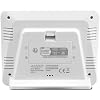
Image: Rear view of the main unit, indicating the battery compartment for installation.
2. Sensor Placement
Place the outdoor sensor in a shaded, dry location, protected from direct sunlight and rain, to ensure accurate temperature and humidity readings. Ensure it is within 90 meters (300 ft.) of the main unit.
3. Initial Setup and Synchronization
After installing batteries, the main unit will automatically search for the outdoor sensor. This process may take a few minutes. Once connected, the outdoor temperature and humidity will appear on the display.
- Time and Date Setting: Manually set the time (12H or 24H format) and calendar (month/day/date) using the buttons on the main unit. Refer to the specific button functions for 'SET' or 'MODE' in your quick start guide.
- Language Selection: Choose the day of the week language from French, English, German, Dutch, Italian, Spanish, and Danish.
Operating the Weather Station
Display Information
The LCD display provides the following information:
- Indoor Temperature (°C/°F) and Humidity (%RH)
- Outdoor Temperature (°C/°F) and Humidity (%RH)
- Daily Min/Max records for indoor/outdoor temperatures and humidity
- Temperature trend indicators
- Time (12H/24H) and Calendar (Month/Day/Date)
- Moon Phases (12 icons)
- Dew Point and Heat Index (°C/°F)
- Outdoor sensor transmission strength indicator
- Low battery indicators for both units
Setting Alarms
- Time Alarm: The unit includes an alarm with a 10-minute snooze function. Press the 'ALARM' button to set the alarm time.
- Temperature Alerts: Programmable high and low alerts for both indoor and outdoor temperatures are available. Consult your quick start guide for specific button sequences to set these alerts.
Viewing Min/Max Records
Press the 'MIN/MAX' button to cycle through the recorded minimum and maximum indoor and outdoor temperature and humidity values for the day.
Changing Units
Press the '°C/°F' button to switch between Celsius and Fahrenheit temperature display. Similarly, use the appropriate button to switch between 12H and 24H time formats.
Maintenance
Battery Replacement
When the low battery indicator appears on the display, replace the batteries in the respective unit (main unit or sensor) with new AA LR6 1.5V batteries. Always replace all batteries in a unit at the same time.
Cleaning
Clean the display and unit casings with a soft, damp cloth. Do not use abrasive cleaners or solvents, as they may damage the surfaces.
Troubleshooting
| Problem | Solution |
|---|---|
| No outdoor temperature/humidity reading | Ensure batteries are correctly installed in the sensor. Move the sensor closer to the main unit. Avoid large metal objects or electronic devices that may interfere with transmission. Re-synchronize by removing and reinserting batteries in both units. |
| Incorrect temperature/humidity readings | Ensure the sensor is placed in a shaded, dry area, away from direct heat sources or extreme cold. Allow time for readings to stabilize after setup. |
| Display is blank or dim | Replace batteries in the main unit. Check battery polarity. |
Specifications
- Model: WS6812
- Indoor Temperature Range: 0°C to 50°C (32°F to 122°F)
- Outdoor Temperature Range: -40°C to 60°C (-40°F to 140°F)
- Temperature Accuracy: ±1°C
- Indoor/Outdoor Humidity Range: %RH (specific range not provided, but indicated as available)
- Transmission Frequency: 433 MHz
- Wireless Range: Up to 90 meters (300 ft.) in open air
- Main Unit Power: 2 x AA LR6 1.5V batteries (not included)
- Sensor Power: 2 x AA LR6 1.5V batteries (not included)
- Main Unit Dimensions: 137.2 x 111.8 x 42.8 mm
- Sensor Dimensions: 40 x 20 x 130 mm
- Material: Plastic, Glass
- Display Type: LCD
- Included Components: Station and Sensor
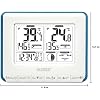
Image: The main display unit with its dimensions indicated for reference.
Warranty and Support
This product comes with a manufacturer's warranty of 1 year. For warranty claims or technical support, please contact La Crosse Technology customer service. Refer to the official La Crosse Technology website for contact information and further assistance.
Manufacturer: La Crosse Technology
Country of Origin: China


