
1. Product Overview
The GE WB44T10104 Bake Element is a genuine Original Equipment Manufacturer (OEM) part designed for electric ovens in GE ranges. This component is located at the bottom of the oven cavity and is responsible for generating the heat required for baking. It is engineered to exact specifications to ensure proper fit and function within compatible GE appliance models.
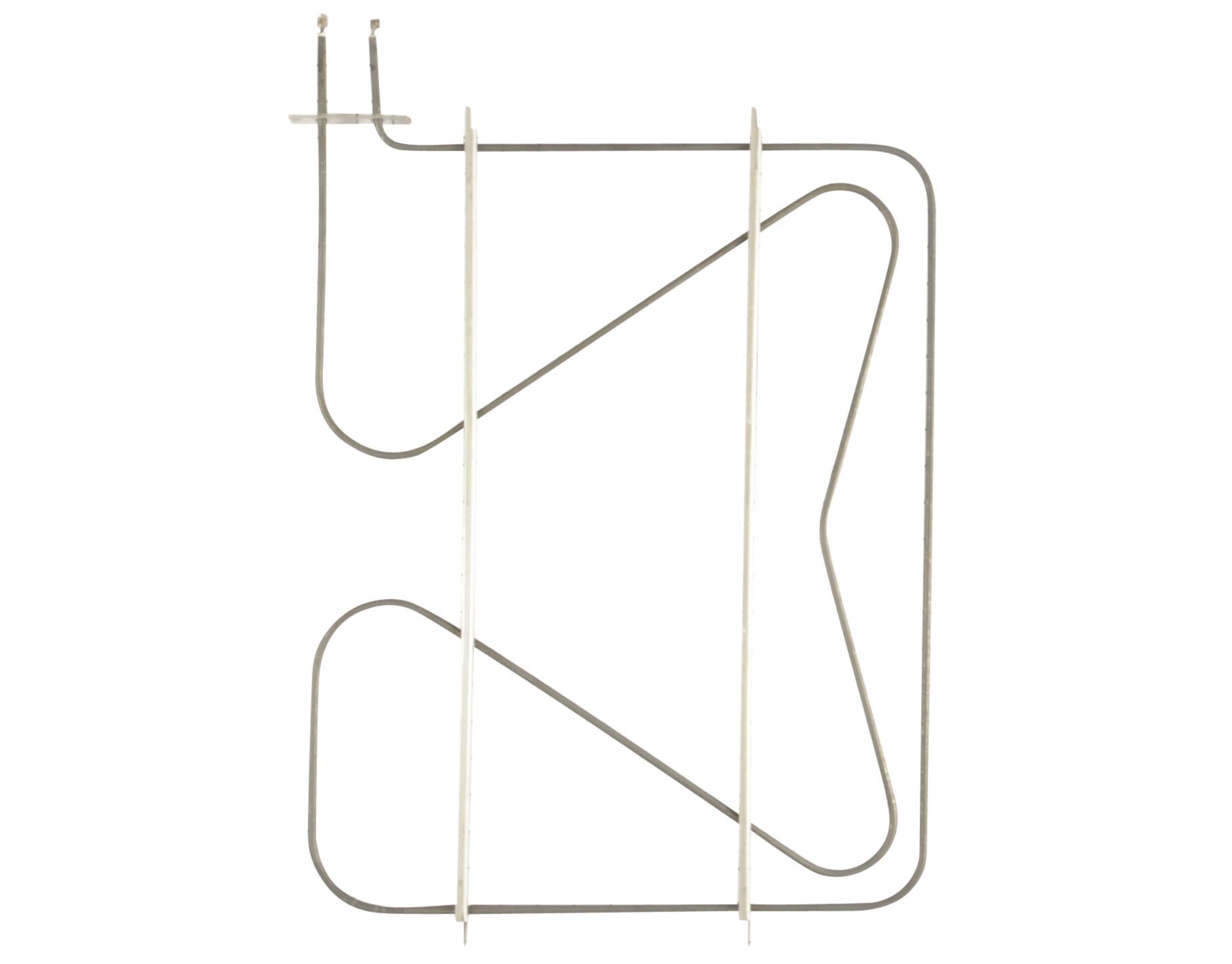
Image showing the GE WB44T10104 bake element, a U-shaped heating component with electrical terminals on one end.
2. Important Safety Instructions
Before attempting any service or repair on your appliance, it is crucial to follow these safety guidelines:
- Disconnect Power: Always disconnect the appliance from all utilities (unplug from the wall outlet or turn off the circuit breaker) before beginning any work.
- Wear Safety Equipment: Use appropriate personal protective equipment, such as gloves and eye protection, to prevent injury.
- Professional Assistance: Some repairs may require a trained service professional. If you are unsure about any step, consult a qualified technician.
- Refer to Owner's Manual: Always refer to your appliance's owner's manual for specific instructions and to confirm part numbers.
3. Installation Guide
This section provides general steps for replacing a bake element. Specific procedures may vary by oven model. Always consult your appliance's service manual for detailed instructions.
- Prepare the Appliance: Ensure the oven is cool. Disconnect power to the range at the circuit breaker or by unplugging the appliance.
- Access the Oven Cavity: Open the oven door. Depending on your model, you may need to remove oven racks or the oven door itself for better access.
- Locate the Bake Element: The bake element is typically found at the bottom of the oven. It is often secured by screws at the back of the oven cavity.
- Remove Securing Screws: Using a screwdriver, carefully remove the screws holding the bake element in place.
- Gently Pull Element Forward: Carefully pull the element forward a few inches to expose the electrical terminals at the back. Do not pull too far, as the wires are still attached.
- Disconnect Wiring: Note the position of the wires. Disconnect the electrical wires from the terminals of the old bake element. It is often helpful to take a picture before disconnecting.
- Remove Old Element: Once wires are disconnected, fully remove the old bake element from the oven.
- Install New Element: Connect the electrical wires to the terminals of the new GE WB44T10104 bake element. Ensure connections are secure.
- Secure New Element: Carefully push the new element into position, aligning it with the screw holes. Reinstall the securing screws.
- Reassemble and Test: Reinstall any removed oven racks or the oven door. Restore power to the appliance. Test the oven's bake function to ensure the new element is heating correctly.
4. Operating Principles
The bake element functions by converting electrical energy into heat. When the oven is set to a bake temperature, electricity flows through the element's resistive material, causing it to glow red and radiate heat. This heat is then distributed throughout the oven cavity, cooking food from the bottom up. The oven's thermostat regulates the power to the bake element to maintain the desired temperature.
5. Maintenance
The GE WB44T10104 bake element typically requires minimal maintenance. However, to ensure optimal performance and longevity:
- Keep Clean: Avoid spills directly onto the element. If food spills occur, allow the oven to cool completely, then gently wipe away any residue. Do not use abrasive cleaners or sharp objects on the element.
- Regular Oven Cleaning: Follow your oven's manufacturer guidelines for regular cleaning of the oven cavity.
- Inspect Periodically: During routine oven cleaning, visually inspect the element for any signs of damage, such as cracks or severe discoloration.
6. Troubleshooting
If your oven is not heating properly or the bake element appears faulty, consider the following:
- Oven Not Heating: Check if the element is glowing red when the oven is set to bake. If not, the element may be burned out or there could be an issue with the oven's power supply or thermostat.
- Uneven Heating: If food is cooking unevenly, the element might be partially damaged or there could be an issue with the oven's temperature sensor.
- Visible Damage: Look for any breaks, blisters, or holes in the element. A visibly damaged element needs replacement.
- No Power: Ensure the oven is receiving power. Check the circuit breaker and wall outlet.
For complex issues or if troubleshooting does not resolve the problem, it is recommended to contact a qualified appliance service technician.
7. Product Specifications
| Specification | Detail |
|---|---|
| Brand Name | GE |
| Model Info | WB44T10104 |
| Item Weight | 1.5 pounds |
| Product Dimensions | 27.1 x 19.3 x 2.2 inches |
| Part Number | WB44T10104 |
| Color | Black |
| Batteries Included? | No |
| Batteries Required? | No |
| ASIN | B00MOCO4FO |
| Date First Available | November 2, 2013 |
8. Warranty Information
As a genuine OEM part, the GE WB44T10104 Bake Element is manufactured to high-quality standards. Specific warranty terms are typically provided by GE Appliances at the time of purchase or can be found in your appliance's original documentation. Please retain your proof of purchase for any warranty claims.
9. Customer Support
For further assistance, technical support, or to locate a qualified service technician, please refer to the contact information provided in your GE appliance's owner's manual or visit the official GE Appliances website.


