
CHAUVET DJ DFIHUB
CHAUVET DJ D-Fi Hub Wireless DMX Controller User Manual
Model: DFIHUB
Introduction
The CHAUVET DJ D-Fi Hub is a compact and versatile DMX unit designed for wireless control of stage lighting. It functions as both a wireless DMX transmitter and receiver, providing flexible and reliable signal transmission for various lighting setups. This manual provides essential information for the safe and effective operation of your D-Fi Hub.
Safety Information
- Always connect the unit to a grounded circuit to avoid the risk of electrocution.
- Ensure the power supply voltage matches the unit's requirements.
- Do not operate the unit if the power cord is damaged.
- Avoid exposing the unit to rain or moisture.
- Refer all servicing to qualified personnel.
- Keep the unit away from flammable materials.
Package Contents
- CHAUVET DJ D-Fi Hub
- Power Adapter
- Quick Reference Guide (not included in this digital manual)
Product Overview
The D-Fi Hub features a compact design with essential controls and connectivity for wireless DMX operation.

Front view of the D-Fi Hub, showing the OLED display and control buttons.

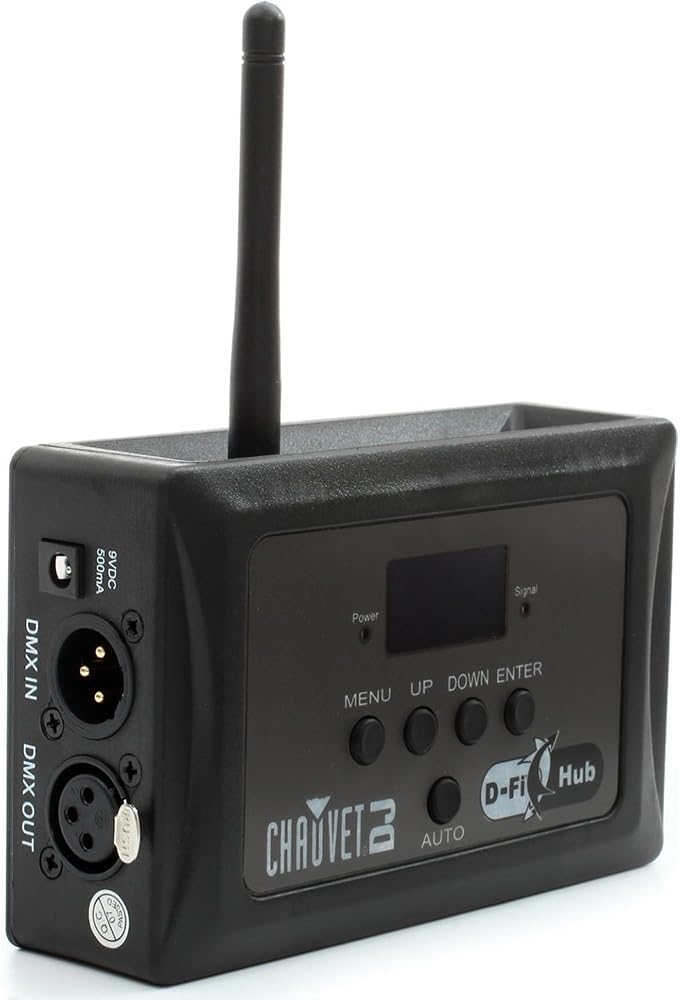
Angled view of the D-Fi Hub, highlighting the antenna and side ports.
Key Features:
- Compact Wireless DMX: Functions as both a transmitter and receiver.
- Auto Frequency Sync: Automatically selects the best 2.4 GHz channel for stable communication.
- Unlimited D-Fi Fixture Synchronization: Connects to an unlimited number of D-Fi-ready fixtures.
- OLED Display: Clear digital display for easy setup and adjustments.
- FCC and RTTE Compliant: Professional design for reliable operation.
Component Identification:
- OLED Display: Shows current settings and status.
- Control Buttons (MENU, UP, DOWN, ENTER, AUTO): For navigating menus and adjusting settings.
- Antenna: For wireless DMX signal transmission and reception.
- DMX IN/OUT Ports: 3-pin XLR connectors for wired DMX connections.
- Power Input: 9VDC, 500mA connection for the power adapter.
- Mounting Options: Includes keyhole mounting holes and M10/M12 threaded holes for truss mounting.

Rear view showing the DMX In/Out ports and power input.
Side view illustrating the M10 and M12 mounting holes.
Setup
- Power Connection: Connect the provided power adapter to the 9VDC input on the D-Fi Hub and then to a suitable power outlet. The unit will power on automatically.
- DMX Connection (Transmitter Mode):
- Connect your DMX controller's output to the DMX IN port on the D-Fi Hub using a 3-pin DMX cable.
- The D-Fi Hub will now transmit the DMX signal wirelessly.
- DMX Connection (Receiver Mode):
- If using the D-Fi Hub as a receiver for non-D-Fi-ready fixtures, connect the DMX OUT port of the D-Fi Hub to the DMX IN port of your first lighting fixture.
- Daisy-chain additional fixtures using DMX cables from the DMX OUT of one fixture to the DMX IN of the next.
- Mounting: Utilize the keyhole mounting holes or M10/M12 threaded holes to securely mount the D-Fi Hub to a truss or other suitable surface.
Operating Instructions
The D-Fi Hub offers both manual and automatic modes for DMX transmission and reception.
OLED Display and Navigation:
The OLED display provides real-time information about the unit's status and settings. Use the MENU, UP, DOWN, and ENTER buttons to navigate through the options.
Selecting Operating Mode:
- Press the MENU button to access the main menu.
- Use the UP or DOWN buttons to scroll to "Settings" and press ENTER.
- Within "Settings", you can choose between:
- Transmit Manual: Manually select a DMX channel for transmission.
- Receive Manual: Manually select a DMX channel for reception.
- Transmit Auto: The unit automatically selects the best available channel for transmission. This is often the recommended setting for ease of use and stable performance.
- Press ENTER to confirm your selection.
Auto Frequency Sync:
The D-Fi Hub operates on the 2.4 GHz frequency range. In "Transmit Auto" mode, the unit will automatically scan and select the clearest channel to minimize interference, ensuring a stable wireless DMX signal.

The D-Fi Hub mounted on a truss, demonstrating its application in a professional lighting rig.

Visual representation of the D-Fi Hub's wireless DMX capabilities and auto-sync technology.
Maintenance
- Cleaning: Clean the exterior of the unit with a soft, dry cloth. Do not use harsh chemicals or abrasive materials.
- Storage: Store the unit in a cool, dry place away from direct sunlight and extreme temperatures.
- Inspection: Periodically inspect the power cable and DMX connectors for any signs of damage.
Troubleshooting
| Problem | Possible Cause | Solution |
|---|---|---|
| No power | Power adapter not connected or faulty. | Ensure power adapter is securely connected and plugged into a live outlet. Test with another adapter if available. |
| No wireless DMX signal | Incorrect channel selection, interference, or unit not in transmit mode. | Verify both transmitter and receiver are on the same DMX channel. Try "Transmit Auto" mode. Check for other 2.4 GHz devices causing interference. Ensure antenna is properly attached. |
| Intermittent signal | Obstructions, distance, or interference. | Reduce distance between units. Clear line of sight. Change DMX channel or use "Transmit Auto". |
Specifications

Image detailing the physical dimensions and key specifications of the D-Fi Hub.
- Product Model: DFIHUB
- Dimensions (L x W x H): 3.2" x 1.6" x 4" (8.1 cm x 4.1 cm x 10.2 cm)
- Weight: 0.25 kg (0.55 lbs)
- Power Source: Corded Electric
- Voltage: 230 Volts
- Amperage: 0.1 Amps
- Wireless Frequency: 2.4 GHz
- Wireless Range: Up to 656 ft (200 m) unobstructed
- DMX Connection Type: 3-pin XLR (In/Out)
- Mounting Type: Built-in hook and loop fastener strap, keyhole mounting holes, M10 and M12 threaded holes.
- Material: Stainless Steel, Plastic
- Color: Black
- Light Source Type: Light Emitting Diode (for internal indicators)
- Special Features: Manual/Automatic Channel Selection, OLED Display
Warranty
The CHAUVET DJ D-Fi Hub comes with a 1-year limited manufacturer's warranty. Please retain your proof of purchase for warranty claims. For detailed warranty terms and conditions, refer to the official CHAUVET DJ website or contact customer support.
Support
For technical assistance, troubleshooting, or further information regarding your CHAUVET DJ D-Fi Hub, please visit the official CHAUVET DJ website or contact their customer support team. You can find contact details and additional resources on their website: www.chauvetdj.com
Related documentsDFIHUB


Ask a question about this manual
Ask about setup, troubleshooting, compatibility, parts, safety, or missing instructions. Manuals+ will review the question and use this page’s manual context to help answer it.