
1. Introduction
Thank you for purchasing the Beyution BT513 Bluetooth Headphones. This manual provides instructions for the proper setup, operation, and maintenance of your headphones. Please read this manual thoroughly before use to ensure optimal performance and longevity of the product.
Safety Information
- Do not expose the headphones to extreme temperatures, humidity, or corrosive environments.
- Avoid dropping or subjecting the headphones to strong impacts.
- Do not disassemble or modify the headphones. This will void the warranty.
- Clean the headphones with a soft, dry cloth. Do not use harsh chemicals.
- Prolonged listening at high volume levels may cause hearing damage.
2. Package Contents
Verify that all items are present in the package:
- Beyution BT513 Bluetooth Headphone
- USB Charging Cable
- 3.5mm Audio Cable
- Carry Pouch
- User Manual (this document)

3. Product Overview
The Beyution BT513 headphones feature a foldable design for portability and comfortable ear cushions for extended wear. They offer both wireless Bluetooth V4.1 connectivity and a wired connection option via a 3.5mm audio jack.

Controls and Ports

- Power & Pair Button: Used to power the headphones on/off and initiate Bluetooth pairing.
- Charger Port: Micro USB port for charging the internal battery.
- Microphone: For hands-free calling.
- Volume Control / Previous & Next: Adjusts volume and navigates tracks.
- Power/Pairing LED Indicator: Shows power status, charging status, and pairing mode.
- 3.5mm Audio Jack: For wired connection to audio sources.
4. Setup
4.1 Charging the Headphones
Before first use, fully charge the headphones. A full charge takes approximately 3 hours.
- Connect the small end of the USB charging cable to the Charger Port on the headphone.
- Connect the large end of the USB charging cable to a USB power source (e.g., computer USB port, USB wall adapter).
- The LED indicator will illuminate during charging and change color or turn off when fully charged.
4.2 Powering On/Off
- To Power On: Press and hold the Power & Pair button until the LED indicator lights up.
- To Power Off: Press and hold the Power & Pair button until the LED indicator turns off.
4.3 Bluetooth Pairing
Pair your headphones with a Bluetooth-enabled device (smartphone, tablet, laptop).
- Ensure the headphones are powered off.
- Press and hold the Power & Pair button for approximately 5-7 seconds until the LED indicator flashes red and blue alternately. This indicates pairing mode.
- On your device, enable Bluetooth and search for available devices.
- Select "BT513" from the list of found devices.
- Once paired, the LED indicator will flash blue slowly, and you will hear an audible confirmation.

4.4 Wired Connection
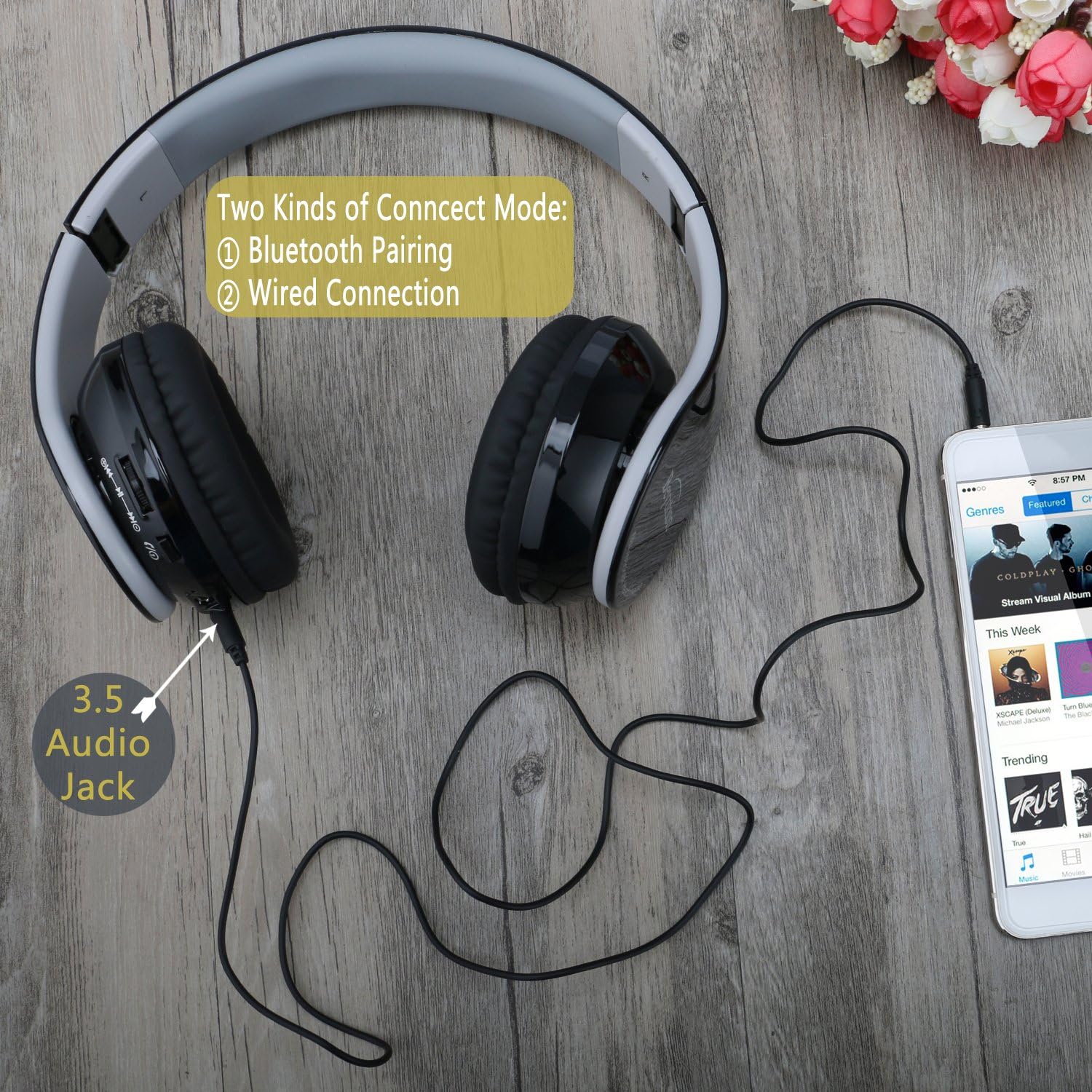
You can use the headphones with a 3.5mm audio cable when Bluetooth is not available or the battery is depleted.
- Connect one end of the 3.5mm audio cable to the 3.5mm Audio Jack on the headphones.
- Connect the other end of the 3.5mm audio cable to the audio output jack of your device.
- The headphones will function as wired headphones.
5. Operating the Headphones
5.1 Music Playback
- Play/Pause: Press the Power & Pair button once.
- Next Track: Press the "Next" button (often combined with Volume Up).
- Previous Track: Press the "Previous" button (often combined with Volume Down).
- Volume Up: Press and hold the "Volume Up" button.
- Volume Down: Press and hold the "Volume Down" button.
5.2 Phone Calls
When connected via Bluetooth, the headphones can be used for hands-free calling.
- Answer/End Call: Press the Power & Pair button once.
- Reject Call: Press and hold the Power & Pair button for 2 seconds.
- Redial Last Number: Double-press the Power & Pair button.
6. Maintenance
Cleaning
- Wipe the headphones with a soft, dry, lint-free cloth.
- Do not use liquid cleaners, aerosols, or solvents.
- Avoid getting moisture into any openings.
Storage
- When not in use, store the headphones in the provided carry pouch to protect them from dust and scratches.
- Store in a cool, dry place away from direct sunlight and extreme temperatures.
7. Troubleshooting
| Problem | Solution |
|---|---|
| Headphones do not power on. | Ensure the headphones are charged. Connect to a power source using the USB charging cable. |
| Cannot pair with device. |
|
| No sound or low volume. |
|
| Sound quality is poor. |
|
| Microphone not working. |
|
8. Specifications
| Feature | Detail |
|---|---|
| Model Name | BT513 |
| Bluetooth Version | V4.1 |
| Bluetooth Range | Up to 10 meters (33 feet) |
| Battery Life (Talk/Audio) | 7-8 hours |
| Standby Time | Up to 300 hours |
| Charging Time | Approximately 3 hours |
| Audio Driver Size | 40 mm |
| Frequency Response | 20000 Hz |
| Sensitivity | 119 dB |
| Impedance | 32 Ohms |
| Noise Control | Passive Noise Cancellation |
| Connectivity | Bluetooth, 3.5mm Audio Jack |
| Microphone | Built-in |
| Weight | 6.1 ounces (0.38 Pounds) |
| Dimensions | 10 x 8 x 6 inches |
| Material | Plastic |
9. Warranty and Support
Beyution products are designed and manufactured to the highest quality standards. For warranty information or technical support, please refer to the contact details provided with your purchase documentation or visit the official Beyution website.
Please retain your proof of purchase for any warranty claims.