
Introduction
Thank you for choosing the Haier Geos AS12 Inverter Split Air Conditioner. This manual provides essential information for the safe and efficient installation, operation, and maintenance of your new air conditioning system. Please read this manual thoroughly before using the appliance and keep it for future reference.
Important Safety Information
- Always ensure the unit is properly grounded.
- Do not attempt to install or repair the unit yourself. Contact qualified service personnel.
- Keep children away from the unit during operation.
- Do not block the air inlets or outlets of the indoor or outdoor units.
- Turn off the power supply before cleaning or performing any maintenance.
Product Overview
The Haier Geos AS12 is an inverter split air conditioning system designed for efficient cooling and heating. It consists of an indoor unit and an outdoor unit, connected by refrigerant piping and electrical wiring.
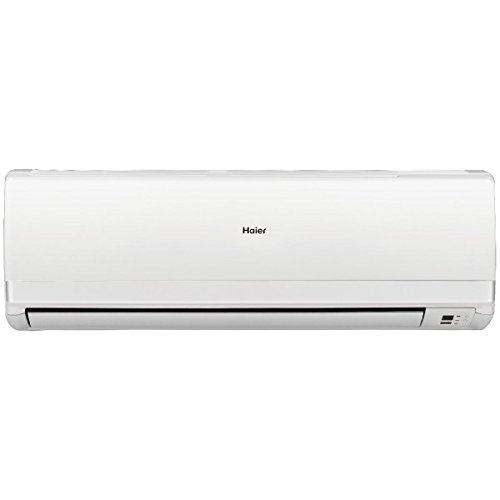
Image: Haier Geos AS12 Split Air Conditioner, showing both the indoor unit (typically mounted high on a wall) and the outdoor compressor unit. The indoor unit is white with a sleek design, and the outdoor unit is a compact, rectangular shape.
Components:
- Indoor Unit: Disperses conditioned air into the room. Features include air filters, fan, and evaporator coil.
- Outdoor Unit: Contains the compressor, condenser coil, and fan. Responsible for heat exchange with the outside air.
- Remote Control: Used to operate the unit, select modes, adjust temperature, and set timers.
Setup & Installation
Installation of a split air conditioning system requires specialized knowledge and tools. To ensure proper function, safety, and warranty validity, installation must be performed by a qualified and certified HVAC technician.
Key Installation Considerations:
- Location: Choose a location for the indoor unit that allows for even air distribution and easy access for maintenance. The outdoor unit should be placed in a well-ventilated area, away from direct sunlight and obstructions.
- Mounting: Both units must be securely mounted according to manufacturer guidelines and local building codes.
- Refrigerant Piping: Proper sizing and insulation of refrigerant lines are crucial for efficiency. The maximum recommended pipe length is 15 meters, with a maximum level difference of 10 meters.
- Electrical Connection: The unit requires a dedicated 230V/50Hz power supply. Ensure all electrical work complies with local regulations and safety standards.
- Drainage: The indoor unit produces condensate water, which must be properly drained to prevent leaks and water damage.
Refer to the detailed installation manual provided to your certified technician for specific instructions and diagrams.
Operating Instructions
Your Haier Geos AS12 air conditioner is operated primarily via the wireless remote control. Ensure the remote control has fresh batteries and is pointed towards the indoor unit when sending commands.
Basic Functions:
- Power ON/OFF: Press the ON/OFF button to start or stop the unit.
- Mode Selection: Press the MODE button to cycle through available modes:
- Cool (❄): For cooling the room. Set desired temperature between 21°C and 35°C.
- Heat (♨): For heating the room. Set desired temperature between 10°C and 27°C.
- Dry (💧): Dehumidifies the air.
- Fan (🌬): Circulates air without cooling or heating.
- Auto: The unit automatically selects the operating mode based on the room temperature.
- Temperature Adjustment: Use the ▲ (Up) and ▼ (Down) buttons to set your desired temperature.
- Fan Speed: Press the FAN button to adjust the fan speed (Auto, Low, Medium, High).
- Swing Function: Use the SWING button to adjust the vertical airflow direction.
- Timer Function: Set the unit to turn on or off automatically after a specified period. Refer to the remote control manual for detailed timer settings.
For advanced features and detailed remote control operation, please consult the dedicated remote control manual.
Maintenance
Regular maintenance ensures optimal performance and extends the lifespan of your air conditioner. Always turn off the main power supply to the unit before performing any maintenance.
Indoor Unit Maintenance:
- Air Filter Cleaning:
- Open the front panel of the indoor unit.
- Remove the air filters.
- Clean the filters using a vacuum cleaner or wash them with lukewarm water and a mild detergent.
- Rinse thoroughly and allow them to dry completely in a shaded area before reinstalling.
- Clean filters every two weeks or more frequently if the unit is used heavily or in dusty environments.
- Unit Surface Cleaning: Wipe the indoor unit's surface with a soft, damp cloth. Do not use harsh chemicals or abrasive cleaners.
Outdoor Unit Maintenance:
- Coil Cleaning: Periodically check the outdoor unit's condenser coils for dirt, leaves, or other debris. Carefully remove any obstructions. For deep cleaning, contact a professional technician.
- Clearance: Ensure there is adequate clearance around the outdoor unit for proper airflow.
- Professional Inspection: It is recommended to have a qualified technician inspect and service the entire system annually, especially before the cooling or heating season.
Troubleshooting
Before contacting service, please check the following common issues and solutions:
| Problem | Possible Cause | Solution |
|---|---|---|
| Unit does not start | No power supply; Remote control batteries low; Circuit breaker tripped. | Check power connection; Replace remote control batteries; Reset circuit breaker. |
| Insufficient cooling/heating | Dirty air filters; Blocked outdoor unit; Doors/windows open; Incorrect mode/temperature setting. | Clean air filters; Clear obstructions from outdoor unit; Close doors/windows; Verify mode and temperature settings. |
| Water leakage from indoor unit | Clogged drain pipe; Improper installation. | Clear drain pipe obstruction; Contact a qualified technician for inspection. |
| Unusual noises | Loose parts; Foreign objects in fan; Refrigerant flow noise (normal). | If persistent or loud, turn off unit and contact service. Minor gurgling is normal. |
If the problem persists after attempting these solutions, please contact a qualified service technician.
Specifications
Technical specifications for the Haier Geos AS12 Inverter Split Air Conditioner:
| Feature | Detail |
|---|---|
| Model Name | AS12 |
| Brand | Haier |
| Type | Inverter Split System |
| Cooling Capacity | 3300 W (approx. 11236 BTU/hr) |
| Heating Capacity | 3650 W |
| Max Power Consumption | 1750 W |
| SEER (Seasonal Energy Efficiency Ratio) | 5.1 |
| SCOP (Seasonal Coefficient of Performance) | 3.4 |
| Energy Class (Cooling/Heating) | A/A |
| Power Supply | 1 Phase / 230 V / 50 Hz |
| Refrigerant Type | R410a |
| Refrigerant Charge | 1000 g |
| Air Flow (Indoor Unit) | 450 m³/h |
| Dehumidification Capacity | 1.5 L/h |
| Indoor Unit Dimensions (W×D×H) | 795 × 187 × 265 mm |
| Indoor Unit Net Weight | 8.8 kg |
| Outdoor Unit Dimensions (W×D×H) | 780 × 245 × 540 mm |
| Outdoor Unit Net Weight | 31 kg |
| Max Piping Length | 15 m |
| Max Level Difference | 10 m |
| Special Feature | Dehumidifier |
Warranty & Support
Warranty Information:
The Haier Geos AS12 Inverter Split Air Conditioner comes with a Limited Warranty. The specific terms and duration of the warranty may vary by region and retailer. Please retain your proof of purchase for warranty claims.
For detailed warranty terms and conditions, please refer to the warranty card included with your product or visit the official Haier website for your region.
Customer Support:
Should you encounter any issues that cannot be resolved using the troubleshooting guide, or if you require professional assistance, please contact Haier customer support or your authorized dealer.
When contacting support, please have your model name (AS12) and serial number ready. The serial number is typically located on a label on the outdoor unit and sometimes on the indoor unit.
You can find contact information for Haier customer service on their official website: www.haier.com


