
1. Important Safety Information
Please read all instructions carefully before operating your new dehumidifier. Keep this manual for future reference. Failure to follow these instructions may result in electric shock, fire, or personal injury.
- Always plug the unit into a grounded 3-prong outlet. Do not remove the grounding prong.
- Do not operate the dehumidifier with a damaged power cord or plug.
- Ensure the unit is placed on a level, stable surface to prevent water spillage.
- Do not block the air intake or exhaust vents. Maintain at least 8 inches (20 cm) of clearance around the unit.
- Never immerse the unit, power cord, or plug in water or other liquids.
- Unplug the dehumidifier before cleaning or performing any maintenance.
- This appliance is designed for household use only.
2. Product Overview
The GARRISON 1028310 is an Energy Star certified 30-Pint Dehumidifier designed to reduce humidity levels in your home. It features a compact design with a soft-touch electronic control panel for ease of use.
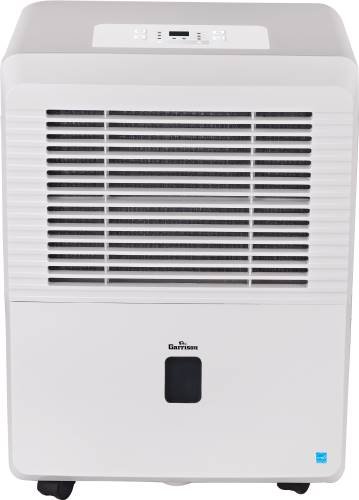
Figure 1: Front view of the GARRISON 1028310 Dehumidifier. This image highlights the compact design and the front-loading water bucket with a transparent water level indicator.
Key Features:
- Front-load water bucket with convenient side handles for easy removal.
- Electric control panel with digital readout.
- Two fan speeds: Turbo and Normal.
- Continuous drain and gravity drain function.
- Washable filter.
- NEMA 5-15 plug type.
- 24-hour on/off timer.
- Auto defrost function.
- Humidistat control.
3. Setup
3.1 Unpacking
Carefully remove the dehumidifier from its packaging. Retain the packaging materials for future storage or transport. Inspect the unit for any shipping damage.
3.2 Placement
Place the dehumidifier on a firm, level surface capable of supporting the unit with a full water bucket. The unit is equipped with four casters for easy movement. Ensure there is at least 8 inches (20 cm) of air space on all sides of the unit for proper air circulation.
For optimal performance, place the dehumidifier in a central location within the area where dehumidification is needed. Avoid placing it near heat sources or in direct sunlight.
3.3 Power Connection
Plug the power cord into a properly grounded 120V AC, 60Hz electrical outlet. The unit will beep once, and the display will illuminate briefly.
4. Operating Instructions
4.1 Control Panel
The dehumidifier features a soft-touch electronic control panel with a digital readout. Buttons typically include Power, Fan Speed, Mode, Timer, and Humidity Set.
4.2 Turning On/Off
Press the POWER button to turn the unit on or off. When turned on, the unit will default to the last used settings or a factory default.
4.3 Setting Desired Humidity Level
Press the HUMIDITY SET (or similar) buttons to adjust the desired humidity level. The digital display will show the set humidity. The unit will operate until the ambient humidity reaches the set level, then cycle off. It will restart when humidity rises above the set level.
4.4 Fan Speed
Press the FAN SPEED button to cycle between available fan speeds: NORMAL and TURBO. Higher fan speed results in faster dehumidification and increased noise.
4.5 Operating Modes
Your dehumidifier may include various operating modes:
- Auto Defrost: The unit automatically detects frost buildup on the evaporator coils and initiates a defrost cycle to prevent damage and maintain efficiency. This is an automatic function and does not require manual activation.
- Continuous: In this mode, the unit will run continuously regardless of the ambient humidity level. This is ideal for very damp conditions or when using the continuous drain option.
- Sleep: This mode typically operates the unit at a lower fan speed and may dim the display lights for quieter operation during sleep hours.
4.6 Timer Function
The 24-hour on/off timer allows you to program the unit to turn on or off automatically after a set period. Consult the control panel instructions for specific timer setting procedures.
4.7 Water Collection
The dehumidifier collects moisture in a front-loading water bucket. The transparent water level indicator allows you to monitor the water level. When the bucket is full, the unit will automatically shut off, and an indicator light will illuminate. Empty the bucket using the easy-remove handle.
For continuous operation without emptying the bucket, use the continuous drain function (see Section 5.3).
5. Maintenance
Regular maintenance ensures optimal performance and extends the life of your dehumidifier. Always unplug the unit before performing any maintenance.
5.1 Cleaning the Air Filter
The dehumidifier is equipped with a washable filter. A 250-hour filter check indicator will remind you when it's time to clean the filter. To clean:
- Gently pull out the air filter from its slot (usually located at the back or side of the unit).
- Wash the filter with warm, soapy water. Rinse thoroughly.
- Allow the filter to air dry completely before reinserting it. Do not use a dryer or direct heat.
- Once the filter is reinserted, reset the filter check indicator if applicable (refer to your control panel instructions).
5.2 Cleaning the Unit
Wipe the exterior of the dehumidifier with a soft, damp cloth. Do not use harsh chemicals, abrasives, or solvents, as these can damage the surface. Clean the water bucket regularly to prevent mold and mildew growth.
5.3 Continuous Drain Operation
For extended operation without manual bucket emptying, you can set up the continuous drain function. This requires a garden hose (not included) and a suitable drain location.
- Locate the continuous drain outlet on the back of the unit.
- Remove the drain cap.
- Thread a standard garden hose onto the drain outlet. Ensure a tight connection to prevent leaks.
- Route the hose to a floor drain or other suitable drainage point. Ensure the hose is sloped downwards to allow gravity drainage. Do not allow the hose to kink or be elevated above the drain outlet.
6. Troubleshooting
Before contacting customer service, please review the following common issues and solutions:
| Problem | Possible Cause | Solution |
|---|---|---|
| Dehumidifier does not turn on. | No power; power cord not fully plugged in; circuit breaker tripped; water bucket full or not properly seated. | Check power connection and outlet; reset circuit breaker; empty and re-seat water bucket. |
| Unit runs but does not collect water. | Ambient humidity is too low; air filter is clogged; temperature is too low (below 41°F/5°C); unit is in continuous drain mode with hose connected. | Check ambient humidity; clean air filter; ensure room temperature is above 41°F; verify continuous drain setup. |
| Unit is noisy. | Air filter clogged; unit not on a level surface; fan obstruction. | Clean air filter; ensure unit is on a level surface; check for obstructions around fan. |
| Water leaks from the unit. | Water bucket not properly seated; continuous drain hose loose or kinked. | Re-seat water bucket; check continuous drain hose connection and ensure proper slope. |
7. Specifications
| Feature | Detail |
|---|---|
| Brand | GARRISON |
| Model Number | 1028310 |
| Capacity | 30 Pints/Day |
| Color | White |
| Special Features | Automatic Drainage, Washable Filter |
| Operation Modes | Auto Defrost, Continuous, Sleep |
| Item Weight | 28.7 Pounds |
| Product Dimensions (L x W x H) | 9.9 x 14.2 x 20.1 inches |
| UPC | 076335219882 |
| Minimum Operating Temperature | 41°F (5°C) |
| Plug Type | NEMA 5-15 plug |
8. Warranty and Support
8.1 Warranty Information
This GARRISON dehumidifier comes with a full 1-year warranty. Additionally, a limited 2nd to 5th-year warranty applies to the sealed system components. Please retain your proof of purchase for warranty claims.
8.2 Customer Support
If you have any questions, require technical assistance, or need to make a warranty claim, please contact GARRISON customer support. Refer to the product packaging or the official GARRISON website for the most current contact information.
