
Introduction
This manual provides comprehensive instructions for the installation, operation, and maintenance of your Lowrance ELITE-3X DSI Color Sonar 455/800kHz Fishfinder. The ELITE-3X DSI is a compact and affordable fishfinder featuring DownScan Imaging for photo-like underwater detail and a water-temperature sensor. Its LED-backlit color display allows for quick and easy identification of fishing-holding structures and fish targets using dual-frequency 455 or 800 kHz DownScan Imaging capability.
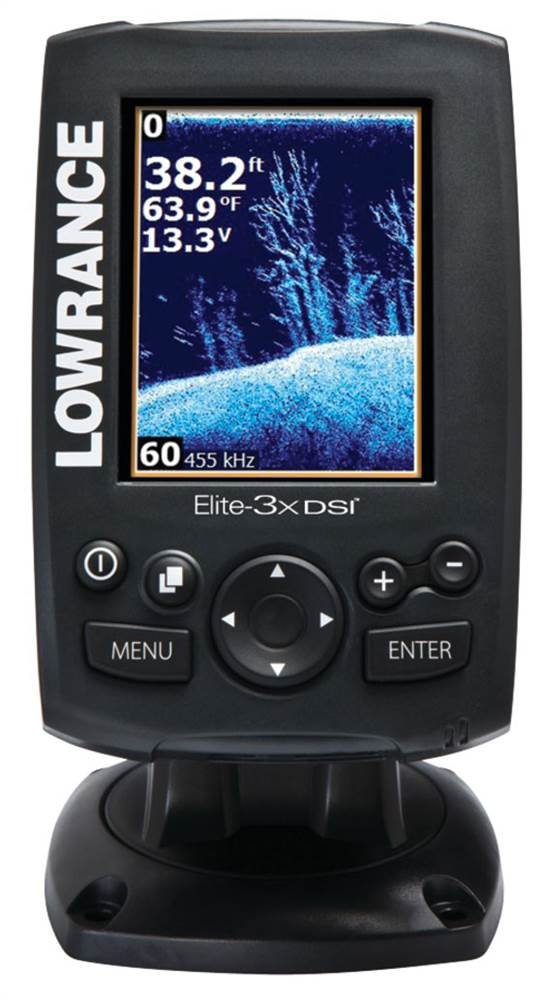
Figure 1: The Lowrance ELITE-3X DSI Fishfinder unit. The screen shows sonar data with depth, temperature, and voltage readings. Below the screen are control buttons including Power, Page, Menu, Enter, and a directional pad, along with plus and minus buttons for zoom.
Setup and Installation
Proper installation is crucial for optimal performance of your ELITE-3X DSI Fishfinder. This section outlines the steps for mounting the unit and connecting the transducer.
1. Mounting the Display Unit
- Choose a location that is easily visible from your operating position and protected from excessive spray or direct sunlight.
- Ensure there is sufficient space behind the unit for cable connections and ventilation.
- Use the provided mounting bracket and hardware to securely attach the display unit to a flat surface. Drill pilot holes as necessary.
- Angle the unit for best viewing and tighten the mounting knobs.
2. Transducer Installation
The ELITE-3X DSI comes with a Skimmer transducer. Proper placement of the transducer is critical for accurate sonar readings.
- Transom Mount: For most small to medium-sized boats, a transom mount is recommended. Mount the transducer on the transom where it will be in clean, undisturbed water flow at all speeds.
- In-Hull Mount: For fiberglass hulls, an in-hull mount may be an option. Consult a professional installer for this method.
- Ensure the transducer face is parallel to the waterline and free from obstructions.
- Route the transducer cable away from engine noise and other electrical interference. Secure the cable to prevent damage.
3. Power Connection
- Connect the red wire from the power cable to the positive (+) terminal of a 12V DC power source (e.g., boat battery).
- Connect the black wire to the negative (-) terminal or a suitable ground point.
- Install an appropriate fuse (typically 3A) in the positive line, close to the battery, to protect the unit.
- Plug the power cable into the back of the ELITE-3X DSI unit.
Operating Instructions
This section details the basic operation of your Lowrance ELITE-3X DSI Fishfinder.
1. Powering On/Off
- To power on, press and hold the Power button (marked with a circle and vertical line) until the Lowrance logo appears.
- To power off, press and hold the Power button until the shutdown prompt appears, then confirm.
2. Basic Navigation
- Use the Directional Pad (up, down, left, right arrows) to navigate through menus and adjust settings.
- Press the ENTER button to confirm selections or open sub-menus.
- Press the MENU button to access the main menu or return to the previous screen.
3. Sonar Display
The ELITE-3X DSI features a color LED display for clear sonar imaging.
- DownScan Imaging: Provides photo-like views of structure and fish below your boat.
- Frequency Selection: The unit operates at 455 kHz or 800 kHz.
- 455 kHz offers wider coverage and is generally better for deeper water.
- 800 kHz provides higher detail and is ideal for shallower water or identifying specific structures.
- Use the PAGES button (marked with a square icon) to toggle between available sonar frequency views (e.g., 455 kHz, 800 kHz, or split-screen views).
- Use the + and - buttons for quick zoom adjustments on the sonar screen.
4. Adjusting Settings
Access the main menu by pressing the MENU button to adjust various settings such as:
- Sensitivity: Adjusts how much detail the sonar displays. Higher sensitivity shows more, but can also show more noise.
- Color Palette: Change the color scheme of the sonar display.
- Depth Range: Manually set the maximum depth displayed.
- Units: Change units for depth (feet/meters), temperature (Fahrenheit/Celsius), etc.
Maintenance
Regular maintenance ensures the longevity and optimal performance of your Lowrance ELITE-3X DSI Fishfinder.
- Cleaning the Display: Use a soft, damp cloth to clean the screen. Avoid abrasive cleaners or solvents that could damage the display.
- Transducer Care: Periodically inspect the transducer for marine growth or damage. Clean it gently with a soft brush and mild soap if necessary. Ensure the transducer cable is not kinked or frayed.
- Connections: Check all electrical connections regularly to ensure they are secure and free from corrosion. Apply dielectric grease to connections in marine environments to prevent corrosion.
- Storage: When not in use for extended periods, store the unit in a dry, cool place, away from direct sunlight and extreme temperatures. Disconnect power if storing for a long time.
Troubleshooting
This section addresses common issues you might encounter with your ELITE-3X DSI Fishfinder.
| Problem | Possible Cause | Solution |
|---|---|---|
| No Power | Loose power connection, blown fuse, dead battery. | Check power cable connections. Inspect and replace fuse if blown. Check battery voltage. |
| No Sonar Reading / Erratic Readings | Transducer not in water, transducer cable damaged, air bubbles under transducer, incorrect frequency. | Ensure transducer is submerged. Check cable for damage. Reposition transducer to avoid turbulence. Try switching sonar frequencies (455/800 kHz). |
| Screen Freezes / Unresponsive | Software glitch, power fluctuation. | Perform a soft reset by powering off and on. If issue persists, consult manufacturer support for a hard reset procedure. |
| Poor Image Quality | Incorrect sensitivity, dirty transducer, electrical interference. | Adjust sensitivity settings. Clean transducer face. Check for other electronics causing interference and re-route cables if possible. |
If the problem persists after attempting these solutions, please contact Lowrance customer support.
Specifications
| Feature | Detail |
|---|---|
| Model Name | Lowrance ELITE-3X DSI Color Sonar 455/800kHz Fishfinder |
| Part Number | 000-11449-001 |
| Display Size | 3 Inches |
| Display Type | LED Color |
| Display Resolution | 320 x 240 pixels |
| Sonar Frequencies | 455 kHz, 800 kHz (DownScan Imaging) |
| Transducer Type | Skimmer Transducer (with water-temperature sensor) |
| Power Output | RMS (Root Mean Square) power not specified, typical for compact units. |
| Operating Voltage | 12V DC |
| Item Weight | 1 Pound |
| Material | Plastic |
| Dimensions (LxWxH) | 10.7 x 9 x 4.4 inches (approximate, based on package dimensions) |
Warranty and Support
For detailed warranty information, please refer to the warranty card included with your product or visit the official Lowrance website. Lowrance provides customer support for technical assistance, troubleshooting, and service inquiries.
Official Lowrance Website: www.lowrance.com
It is recommended to register your product on the Lowrance website to receive updates and support.


