
1. Introduction
Thank you for choosing the Seiko QHE114KLH Bedside Alarm Clock. This clock features a reliable Japanese quartz movement, luminous hands and numerals for easy readability in the dark, and includes a digital stopwatch and countdown timer. This manual provides detailed instructions for setup, operation, and maintenance to ensure optimal performance of your clock.
2. Package Contents
Please check that all items are present in the package:
- Seiko QHE114KLH Bedside Alarm Clock
- 2 x AA Batteries (pre-installed or separate)
- User Manual (this document)
3. Parts Identification
Familiarize yourself with the various parts and controls of your Seiko QHE114KLH alarm clock.
Front View
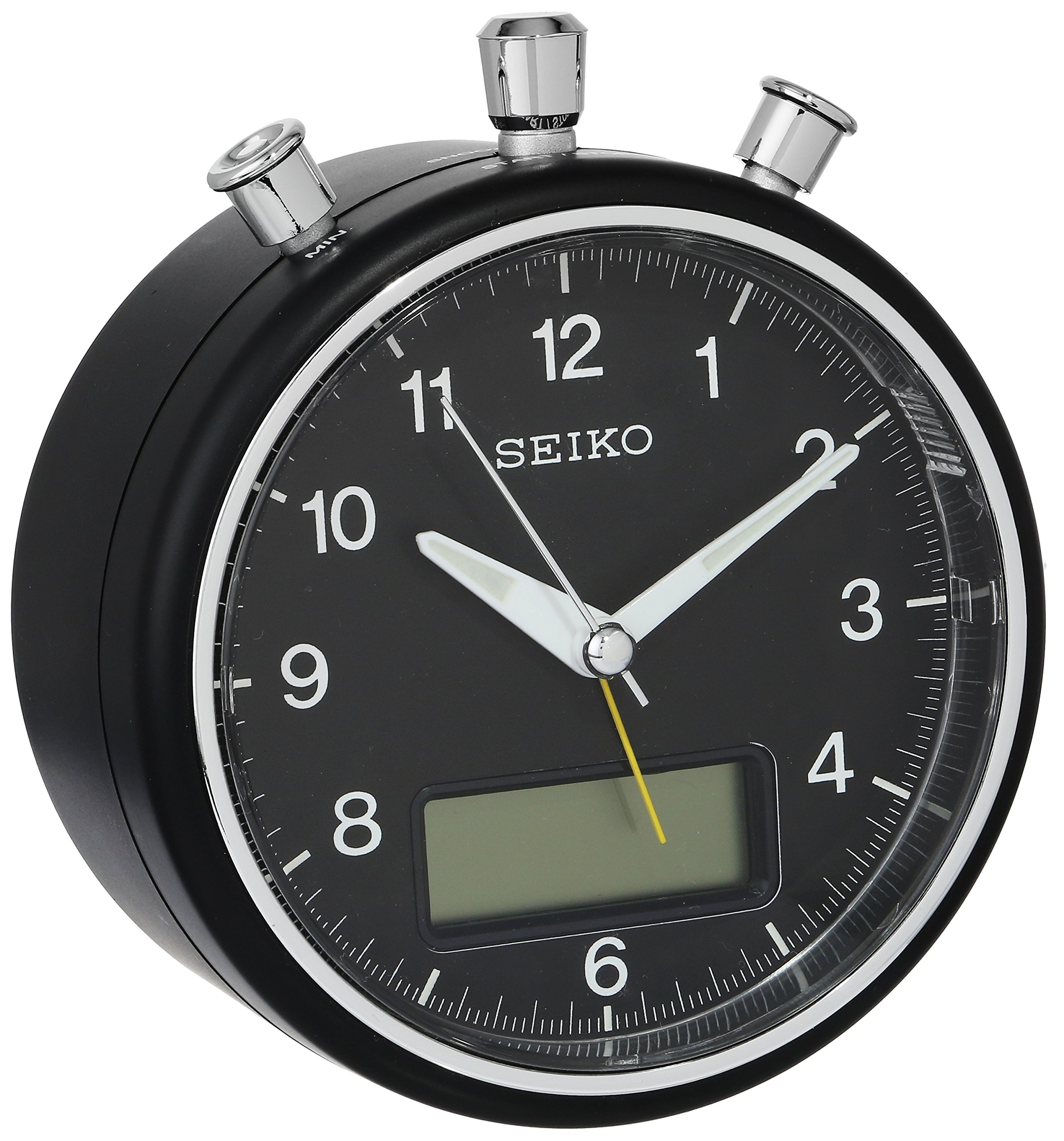
Figure 3.1: Front view of the Seiko QHE114KLH alarm clock. This image displays the analog clock face with its matte black dial, white Arabic numerals, and luminous hands. A digital display panel is visible at the bottom of the dial.
- Analog Dial: Displays current time with hour, minute, and sweep second hands.
- Luminous Hands & Numerals: Glow in the dark for easy viewing at night.
- Digital Display Panel: Shows stopwatch, countdown timer, or other digital functions.
Rear View and Controls

Figure 3.2: Rear view of the Seiko QHE114KLH alarm clock. This image highlights the back panel, including the battery compartment cover, the 'TIME' and 'ALARM' setting knobs, the 'SNOOZE/LIGHT' button, and the 'STOP' button. An 'ON/OFF' switch is visible on the side.
- TIME Setting Knob: Used to adjust the analog time.
- ALARM Setting Knob: Used to set the alarm time.
- SNOOZE/LIGHT Button: Activates snooze function when alarm sounds, or illuminates the dial briefly.
- STOP Button: Stops the alarm.
- ALARM ON/OFF Switch: Activates or deactivates the alarm function.
- Battery Compartment: Holds 2 AA batteries.
4. Setup
4.1 Battery Installation
- Open the battery compartment cover located on the back of the clock (refer to Figure 3.2).
- Insert two (2) AA batteries, ensuring the correct polarity (+ and -) as indicated inside the compartment.
- Close the battery compartment cover securely.
Note: Always replace both batteries at the same time with new ones. Do not mix old and new batteries or different types of batteries.
4.2 Setting the Current Time
- Locate the TIME Setting Knob on the back of the clock (refer to Figure 3.2).
- Rotate the knob clockwise or counter-clockwise until the analog hour and minute hands display the correct current time.
4.3 Setting the Alarm Time
- Locate the ALARM Setting Knob on the back of the clock (refer to Figure 3.2).
- Rotate the knob to set the desired alarm time. The alarm hand on the dial will move independently.
- Ensure the ALARM ON/OFF Switch (located on the side) is in the 'ON' position for the alarm to activate.
5. Operating Instructions
5.1 Using the Alarm
- Activating the Alarm: Slide the ALARM ON/OFF Switch to the 'ON' position.
- Stopping the Alarm: When the alarm sounds, press the STOP Button on the top of the clock. The alarm will stop and reset for the next day.
- Snooze Function: When the alarm sounds, press the SNOOZE/LIGHT Button on the top. The alarm will pause for a short period (typically 5-10 minutes) and then sound again. This can be repeated.
5.2 Using the Light Function
To illuminate the clock face in low light conditions, press the SNOOZE/LIGHT Button. The light will stay on briefly and then turn off automatically.
5.3 Digital Stopwatch and Countdown Timer
The Seiko QHE114KLH features a digital display panel that includes a stopwatch and countdown timer. Specific controls for these functions are typically integrated with the top buttons (e.g., STOP, SNOOZE/LIGHT) or a dedicated mode button. Refer to the markings near the digital display or buttons for exact operation. Generally:
- Mode Selection: A button (often labeled 'MODE' or integrated with 'STOP') cycles through time display, stopwatch, and countdown timer modes.
- Stopwatch Operation: In stopwatch mode, press a designated button (e.g., 'START/STOP' or 'SNOOZE/LIGHT') to start/pause, and another (e.g., 'RESET' or 'STOP') to reset.
- Countdown Timer Operation: In timer mode, set the desired countdown duration using adjustment buttons (often combined with time/alarm setting knobs or dedicated digital buttons), then press 'START' to begin. An alarm will sound when the timer reaches zero.
Note: The exact button assignments for digital functions may vary slightly. Please observe the labels on your specific unit.
6. Maintenance
6.1 Cleaning
To clean your clock, wipe it gently with a soft, dry cloth. Do not use abrasive cleaners, solvents, or chemical sprays, as these can damage the finish and internal components.
6.2 Battery Replacement
When the clock's display dims, the alarm weakens, or the clock stops functioning, it is time to replace the batteries. Follow the battery installation steps in Section 4.1. Dispose of used batteries responsibly according to local regulations.
7. Troubleshooting
| Problem | Possible Cause | Solution |
|---|---|---|
| Clock not working / Display blank | Dead or incorrectly installed batteries. | Replace batteries with new AA batteries, ensuring correct polarity. |
| Alarm does not sound | Alarm switch is OFF; Alarm time not set correctly; Low batteries. | Ensure ALARM ON/OFF switch is 'ON'. Verify alarm time setting. Replace batteries. |
| Luminous hands/numerals not glowing | Insufficient exposure to light. | Expose the clock face to bright light for a period to 'charge' the luminous material. |
8. Specifications
| Feature | Detail |
|---|---|
| Model Number | QHE114KLH |
| Movement | Japanese Quartz |
| Display Type | Analog-Digital |
| Power Source | Battery Powered (2 x AA batteries) |
| Product Dimensions (LxWxH) | 13.34 x 12.07 x 7.62 cm (5.25" x 4.75" x 3.0") |
| Item Weight | 453.59 g (1 lb) |
| Material | Plastic |
| Color | Black metallic round case |
| Features | Alarm, Stopwatch, Countdown Timer, Luminous Hands/Numerals, Quiet Sweep Second Hand |
9. Warranty and Support
For warranty information and customer support, please refer to the documentation provided at the time of purchase or contact your retailer. Seiko products typically come with a manufacturer's warranty covering defects in materials and workmanship.
For further assistance, you may visit the official Seiko website or contact their customer service department. Please have your model number (QHE114KLH) and purchase details ready when seeking support.


