
Flysky FS-T4B
FlySky FS-T4B 2.4GHz 4 Channel Transmitter and Receiver Radio System User Manual
Model: FS-T4B | Brand: Flysky
Introduction
This manual provides comprehensive instructions for the setup, operation, and maintenance of your FlySky FS-T4B 2.4GHz 4 Channel Transmitter and Receiver Radio System. Designed for helicopter and airplane models, this system offers reliable 2.4GHz communication with essential features for both novice and experienced users. Please read this manual thoroughly before using the product to ensure safe and optimal performance.

Image: The FlySky FS-T4B 2.4GHz 4 Channel Transmitter and its accompanying receiver unit.
Setup
1. Unpacking and Component Check
Carefully remove all components from the packaging. Verify that you have the following items:
- FlySky FS-T4B 4-Channel Transmitter
- FlySky 2.4GHz Receiver

Image: The FlySky FS-T4B transmitter and receiver unit, ready for setup.
2. Battery Installation (Transmitter)
The FS-T4B transmitter requires 8 AA batteries (not included) for operation. Follow these steps to install the batteries:
- Locate the battery compartment cover on the back of the transmitter.
- Slide the cover downwards to open the compartment.
- Insert 8 AA batteries, ensuring correct polarity (+/-) as indicated inside the compartment.
- Close the battery compartment cover securely.
Note: The transmitter features a low voltage warning system that activates when the battery voltage drops below 9 Volts. Replace batteries promptly when this warning occurs to avoid loss of control.

Image: Rear view of the FlySky FS-T4B transmitter with the battery compartment open, showing the slots for 8 AA batteries.
3. Receiver Connection and Binding
The receiver is responsible for receiving signals from the transmitter and controlling your model. Connect the receiver to your model's electronic speed controller (ESC) and servos according to your model's specific instructions. The receiver is a 6-channel unit, but this transmitter will only utilize 4 channels.
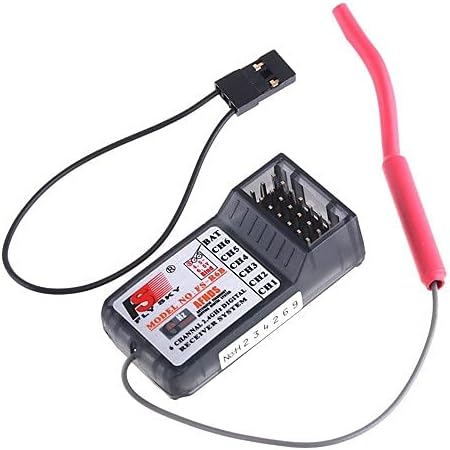
Image: Close-up of the FlySky 2.4GHz receiver unit with its antenna and connection ports.
To bind the transmitter and receiver (establish a secure connection):
- Ensure both the transmitter and receiver are powered off.
- Connect the bind plug (usually included with the receiver) to the B/VCC port on the receiver.
- Power on the receiver. The receiver's LED should flash rapidly, indicating it is in bind mode.
- While holding down the "BIND RANGE TEST" button on the transmitter, power on the transmitter.
- The transmitter's LED should flash, and the receiver's LED should become solid, indicating successful binding.
- Release the "BIND RANGE TEST" button on the transmitter, then power off both the transmitter and receiver.
- Remove the bind plug from the receiver.
- Power on the transmitter first, then the receiver. The receiver's LED should be solid, confirming a successful connection.
Operating Instructions
1. Transmitter Controls Overview
The FS-T4B transmitter features an ergonomic design with intuitive controls for precise model operation.

Image: Front view of the FlySky FS-T4B transmitter, highlighting the control sticks and switches.
- Left Stick: Typically controls Throttle (vertical movement) and Rudder (horizontal movement). Note that the left stick's vertical movement does not automatically re-center.
- Right Stick: Typically controls Elevator (vertical movement) and Aileron (horizontal movement).
- Trim Levers: Small sliders next to each stick for fine-tuning the neutral position of each control surface.
- Power Switch: Located on the right side of the transmitter.
- Servo Reverser Switches: Individual switches for each channel (RUD, THR, ELE, AIL) to reverse the direction of servo movement if needed.
- DSC Port (PS2): Located on the back, provides PPM output for simulator use or trainer functions.
- Charger Port: For charging rechargeable batteries (if installed) without removing them.

Image: Close-up of the FlySky FS-T4B transmitter's servo reverser switches (RUD, THR, ELE, AIL) and the power switch.
2. Channel Functions
The 4 channels on the FS-T4B typically correspond to the following aircraft controls:
| Channel | Control Function | Typical Stick Movement |
|---|---|---|
| Channel 1 (AIL) | Aileron (Roll) | Right Stick, Left/Right |
| Channel 2 (ELE) | Elevator (Pitch) | Right Stick, Up/Down |
| Channel 3 (THR) | Throttle (Power) | Left Stick, Up/Down |
| Channel 4 (RUD) | Rudder (Yaw) | Left Stick, Left/Right |
Always perform a range check before operating your model to ensure a strong and reliable signal.
Maintenance
1. Cleaning
To maintain the longevity and appearance of your radio system:
- Wipe the transmitter and receiver with a soft, dry cloth after each use.
- For stubborn dirt, use a slightly damp cloth with mild soap, then dry thoroughly.
- Avoid using harsh chemicals, solvents, or abrasive cleaners, as these can damage the plastic and electronic components.
2. Storage
Proper storage helps preserve the system's condition:
- Store the transmitter and receiver in a cool, dry place, away from direct sunlight and extreme temperatures.
- If storing for an extended period (more than a few weeks), remove the AA batteries from the transmitter to prevent leakage and corrosion.
- Keep the system away from dust and moisture.
3. Battery Care
For optimal battery performance and safety:
- Always use fresh, high-quality AA batteries.
- Do not mix old and new batteries, or different types of batteries.
- Dispose of used batteries responsibly according to local regulations.
- If using rechargeable AA batteries, follow the manufacturer's charging instructions and use the dedicated charger port if applicable.
Troubleshooting
This section addresses common issues you might encounter with your FlySky FS-T4B system.
| Problem | Possible Cause | Solution |
|---|---|---|
| Transmitter does not power on. | Dead or incorrectly installed batteries. | Check battery polarity. Replace all 8 AA batteries with fresh ones. |
| Receiver LED not solid after powering on. | Not bound to transmitter, or signal interference. | Perform the binding procedure again (refer to "Receiver Connection and Binding" section). Ensure no other 2.4GHz devices are causing interference nearby. |
| Controls are reversed (e.g., pushing stick forward moves model backward). | Servo direction is incorrect. | Use the servo reverser switches on the transmitter for the affected channel (RUD, THR, ELE, AIL). |
| Low voltage warning activates frequently. | Transmitter batteries are low. | Replace all 8 AA batteries immediately. |
| Model does not respond to controls. | Loss of signal, receiver power issue, or ESC/servo problem. | Verify transmitter and receiver are powered on and bound. Check all connections between receiver, ESC, and servos. Ensure model's battery is charged. |
Specifications
Detailed technical specifications for the FlySky FS-T4B Radio System:
- Channels: 4
- Model Type: Helicopter/Airplane
- RF Range: 2.4-2.48GHz
- Bandwidth: 500KHz
- Band: 160
- RF Power: Less than 20dBm
- Code Type: GFSK (Frequency Hopping Digital System - AFHDS)
- Sensitivity: 1024
- Low Voltage Warning: Under 9 Volts
- DSC Port: PS2 - PPM Output
- Charger Port: Yes
- Power: 12V DC (8 AA Batteries - Not Included)
- Transmitter Weight: 495 grams
- Antenna Length: 26mm
- Product Dimensions: 7.4 x 3.8 x 11.6 inches (188mm x 96.5mm x 294.6mm)
- Item Weight (overall): 1.7 pounds (530.7 g)
- Item Model Number: FS-T4B
- Manufacturer Recommended Age: 14 years and up
- Date First Available: May 20, 2014
Warranty and Support
For information regarding product warranty, please refer to the documentation provided at the time of purchase or contact your retailer. Flysky products are typically covered by a manufacturer's warranty against defects in materials and workmanship.
For technical support, troubleshooting assistance beyond this manual, or to inquire about replacement parts, please visit the official Flysky website or contact their customer service department. You can also visit the Flysky Store on Amazon for additional product information.
Related documentsFS-T4B


Ask a question about this manual
Ask about setup, troubleshooting, compatibility, parts, safety, or missing instructions. Manuals+ will review the question and use this page’s manual context to help answer it.