
1. Introduction
This manual provides detailed instructions for the setup, operation, and maintenance of your Futaba 10JH 10-Channel Heli T-FHSS Computer Radio System. The 10JH is a versatile radio system designed for various remote-controlled applications, including airplanes, helicopters, gliders, and multi-rotor aircraft. It features T-FHSS and S-FHSS 2.4GHz security, telemetry capabilities, and user-updatable software. Please read this manual thoroughly before operating the system to ensure safe and correct usage.

Figure 1: Futaba 10JH 10-Channel Heli T-FHSS Computer Radio System Transmitter.
2. Package Contents
Verify that all items listed below are included in your package:
- Futaba 10JH 2.4GHz 10-Channel S/FHSS Radio System Transmitter
- R3008SB T-FHSS Telemetry-Capable Receiver
- Switch Harness
- Neck Strap
Note: Servos are not included with this system.
3. Key Features
The Futaba 10JH system offers a range of advanced features for precise control and monitoring:
- Futaba T-FHSS, S-FHSS 2.4GHz security for reliable communication.
- Dedicated software for Airplane, Helicopter, Glider, and Multi-Rotor applications.
- 30-model memory for storing multiple aircraft configurations.
- S.Bus capable T-FHSS receiver (R3008SB).
- Integrated Telemetry functions.
- Synthesized voice for telemetry data alerts.
- Vibration alerts for alarm conditions and low battery.
- User-updatable software (requires optional CIU-2 interface).
- Wireless data transfer among 10J transmitters.
- Built-in S.Bus programming link for S.Bus servos.
- 10-character model and user naming.
- Large (128 x 64 dot) backlit LCD display for clear visibility.
- 10 channels, including variable knob, 2-position switches, 3-position switches, momentary switch, and digital levers.
- Built-in diversity antenna for enhanced signal reception.
- Jog dial and 3 buttons for intuitive programming.
- Sub-trim and fail-safe (all channels).
- Servo reversing, endpoint adjustment, digital trims, dual rates/exponential, and ATL.
- Trim step adjustability.
- Trainer system compatibility.
- Throttle cut function.
- Two count-up/count-down timers plus an integrated timer.
- Model timer.
- Range check mode.
- Servo cycle with bar graph displays.
- Assignable switch/lever/functions (Channels 5-10).
4. Setup
4.1 Initial Power-Up and Model Selection
Upon initial power-up or when creating a new model, the 10JH defaults to helicopter settings. You can change the model type in the programming menu to suit your aircraft (Airplane, Glider, or Multi-Rotor).
4.2 Receiver Binding (Linking)
To establish communication between the transmitter and receiver:
- Ensure both the transmitter and receiver are powered off.
- Connect a battery to the R3008SB receiver. The receiver's LED will begin to flash.
- Press and hold the F/S (Fail-Safe) button on the receiver.
- While holding the F/S button, power on the transmitter.
- The receiver's LED should turn solid green, indicating successful binding.
- Release the F/S button and power cycle both the transmitter and receiver to confirm the link.
4.3 Connecting Peripherals
The transmitter features various ports for connectivity:

Figure 2: Transmitter ports for headphones and S.Bus/interface connections.
- PHONE Jack: Connect headphones to hear synthesized voice telemetry data and audio alerts.
- S.I/F Port: Used for S.Bus servo programming and connecting to a PC for software updates via the optional CIU-2 interface.
5. Operating Instructions
The 10JH offers comprehensive programming for different aircraft types. Use the jog dial and three buttons to navigate the menu and adjust settings on the backlit LCD display.
5.1 Programming Menus
The system includes specific menus tailored for each aircraft type:
- Airplane Menu: Features 6 programmable mixes, 9 factory-defined mixes, flaperons with differential rate, flap trim, differential ailerons, gyro sensitivity, 5-point throttle and pitch curves, throttle delay, and idle down.
- Glider Menu: Includes 6 programmable mixes, 3 factory-defined mixes, 5 wing types, gyro sensitivity, motor menu, and 2 flight conditions.
- Helicopter Menu: Offers 6 programmable mixes, 10 factory-defined mixes, 8 swash plate types, 5 flight conditions with delay, throttle curve (4 curves, 5 points), differential ailerons, pitch curve (5 curves, 5 points), throttle hold & delay, Swash AFR, and electronic swash ring.
- Multi-Rotor Menu: Provides 6 programmable mixes, gyro sensitivity/mixing, and a center stick alarm.

Figure 3: Display showing Airplane (Acrobatic) programming selection.
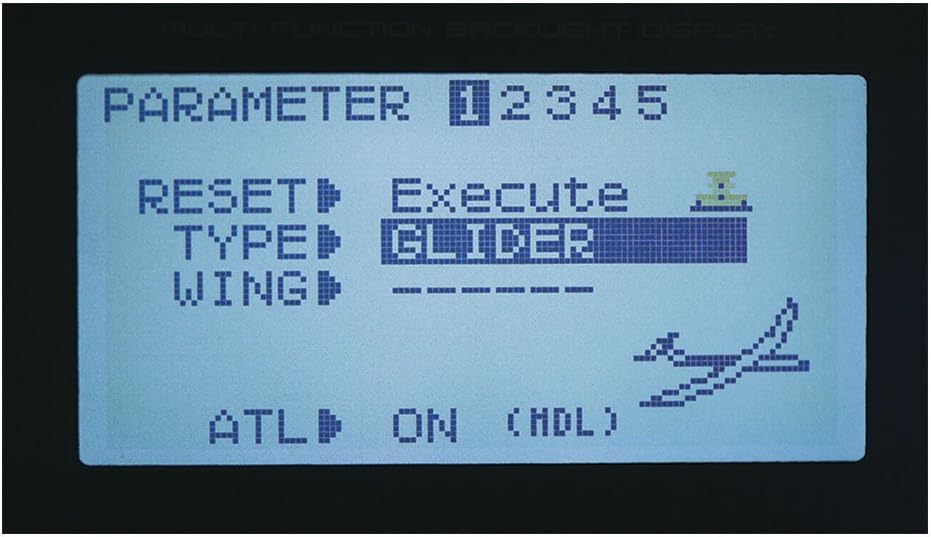
Figure 4: Display showing Glider programming selection.

Figure 5: Display showing Multi-Rotor programming selection.
6. Telemetry Functions
The Futaba 10JH system supports telemetry, allowing you to monitor real-time data from your aircraft. The R3008SB receiver is telemetry-capable.
6.1 Live Telemetry Data Display
Telemetry data can be viewed directly on the transmitter's backlit LCD screen. This includes information such as receiver battery voltage, external battery voltage, temperature, and RPM, depending on the sensors connected.

Figure 6: Live telemetry data displayed on the transmitter screen.
6.2 Audio and Vibration Alerts
The 10JH provides synthesized voice alerts for telemetry data and vibration alerts for critical conditions like low battery. Connect headphones to the PHONE jack for audible alerts.
Video 1: Overview of Futaba 10J features, including telemetry display, voice alerts, and S.Bus programming. This video demonstrates the user interface and key functionalities of the transmitter.
7. S.Bus Programming
The 10JH features a built-in S.Bus programming link, allowing direct configuration of S.Bus servos without needing an external programmer. This simplifies setup and fine-tuning of complex servo systems.
8. Maintenance
Proper maintenance ensures the longevity and reliable operation of your Futaba 10JH system.
- Cleaning: Keep the transmitter and receiver clean and free from dust and debris. Use a soft, dry cloth. Avoid using solvents or harsh chemicals.
- Storage: Store the system in a cool, dry place away from direct sunlight and extreme temperatures. Remove batteries if storing for extended periods.
- Software Updates: Regularly check the Futaba website for software updates. Updating the transmitter's firmware can provide new features and performance improvements. An optional CIU-2 interface is required for this process.
- Battery Care: Ensure proper charging and discharge practices for the transmitter battery. Do not overcharge or deep discharge.
9. Troubleshooting
If you encounter issues with your Futaba 10JH system, consider the following troubleshooting steps:
- No Power: Check battery connections and ensure batteries are charged. Verify the power switch is in the 'ON' position.
- No Control/Intermittent Control: Confirm that the transmitter and receiver are properly bound. Check all wiring connections between the receiver and servos. Ensure the aircraft is within the operational range.
- Incorrect Servo Movement: Review your model's programming settings (servo reversing, endpoint adjustments, mixes).
- Telemetry Data Issues: Ensure telemetry sensors are correctly connected to the receiver and configured in the transmitter menu. Check sensor functionality.
- Display Problems: If the LCD display is unreadable or unresponsive, try power cycling the transmitter.
If problems persist after attempting these steps, please contact Futaba customer support or your local dealer for further assistance.
10. Specifications
10.1 Transmitter Specifications
| Type | 2-stick, 10 channel, T-FHSS Air-2.4GHz system |
| Transmitter Frequency | 2.4GHz band |
| System | T-FHSS Air, S-FHSS, switchable |
| Power Supply | 6.0V dry battery |
| Dimensions | 10.13 x 10.13 x 4.63 inches |
| Item Weight | 2.45 pounds |
10.2 R3008SB Receiver Specifications
| Type | T-FHSS Air-2.4GHz, dual antenna diversity, S.BUS system |
| Power Requirement | 4.8-7.4V battery or regulated output from ESC (Note: When using ESCs, ensure the regulated output capacity meets usage application) |
| Size | 0.98 x 1.86 x 0.56 inches (24.9 x 47.3 x 14.3mm) |
| Weight | 0.36 oz (10.1g) |
| Battery F/S Voltage | Sets up with transmitter |
11. Warranty and Support
For warranty information and technical support, please refer to the official Futaba website or contact your authorized Futaba dealer. Keep your proof of purchase for warranty claims. The manufacturer recommends this product for ages 15 years and up.


