
1. Introduction
The PulseTech PRO-12-RP RediPulse12 Station Battery Maintenance System is designed to maintain up to twelve 12-volt lead-acid batteries, ensuring they remain fully charged and in optimal condition. This system utilizes patented Pulse Technology to prevent and reverse battery sulfation, extending battery life and maintaining peak performance. It is ideal for keeping new and lightly used batteries factory fresh during storage.

Figure 1: The PulseTech PRO-12-RP RediPulse12 Battery Maintenance System, showing the main unit with multiple battery leads connected.
2. Important Safety Information
Read all instructions carefully before using the PulseTech PRO-12-RP. Failure to follow these safety guidelines may result in injury or damage to the product or property.
- Risk of Explosive Gas: Batteries generate explosive gases during normal operation. Ensure adequate ventilation when using the system.
- Connection: Connect and disconnect battery leads only when the supply cord is disconnected from the AC outlet.
- Vehicle Use: Do not install or use this product in vehicles.
- Overcharging: Do not overcharge batteries.
- Smoking/Sparks: Do not smoke or allow sparks or flames near the battery or the maintenance system.
- Ventilation: Always operate the system in a well-ventilated area.
- Damaged Cords/Wires: Do not use if the supply cord, output cords, or wires are damaged. Replace defective cords or wires immediately.
- Battery Condition: This unit is not designed for batteries below 11.5 volts or heavily sulfated batteries. Such batteries should be recharged with a standard charger first.
3. Key Features
- Multi-Battery Maintenance: Maintains up to twelve 12-volt lead-acid batteries simultaneously.
- Continuous Low Amp Charge: Provides a continuous low amperage charge to offset a battery's natural discharge rate, keeping batteries fully charged.
- Patented Pulse Technology: Reverses and prevents the buildup of lead-sulfate deposits on battery plates, which is a primary cause of battery failure. This technology extends battery life and ensures optimal performance.
- Spark-Free Connection: Engineered to prevent sparking between battery leads during connection.
- Plug and Play Technology: Designed for ease of use with simple connection procedures.
- Audible Alarm: An audible alarm sounds if a battery is connected improperly, providing immediate feedback for correct setup.
- LED Indicators: Individual LEDs for each battery connection indicate the condition of each battery, showing when it is charging or ready for use.

Figure 2: The RediPulse12 system connected to multiple 12-volt lead-acid batteries, demonstrating its capacity to maintain up to twelve batteries.

Figure 3: The RediPulse12 unit highlighting its user-friendly 'plug and play' design for easy setup and operation.

Figure 4: Close-up of the RediPulse12 showing the LED indicators, which provide visual feedback on the charge status of each connected battery.
4. Setup Instructions
Follow these steps to set up your PulseTech PRO-12-RP system:
- Placement: Place the RediPulse12 unit in a dry, well-ventilated area, away from direct sunlight or heat sources. Ensure it is not installed in a vehicle.
- Battery Preparation: Ensure the 12-volt lead-acid batteries you intend to maintain are clean and in good working order. For deeply discharged batteries (below 11.5 volts) or heavily sulfated batteries, it is recommended to fully charge them with a standard battery charger before connecting to the RediPulse12.
- Connect Battery Leads: Connect the RediPulse12's output leads to the terminals of each battery. Ensure the red clamp connects to the positive (+) terminal and the black clamp connects to the negative (-) terminal. The system is designed to prevent sparking during connection.
- Verify Connection: After connecting each battery, check the corresponding LED indicator on the RediPulse12 unit. If an audible alarm sounds, a battery is connected improperly. Disconnect the power cord from the AC outlet, correct the connection, and then reconnect the power.
- Power Connection: Once all batteries are correctly connected, plug the AC power cord of the RediPulse12 unit into a standard 120V AC wall outlet.
- Operation Confirmation: The LEDs for each connected battery should illuminate, indicating that the system is actively maintaining the batteries.
5. Operating Instructions
The PulseTech PRO-12-RP operates automatically once connected and powered. It provides continuous maintenance to keep your batteries in optimal condition.
- Continuous Maintenance: The system delivers a continuous low-amp charge to counteract the natural self-discharge of batteries, ensuring they remain fully charged over extended periods.
- Pulse Technology: The patented Pulse Technology works continuously to desulfate battery plates, which helps to restore and maintain the battery's ability to accept and store charge.
- LED Indicators: Each battery connection point has an LED. These LEDs provide visual feedback on the status of the individual battery. A lit LED indicates the battery is being maintained or is ready. Refer to the unit's label for specific LED meanings (e.g., "Battery is charging," "Battery is ready for use").
- Audible Alarm: If the system detects an improper connection (e.g., reverse polarity), an audible alarm will sound. Disconnect the unit from AC power, correct the battery connection, and then re-apply power.
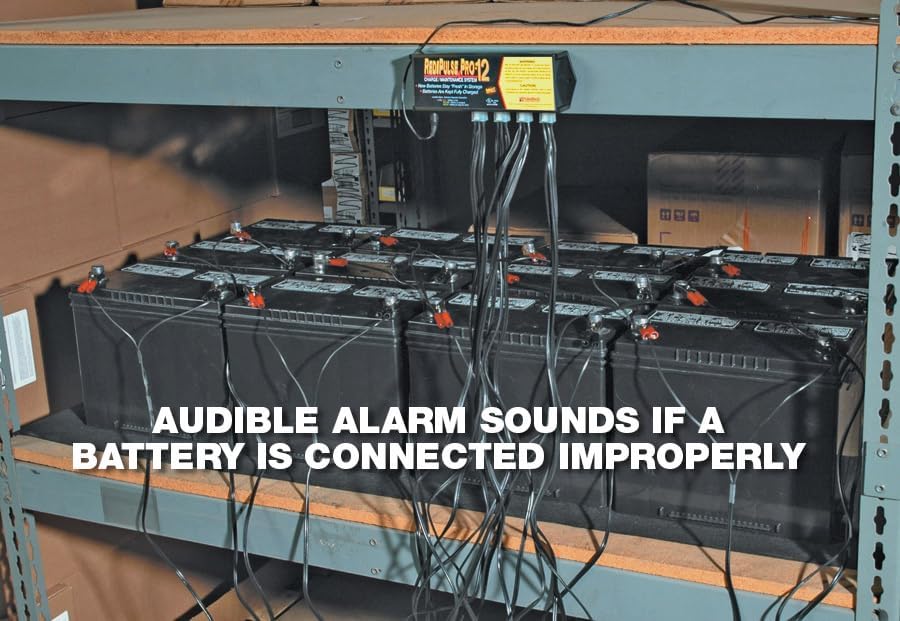
Figure 5: The RediPulse12 system actively maintaining batteries, illustrating the benefits of continuous low-amp charging and patented pulse technology for sulfation reversal.
6. Maintenance
The PulseTech PRO-12-RP is designed for minimal maintenance. However, regular checks can ensure optimal performance and longevity of both the unit and your batteries.
- Unit Cleaning: Keep the unit clean and free from dust and debris. Use a dry cloth to wipe the exterior. Do not use liquid cleaners.
- Cable Inspection: Periodically inspect all cables and connectors for any signs of wear, damage, or corrosion. Replace any damaged components immediately.
- Battery Inspection: Regularly check the batteries being maintained. Ensure terminals are clean and free of corrosion. For flooded lead-acid batteries, check electrolyte levels and top up with distilled water if necessary, following battery manufacturer guidelines.
- Ventilation: Ensure the operating area remains well-ventilated to prevent the accumulation of explosive gases from batteries.
7. Troubleshooting
This section addresses common issues you might encounter with your RediPulse12 system.
| Problem | Possible Cause | Solution |
|---|---|---|
| No LEDs illuminate when connected to power and batteries. |
|
|
| Audible alarm sounds. | Improper battery connection (e.g., reverse polarity). | Disconnect AC power immediately. Correct the battery connection (red to positive, black to negative). Reconnect AC power. |
| Battery does not seem to be maintained or charged. |
|
|
8. Specifications
| Feature | Detail |
|---|---|
| Model Number | PRO-12-RP |
| Brand | PulseTech |
| Battery Compatibility | 12-Volt Lead-Acid Batteries (VRLA, AGM, Gel, Flooded Cell) |
| Number of Batteries Maintained | Up to 12 |
| Input Voltage | 120V AC (Standard US Outlet) |
| Output Voltage | 12 Volts DC |
| Output Current | Continuous Low Amp Charge |
| Technology | Patented Pulse Technology |
| Dimensions (L x W x H) | 7.25 x 2.25 x 1 inches |
| Item Weight | 0.01 ounces |
| Manufacturer | PulseTech |
9. Warranty & Support
For warranty information and customer support regarding your PulseTech PRO-12-RP RediPulse12 Station Battery Maintenance System, please refer to the documentation included with your product or visit the official PulseTech website.
PulseTech Products is committed to providing high-quality battery maintenance solutions. For technical assistance, troubleshooting beyond this manual, or warranty claims, please contact PulseTech customer service directly.
You can find more information and contact details on the PulseTech Brand Store on Amazon or their official company website.


