
Bose 626238-0040
Bose SoundTrue Around-Ear Headphones User Manual
Introduction
Welcome to the user manual for your Bose SoundTrue Around-Ear Headphones. This guide provides essential information for setting up, operating, maintaining, and troubleshooting your headphones to ensure optimal performance and longevity. Please read this manual thoroughly before using your product.
Package Contents
- Bose SoundTrue Around-Ear Headphones
- Audio cable with in-line remote and microphone
- Carrying case

Bose SoundTrue Around-Ear Headphones folded and placed inside their matching black and mint carrying case.
Setup
Connecting the Audio Cable
- Identify the headphone jack located on the left earcup.
- Insert the smaller end of the audio cable into the headphone jack until it clicks securely into place.
- Insert the 3.5mm plug into the audio output jack of your compatible device (e.g., smartphone, tablet, computer).
Wearing the Headphones
- Gently extend or retract the headband to adjust for a comfortable fit over your head.
- Ensure the earcups fully enclose your ears. The earcups are marked 'L' for left and 'R' for right to indicate proper orientation.

Bose SoundTrue Around-Ear Headphones, black with mint accents, viewed from the front-right.

A person wearing Bose SoundTrue Around-Ear Headphones, connected to a smartphone, demonstrating proper fit.
Operating Instructions
Audio Playback and Call Control
The in-line remote and microphone are designed for use with compatible Apple devices (iPod, iPhone, iPad). Functionality may vary when used with other audio devices.
- Play/Pause: Press the center button once to play or pause audio.
- Skip Track: Press the center button twice quickly for the next track, or three times quickly for the previous track.
- Answer/End Call: Press the center button once to answer an incoming call or end an active call.
- Volume Control: Use the '+' and '-' buttons on the remote to adjust the audio volume.

Close-up of Bose SoundTrue Around-Ear Headphones showing the detachable audio cable with in-line remote and microphone.
Maintenance and Care
Cleaning
- Use a soft, dry cloth to gently clean the surfaces of the headphones.
- Do not use liquid cleaners, sprays, or solvents, as these may damage the product.
- The earcup cushions are made of memory foam and should be kept dry.
Storage
- When not in use, store the headphones in the provided carrying case to protect them from dust, scratches, and potential damage.
- Avoid storing the headphones in areas with extreme temperatures or high humidity.
Troubleshooting
| Issue | Possible Solution |
|---|---|
| No sound or intermittent sound | Ensure the audio cable is securely connected to both the headphones and the audio device. Test with another audio device or cable if available. |
| Microphone or remote not working | Verify compatibility with your audio device. Ensure the cable is fully inserted. Clean the 3.5mm jack on your device. |
| Uncomfortable fit | Adjust the headband and earcup position. Ensure earcups are correctly oriented (L/R). |
| Sound distortion | Reduce the volume on your audio device. Check the quality of the audio source. |
Specifications
| Feature | Detail |
|---|---|
| Model Name | SoundTrue |
| Model Number | 626238-0040 |
| Connectivity Technology | Wired |
| Headphones Jack | 3.5 mm Jack |
| Ear Placement | Over Ear |
| Form Factor | Over Ear |
| Material | Memory Foam |
| Special Feature | Microphone Included |
| Compatible Devices | iPod, iPhone, iPad (full functionality), other devices (audio only) |
| Frequency Range | 20 Hz - 20,000 Hz |
| Impedance | 8 Ohm |
| Item Weight | 6.4 ounces (approx. 0.4 lbs) |
| Manufacturer | Bose Corporation |
| UPC | 017817628112 |
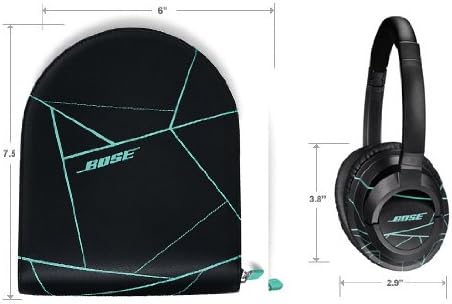
Diagram showing the dimensions of the Bose SoundTrue Around-Ear Headphones and their carrying case.
Warranty and Support
Bose products are engineered for durability and high performance. For specific warranty details pertaining to your SoundTrue Around-Ear Headphones, please refer to the warranty card included with your product packaging or visit the official Bose website.
For technical assistance, product registration, or customer service inquiries, please visit the Bose support portal at www.bose.com/support or contact Bose customer service directly.
Related documents626238-0040


Ask a question about this manual
Ask about setup, troubleshooting, compatibility, parts, safety, or missing instructions. Manuals+ will review the question and use this page’s manual context to help answer it.