
Blue Wave NE6183
Blue Wave Tidal Wave 2-Speed Pool Pump User Manual
Model: NE6183
Introduction
This manual provides essential information for the safe and efficient operation and maintenance of your Blue Wave Tidal Wave 2-Speed Replacement Pump. Please read this manual thoroughly before installation and use, and keep it for future reference.
The Blue Wave Tidal Wave Maxi II Above-Ground Pool Pump is designed to maintain water circulation and filtration in above-ground pools. It features a two-speed motor for adjustable performance and energy efficiency, dual ports for versatile connection, and a self-priming capability for quick startup. Its construction is corrosion-proof polymer, and it includes a transparent lid for easy inspection of the strainer basket.
Safety Information
Always follow basic safety precautions to reduce the risk of fire, electric shock, and injury to persons, including the following:
- Read all instructions before using this product.
- Connect only to a grounded, ground-fault circuit-interrupter (GFCI) protected receptacle.
- Do not bury cord. Locate cord to prevent damage from lawn mowers, hedge trimmers, and other equipment.
- To reduce the risk of electric shock, do not use an extension cord. Provide a properly located outlet.
- Do not operate the pump if the power cord or plug is damaged.
- Ensure the pump is installed on a solid, level surface.
- Always disconnect power before servicing the pump or filter system.
- Keep children away from the pump and filter area.
Product Features
- Dual-Port Design: Designed to fit most filter systems, featuring dual ports for vertical or horizontal application. Allows easy connection to existing sand or cartridge filters.
- Energy Saving Technology: Two-speed motor allows adjustment of pump speed to match pool's needs, contributing to energy savings.
- Reliable Performance: Provides consistent and powerful water circulation for above-ground pools. Operates quietly.
- Easy to Clean: Equipped with a clear lid for easy inspection and cleaning of the strainer basket, preventing clogging and maintaining optimal performance.
- Durable Construction: Made with corrosion-proof polymer for extended service life.
Specifications
| Attribute | Value |
|---|---|
| Brand | Blue Wave |
| Model Number | NE6183 |
| Color | Black |
| Material | Polyethylene |
| Product Dimensions (L x W x H) | 24"L x 8"W x 11"H |
| Power Source | Corded Electric |
| Item Weight | 22 Pounds |
| Maximum Flow Rate | 83 Gallons Per Minute |
| Maximum Lifting Height | 43 Feet |
| Voltage | 110 Volts |
| Horsepower | 1.5 HP |
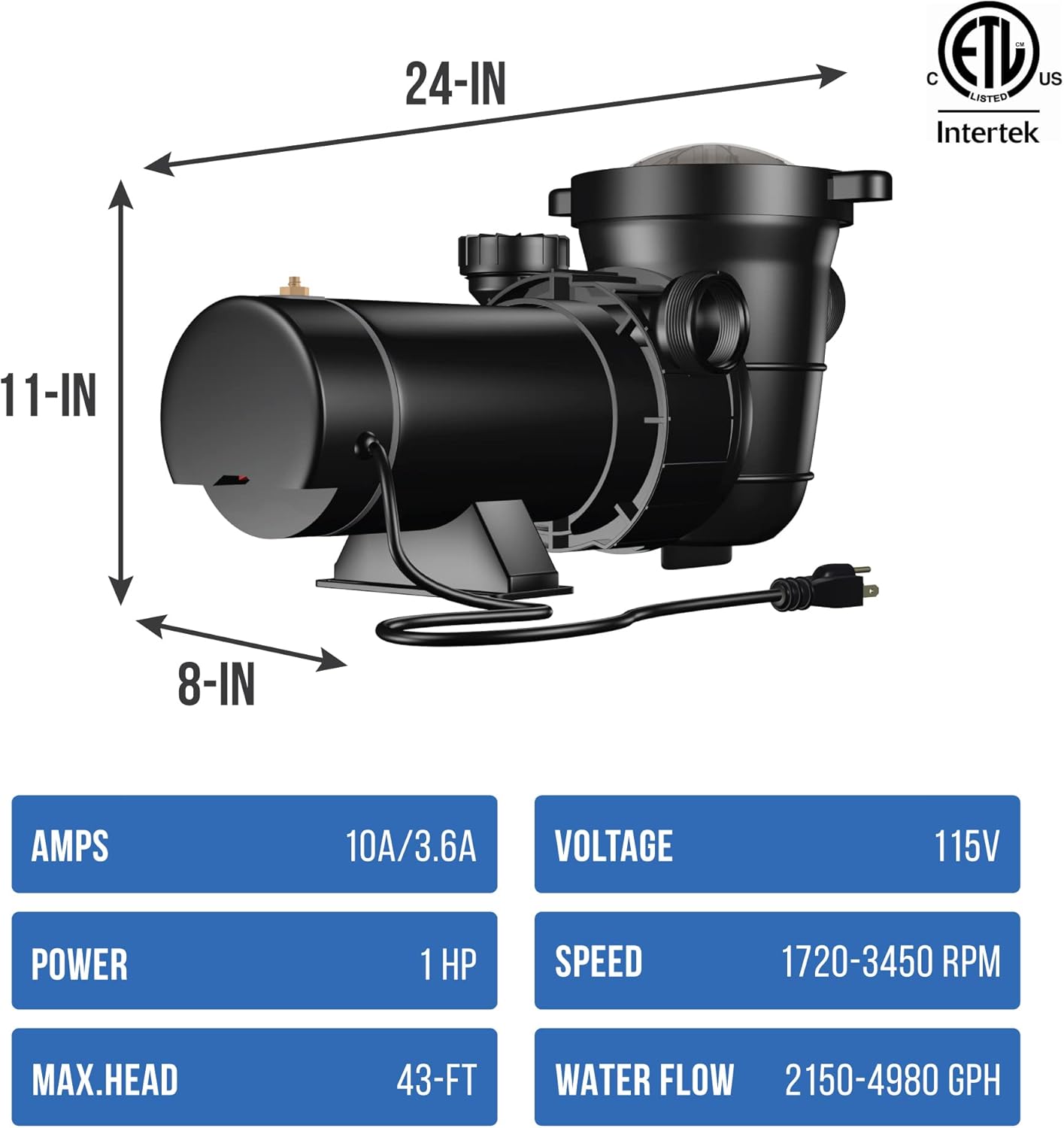
Image: Blue Wave Tidal Wave Pool Pump with key dimensions and electrical specifications.
Setup and Installation
Proper installation is crucial for the pump's performance and longevity. If you are unsure about any step, consult a qualified pool technician.
- Unpacking: Carefully remove the pump from its packaging. Inspect for any shipping damage.
- Location: Place the pump on a firm, level surface, as close to the pool as possible to minimize friction loss from long pipe runs. Ensure adequate ventilation around the pump.
- Plumbing Connections: Connect the pump to your existing filter system using appropriate plumbing. The dual-port design allows for vertical or horizontal discharge. Ensure all connections are tight to prevent leaks. Use thread sealant where necessary.
- Electrical Connection: Connect the pump to a dedicated 110-volt, GFCI-protected electrical outlet. Do not use extension cords. Ensure the power cord is routed safely to prevent damage.
- Priming the Pump: Before starting, ensure the pump is filled with water. Remove the transparent lid and fill the strainer basket housing with water until it overflows. Replace the lid securely. This self-priming feature assists in quick startup.

Image: Front view of the Blue Wave Tidal Wave Pool Pump, showing its compact design and power cord.
Operating Instructions
The Tidal Wave pump features a two-speed motor for flexible operation.
- Starting the Pump: After ensuring the pump is primed and all connections are secure, turn on the power at the GFCI outlet. The pump should begin to operate.
- Speed Selection:
- Low Speed: Use the low-speed setting for general filtration and daily circulation. This setting is more energy-efficient and quieter, ideal for continuous operation.
- High Speed: Switch to the high-speed setting for tasks requiring maximum flow, such as backwashing the filter, vacuuming the pool, or when rapid water turnover is needed.
- Monitoring Performance: Regularly check the pressure gauge on your filter (if applicable) to ensure proper flow and to determine when backwashing or filter cleaning is required.
Maintenance
Regular maintenance ensures optimal performance and extends the life of your pump.
- Strainer Basket Cleaning: The transparent lid allows you to visually inspect the strainer basket. When debris accumulates and is visible, or when water flow appears reduced, clean the basket.
- Turn off the pump and disconnect power.
- Unscrew the transparent lid.
- Remove the strainer basket and empty any debris.
- Rinse the basket thoroughly with water.
- Inspect the O-ring on the lid for cracks or wear. Replace if necessary.
- Place the basket back into the housing, ensuring it is seated correctly.
- Replace the lid and tighten securely.
- Winterization: In colder climates, the pump must be drained and stored in a warm, dry place during winter to prevent freezing damage.
- General Cleaning: Keep the exterior of the pump clean and free of debris. Do not spray water directly onto the motor.

Image: Side view of the Blue Wave Tidal Wave Pool Pump, highlighting the transparent strainer lid.
Troubleshooting
If you encounter issues with your pump, refer to the following common problems and solutions:
| Problem | Possible Cause | Solution |
|---|---|---|
| Pump does not start | No power; tripped GFCI; motor overload; seized impeller. | Check power supply and GFCI. Allow motor to cool if overloaded. Inspect impeller for obstructions. |
| Pump runs but no water flow | Pump not primed; clogged strainer basket; closed valves; air leak in suction line. | Re-prime pump. Clean strainer basket. Open all necessary valves. Check for air leaks and tighten connections. |
| Low water flow | Clogged strainer basket; dirty filter; partially closed valves; undersized plumbing. | Clean strainer basket. Clean or backwash filter. Ensure all valves are fully open. Consult a professional for plumbing assessment. |
| Excessive noise or vibration | Air leak in suction; cavitation; worn bearings; debris in impeller. | Check for air leaks. Ensure adequate water supply to pump. Contact customer support if bearings are suspected. Clear impeller. |
| Water leaking from pump | Loose connections; damaged O-rings or seals; cracked housing. | Tighten all plumbing connections. Inspect and replace O-rings/seals. If housing is cracked, pump may need replacement. |
Warranty and Support
The manufacturer warrants this pump to be free from defects in workmanship and materials, under normal residential use and conditions, for a period of 90 days from the date of purchase.
For technical support, warranty claims, or to purchase replacement parts, please refer to the contact information provided with your product packaging or visit the official Blue Wave website.
An official User Manual in PDF format is also available for download: Download User Manual (PDF)
Related documentsNE6183


Ask a question about this manual
Ask about setup, troubleshooting, compatibility, parts, safety, or missing instructions. Manuals+ will review the question and use this page’s manual context to help answer it.