
Stanley DN200/8/6
Stanley DN200/8/6 Air Compressor User Manual
Model: DN200/8/6 | Brand: Stanley
1. Introduction
This user manual provides comprehensive instructions for the safe and efficient operation, maintenance, and troubleshooting of your Stanley DN200/8/6 Air Compressor. Please read this manual thoroughly before using the compressor and keep it for future reference.
General Safety Warnings
- Always wear appropriate personal protective equipment (PPE) such as safety glasses and hearing protection when operating the compressor.
- Ensure the compressor is placed on a stable, level surface in a well-ventilated area.
- Do not operate the compressor in damp or wet conditions, or near flammable liquids or gases.
- Before performing any maintenance or adjustments, always disconnect the compressor from the power supply and ensure the tank is depressurized.
- Never direct compressed air at people or animals.
- Regularly inspect the power cord, hoses, and connections for damage. Do not use if damaged.
2. Product Components
Familiarize yourself with the main components of your Stanley DN200/8/6 Air Compressor:

Figure 2.1: Overall view of the Stanley DN200/8/6 Air Compressor. This image shows the compact design, yellow tank, black motor housing, and integrated carry handle. The control panel with gauges and knobs is visible on top.
- Air Tank (6 Liters): Stores compressed air.
- Motor/Pump Assembly: Generates compressed air.
- Pressure Gauge: Displays the pressure inside the air tank.
- Regulator Knob: Adjusts the output air pressure.
- Output Pressure Gauge: Displays the regulated output air pressure.
- Quick Connect Coupler: For attaching air hoses and tools.
- ON/OFF Switch: Powers the compressor on or off.
- Safety Valve: Releases pressure if it exceeds a safe limit.
- Drain Valve: Located at the bottom of the tank, used to drain condensation.
- Carry Handle: For easy portability.
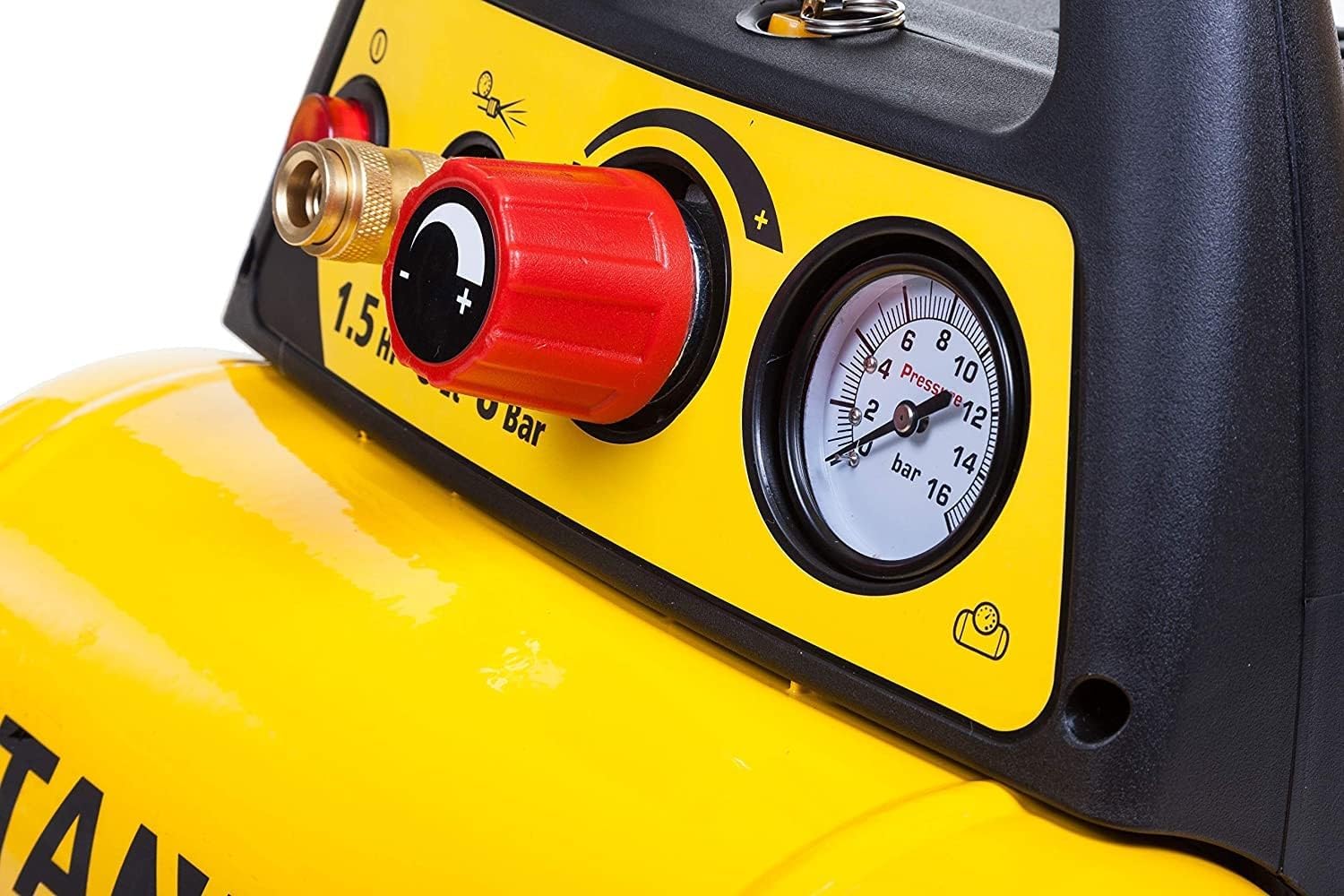
Figure 2.2: Detailed view of the compressor's control panel. This close-up highlights the red ON/OFF switch, the quick connect fitting, the red pressure regulator knob, and the two pressure gauges (tank pressure and regulated output pressure).
3. Setup and Initial Use
- Unpacking: Carefully remove the compressor from its packaging. Inspect for any shipping damage. Retain packaging for future storage or transport.
- Placement: Place the compressor on a firm, level, and stable surface. Ensure there is adequate ventilation around the unit to prevent overheating. Keep it away from walls or other obstructions.
- Power Connection: Ensure the ON/OFF switch is in the "OFF" position. Connect the power cord to a suitable grounded electrical outlet (230 Volts). Verify that the power supply matches the compressor's requirements.
- Initial Run-in (if applicable): For oil-lubricated compressors, it's often recommended to run the compressor for a short period (e.g., 15-20 minutes) with the drain valve open to allow components to seat properly. Consult the manufacturer's specific instructions if provided.
- Attaching Accessories: Connect your air hose to the quick connect coupler on the compressor. Ensure a secure connection. Attach your desired air tool to the other end of the hose.
4. Operating Instructions
- Power On: Turn the ON/OFF switch to the "ON" position. The compressor will start to build pressure. The tank pressure gauge will show the increasing pressure.
- Pressure Regulation: Once the compressor reaches its maximum tank pressure and shuts off automatically, you can adjust the output pressure. Turn the red regulator knob clockwise to increase pressure and counter-clockwise to decrease it. The output pressure gauge will show the adjusted pressure.
- Using Air Tools: With the desired pressure set, you can now operate your air tool. The compressor will automatically cycle on and off to maintain the set pressure as air is consumed.
- Power Off: When finished, turn the ON/OFF switch to the "OFF" position.
- Depressurize Tank: Before storing, always open the drain valve at the bottom of the tank to release any remaining air pressure and drain condensation. This prevents rust inside the tank.

Figure 4.1: The Stanley DN200/8/6 Air Compressor in use, powering an orbital sander. This demonstrates a typical application for the compressor, highlighting its utility for various air tools in a workshop setting.
5. Maintenance
Regular maintenance ensures the longevity and optimal performance of your air compressor. Always disconnect power before performing maintenance.
- Drain Condensation (Daily/After Each Use): Open the drain valve at the bottom of the tank to release accumulated moisture. This is crucial to prevent internal tank corrosion.
- Check Oil Level (Before Each Use): If your model is oil-lubricated (indicated by "Huile" feature), check the oil level using the dipstick or sight glass. Add compressor oil if necessary.
- Change Oil (Every 50-100 Operating Hours or Annually): Refer to the manufacturer's specific guidelines for oil change intervals and type of oil.
- Clean/Replace Air Filter (Monthly or as Needed): A clogged air filter reduces compressor efficiency. Clean or replace the filter element according to the manual.
- Inspect Hoses and Fittings (Regularly): Check for cracks, leaks, or wear on air hoses and fittings. Replace any damaged components immediately.
- Clean Exterior: Wipe down the exterior of the compressor with a damp cloth to remove dust and debris. Do not use harsh chemicals.
6. Troubleshooting
This section addresses common issues you might encounter with your air compressor.
| Problem | Possible Cause | Solution |
|---|---|---|
| Compressor does not start. | No power, tripped circuit breaker, faulty switch. | Check power connection, reset circuit breaker, contact service if switch is faulty. |
| Compressor runs continuously or frequently. | Air leak in system, excessive air consumption, faulty pressure switch. | Check all connections for leaks, reduce air consumption, contact service for pressure switch. |
| Low air pressure at output. | Regulator set too low, air leak, clogged air filter. | Adjust regulator, check for leaks, clean/replace air filter. |
| Excessive noise or vibration. | Loose components, worn parts, low oil level. | Tighten fasteners, check oil level, contact service for worn parts. |
| Moisture in air output. | Tank not drained regularly. | Drain condensation from the tank more frequently. |
7. Technical Specifications
| Specification | Value |
|---|---|
| Model Number | DN200/8/6 |
| Manufacturer | Mecafer |
| Power | 1100 Watts (1.5 HP) |
| Voltage | 230 Volts |
| Tank Capacity | 6 Liters |
| Maximum Pressure | 8 Bars |
| Air Flow Rate | 10800 Liters per hour |
| Noise Level | 97 dB |
| Product Dimensions (L x W x H) | 50 x 50 x 28 cm |
| Weight | 9 Kilograms |
| Hose Length | 1.5 Meters |
| Special Feature | Oil-lubricated |
| Recommended Use | Tire inflation |
| Country of Origin | China |
8. Warranty and Support
For warranty information, please refer to the documentation included with your purchase or visit the official Stanley website. Keep your proof of purchase for warranty claims.
For technical support, spare parts, or service inquiries, please contact Stanley customer service or an authorized service center. Contact details can typically be found on the product packaging or the official brand website.
Online Resources:
- Official Stanley Website: www.stanleytools.com (Please note: This is a generic link. Refer to your region's specific Stanley website for accurate support.)
Related documentsDN200/8/6


Ask a question about this manual
Ask about setup, troubleshooting, compatibility, parts, safety, or missing instructions. Manuals+ will review the question and use this page’s manual context to help answer it.