Introduction
This manual provides detailed instructions for the safe and effective use of your Sirui ET-2204 Carbon Fiber Tripod with E-20 Ball Head. Please read this manual thoroughly before operating the product and retain it for future reference.
What's in the Box
- Sirui ET-2204 Carbon Fiber Tripod
- Sirui E-20 Ball Head
- Tripod Bag
- Short Center Column (for macro photography)
- Allen Wrenches
- Spike Feet (set of 3)
Setup
1. Attaching the Ball Head
Ensure the tripod's mounting plate is clean. Align the E-20 Ball Head with the tripod's mounting screw and rotate clockwise until securely fastened. Do not overtighten.

Image: Sirui ET-2204 Carbon Fiber Tripod with the E-20 Ball Head securely attached, ready for camera mounting.
2. Adjusting Leg Angles
Each leg features a locking mechanism to adjust its angle. Pull the blue lock tab outwards to release the leg, set it to the desired angle (multiple positions available), and push the tab back in to lock. This allows for stable positioning on uneven terrain or for low-angle shots.

Image: Close-up view of the blue leg angle lock tab on the Sirui ET-2204 tripod, demonstrating the mechanism for adjusting leg spread.
3. Extending Tripod Legs
The ET-2204 features 4-section legs. To extend a leg, twist the locking collars counter-clockwise to loosen, pull out the leg sections to the desired length, and then twist the collars clockwise to secure them firmly. Ensure all sections are fully locked before mounting equipment.

Image: The Sirui ET-2204 tripod shown in both fully extended and folded configurations, highlighting its compact design and maximum height.
Operating Instructions
1. Mounting Your Camera
Attach your camera to the quick release plate of the E-20 Ball Head. Ensure the plate is securely fastened to your camera and then slide the plate into the ball head clamp. Tighten the clamp knob to prevent accidental release.
2. Adjusting Ball Head Position
The E-20 Ball Head allows for precise camera positioning. Loosen the main locking knob to adjust the ball's angle. Once the desired angle is achieved, tighten the knob firmly. A separate panning knob allows for 360-degree rotation without affecting the ball's tilt.
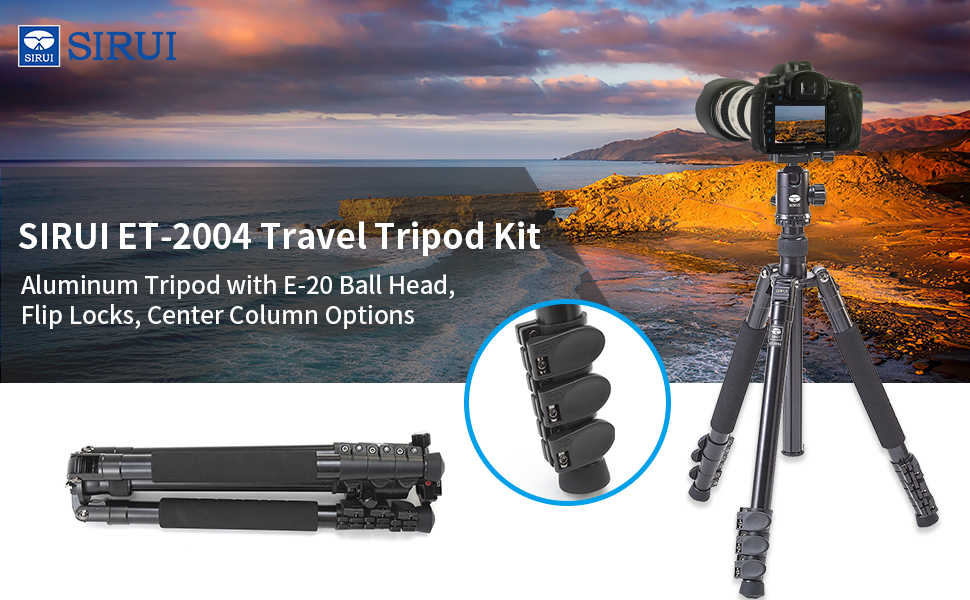
Image: Detailed view of the Sirui E-20 Ball Head, illustrating its wide load capacity and panoramic control features with labeled knobs.
3. Using the Short Center Column
For extreme low-angle or macro photography, the standard center column can be replaced with the included short center column. Unscrew the main column, insert the short column, and reattach the ball head. This significantly reduces the minimum shooting height.
4. Monopod Functionality
One of the tripod legs can be detached and used as a monopod. Unscrew the leg from the tripod spider and attach the ball head directly to the leg's mounting screw. This provides a portable support solution for situations where a full tripod is not practical.
5. General Tripod Usage Demonstration
Watch this video for a general demonstration of Sirui tripod features and usage, including quick setup and adjustments.
Video: A demonstration of a SIRUI lightweight and compact tripod, showcasing its features and ease of use for various camera setups.
Maintenance
- Cleaning: Regularly wipe down the tripod legs and ball head with a soft, dry cloth. For stubborn dirt, use a slightly damp cloth and mild soap, then dry thoroughly. Avoid harsh chemicals.
- Lubrication: The leg locking mechanisms and ball head components are designed for smooth operation. Avoid applying lubricants unless specifically recommended by Sirui, as this can attract dust and grit.
- Storage: Store the tripod in its protective bag in a dry, cool environment when not in use.
- Inspection: Periodically check all screws and connections for tightness. Use the provided Allen wrenches for any adjustments.
Troubleshooting
- Legs not extending/retracting smoothly: Ensure locking collars are fully loosened. Clean any dirt or debris from the leg sections.
- Ball head not holding position: Ensure the main locking knob is tightened sufficiently. Check that the camera plate is securely attached to both the camera and the ball head clamp.
- Tripod instability: Verify all leg sections are fully extended and locked, and leg angles are set correctly. Ensure the tripod is placed on a stable surface.
Specifications
| Feature | Detail |
|---|---|
| Material | Carbon Fiber, Aluminum |
| Item Weight | 3.7 lbs (1.68 kg) |
| Weight Load Capacity | 26.5 lbs (12 kg) |
| Maximum Height | 57.1 inches (145 cm) |
| Minimum Height | 5 inches (12.7 cm) |
| Closed Height | 17 inches (43.2 cm) |
| Tripod Head Type | Ball Head (E-20) |
| Leg Sections | 4 |
| Special Feature | Clip-lock legs, Monopod conversion |
Warranty and Support
For warranty information and technical support, please refer to the official Sirui website or contact their customer service directly. Keep your purchase receipt as proof of purchase.
For additional product information and support, visit the official Sirui Store on Amazon.


