
Avalon ST-4
Avalon ST-4 High-Performance Vacuum Tube Set User Manual
For VT-737SP & VT-747SP
1. Introduction
This user manual provides essential information for the Avalon ST-4 High-Performance Vacuum Tube Set. This set includes four (4) matched 6922 military-grade vacuum tubes, specifically designed as replacement tubes for the Avalon VT-737SP and VT-747SP audio processing units. Proper installation and care are crucial for optimal performance and longevity of these tubes.
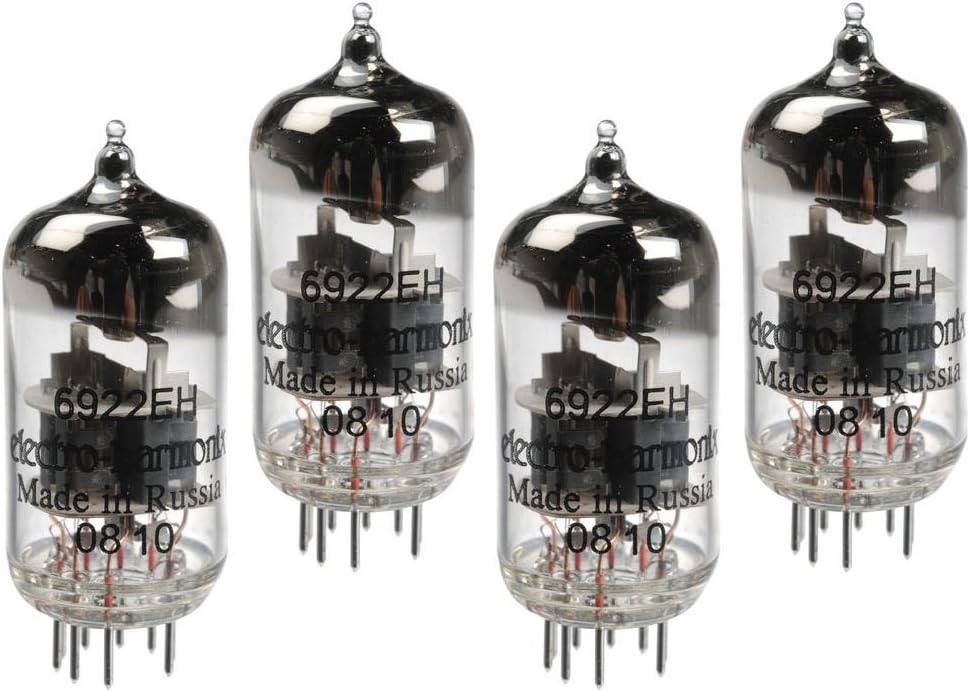
Figure 1.1: The Avalon ST-4 High-Performance Vacuum Tube Set. This image displays four individual vacuum tubes, each with a clear glass envelope revealing the internal electrode structure. The tubes are labeled "6922EH" and "Made in Russia". They are designed for high-performance audio applications.
2. Safety Information
Please read and understand the following safety precautions before handling or installing the vacuum tubes.
- Electrical Hazard: Vacuum tubes operate at high voltages. Always ensure the host unit (VT-737SP or VT-747SP) is completely powered off and unplugged from the mains electricity before attempting any tube replacement. Allow sufficient time for internal capacitors to discharge.
- Hot Surfaces: Tubes can become extremely hot during operation. Allow the unit and tubes to cool down completely before handling.
- Fragile Components: Vacuum tubes are made of glass and are delicate. Handle them with extreme care to prevent breakage. Avoid dropping or subjecting them to impact.
- Contamination: Avoid touching the glass envelope of the tubes directly with bare hands. Oils from your skin can create hot spots and reduce tube lifespan. Use clean cotton gloves or a lint-free cloth when handling.
- Professional Installation Recommended: If you are not familiar with electronic equipment or tube replacement procedures, it is highly recommended to seek assistance from a qualified technician.
3. Package Contents
The Avalon ST-4 High-Performance Vacuum Tube Set package includes:
- Four (4) Matched 6922 Vacuum Tubes
Note: The tubes are carefully matched for optimal performance in your Avalon VT-737SP or VT-747SP unit. It is recommended to replace all four tubes simultaneously for consistent sound quality.
4. Setup and Installation
This section outlines the general procedure for replacing vacuum tubes. Always refer to the specific user manual of your Avalon VT-737SP or VT-747SP unit for detailed, model-specific instructions and safety warnings.
- Power Down and Unplug: Ensure your Avalon VT-737SP or VT-747SP unit is completely powered off and disconnected from the AC power outlet.
- Allow Cooling: Allow the unit to cool down for at least 30 minutes to an hour. Vacuum tubes can retain significant heat after operation.
- Access Tubes: Carefully remove the cover or access panel of your unit as instructed in its specific manual to expose the vacuum tubes.
- Handle with Care: Wear clean cotton gloves or use a lint-free cloth to handle the new and old tubes. Avoid touching the glass directly.
- Remove Old Tubes: Gently grasp the old tube at its base (not the glass envelope) and rock it slightly while pulling straight up. Do not twist or apply excessive force, as this can damage the tube socket.
- Insert New Tubes: Align the pins of the new 6922 tube with the corresponding holes in the tube socket. The pins are typically arranged in a specific pattern to ensure correct orientation. Gently push the tube straight down into the socket until it is firmly seated. Do not force it.
- Verify Seating: Ensure all four new tubes are securely and fully seated in their respective sockets.
- Reassemble Unit: Carefully replace the cover or access panel of your unit.
- Power On: Reconnect the unit to the AC power outlet and power it on. Allow a few minutes for the tubes to warm up before use.
5. Operating Considerations
Once installed, the Avalon ST-4 vacuum tubes function as an integral part of your VT-737SP or VT-747SP unit. To maximize their lifespan and maintain optimal performance:
- Warm-up Time: Allow your unit sufficient warm-up time (typically 10-15 minutes) after powering on before critical use. This allows the tubes to reach their optimal operating temperature.
- Cool-down Time: After use, allow the unit to cool down naturally before moving it or powering it off completely. Rapid temperature changes can stress the tubes.
- Ventilation: Ensure your unit has adequate ventilation to prevent excessive heat buildup, which can shorten tube life.
- Avoid Vibrations: Minimize physical shocks or vibrations to the unit during operation, as this can affect tube performance and potentially cause microphonics.
6. Maintenance
Proper maintenance helps ensure the longevity and performance of your vacuum tubes.
- Cleaning: Periodically, with the unit powered off and cooled, gently wipe the exterior of the tubes and the surrounding area with a soft, dry, lint-free cloth to remove dust buildup. Do not use liquid cleaners.
- Storage: If storing the tubes separately, keep them in their original packaging or a protective, anti-static container in a cool, dry place away from direct sunlight and extreme temperatures.
- Regular Inspection: Occasionally inspect the tubes for any visible signs of damage, such as cracks in the glass or loose internal components.
7. Troubleshooting
If you experience issues with your Avalon VT-737SP or VT-747SP after tube replacement, consider the following:
- No Sound or Weak Signal:
- Ensure all tubes are fully seated in their sockets.
- Verify the unit is properly powered on and connected.
- Check all audio cables and connections.
- Excessive Noise (Hum, Hiss, Crackling):
- Ensure tubes are properly seated.
- Check for external interference or ground loops.
- If noise persists, one or more tubes may be faulty. Try re-seating them or, if possible, testing them individually (requires specialized equipment or professional assistance).
- Distorted Sound:
- This could indicate a tube issue. Ensure proper installation.
- Verify input levels are not overdriving the unit.
If troubleshooting steps do not resolve the issue, contact Avalon customer support or a qualified service technician.
8. Specifications
| Model Number | ST-4 |
| Tube Type | 6922 (Matched Set of 4) |
| Compatibility | Avalon VT-737SP, Avalon VT-747SP |
| Item Weight | 8.8 ounces (approx. 250 grams) |
| Product Dimensions (Packaging) | 7.4 x 7.2 x 4.7 inches (approx. 18.8 x 18.3 x 11.9 cm) |
| Date First Available | February 13, 2014 |
9. Warranty and Support
For information regarding warranty coverage or technical support for your Avalon ST-4 High-Performance Vacuum Tube Set, please refer to the documentation provided with your original Avalon VT-737SP or VT-747SP unit. You may also contact Avalon customer service directly for assistance.
Related documentsST-4


Ask a question about this manual
Ask about setup, troubleshooting, compatibility, parts, safety, or missing instructions. Manuals+ will review the question and use this page’s manual context to help answer it.