
1. Introduction
This manual provides comprehensive instructions for the installation, operation, and maintenance of your AGPTEK RFID Door Access Control System Kit. This system is designed to enhance security by controlling access to designated areas using RFID proximity cards, passwords, or a combination of both.
The kit includes a robust 280kg (620LB) electric magnetic lock, a user-friendly keypad, a power supply unit, and key fobs, offering a reliable and convenient solution for home, office, factory, or community security needs.
2. Product Components
The AGPTEK RFID Door Access Control System Kit typically includes the following components:
- RFID Access Control Keypad (AD2000-M)
- Electric Magnetic Lock (280kg/620LB holding force)
- Power Supply Control Unit (AD813, AC110-240V to DC12V 3A)
- Door Exit Button
- RFID Key Fobs (typically 10 units)
- Mounting Hardware (screws, anchors, brackets)
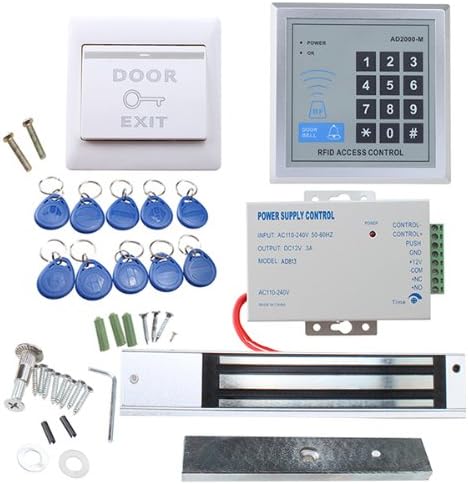
Figure 2.1: Overview of AGPTEK RFID Door Access Control System Kit components.
3. Specifications
| Feature | Specification |
|---|---|
| Brand | AGPTEK |
| Model Number | HS0014+15+16+17-MB1 |
| Magnetic Lock Holding Force | 280kg (620LB) |
| Power Supply Input | AC 110-240V |
| Power Supply Output | DC 12V, 3A |
| Connectivity Technology | Wired |
| Sensor Technology | RFID |
| Control Method | Keypad, RFID Card/Fob |
| Item Dimensions (L x W x H) | 9.84 x 7.09 x 5.12 inches |
| Item Weight | 5.1 Pounds |
4. Safety Information
WARNING: If you are unsure about any part of these instructions, consult a qualified electrician or security system professional. Improper installation or wiring can lead to electric shock, fire, or damage to the system.
- Ensure all power is disconnected before beginning installation or maintenance.
- Follow all local electrical codes and regulations.
- Do not expose the components to water or extreme temperatures.
- Use only the specified power supply and components provided with the kit.
5. Setup and Installation
5.1 Component Overview

Figure 5.1: Magnetic Lock and Mounting Hardware.

Figure 5.2: Power Supply Control Unit (AD813).

Figure 5.3: Door Exit Button.

Figure 5.4: RFID Access Control Keypad (AD2000-M) and Key Fobs.
5.2 Wiring Diagrams
Carefully follow the wiring diagrams provided. Incorrect wiring can damage the system or pose safety risks. Ensure all connections are secure and insulated.

Figure 5.5: Wiring Diagram for Access Control Keypad and Power Supply.

Figure 5.6: Comprehensive Wiring Diagram for the Complete System.
Note on Power Supply: The power supply unit (AD813) requires connection to AC 110-240V. One lead connects to the live wire and the other to the neutral wire. Always ensure power is off before making these connections.
5.3 Physical Installation
The system components are designed for screw-in installation. Refer to the specific instructions for mounting the magnetic lock, keypad, and exit button on your door frame and door. Ensure the magnetic lock and armature plate are aligned correctly for optimal performance.

Figure 5.7: Example of System Installation on a Door.
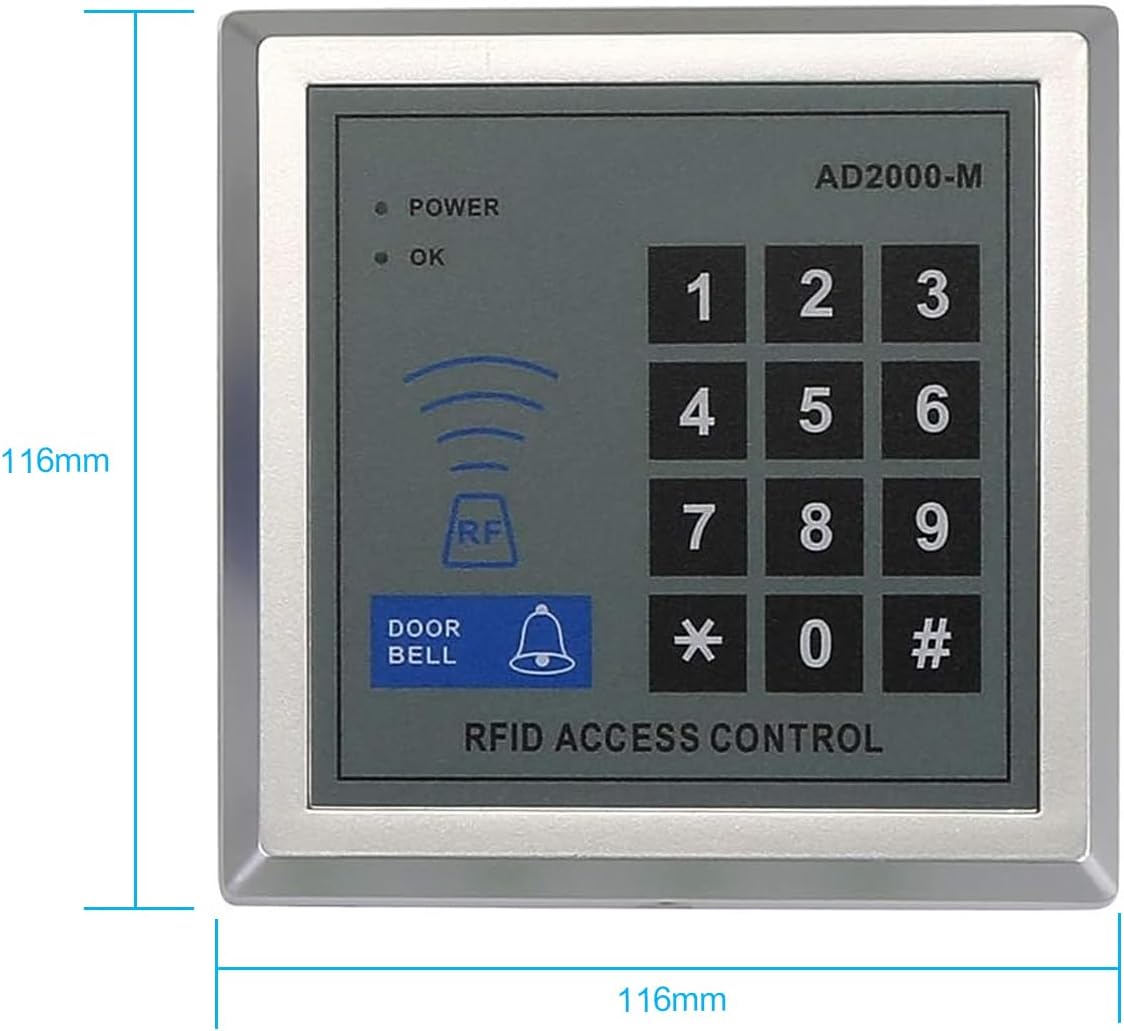
Figure 5.8: Keypad Dimensions for Installation Planning.
6. Operating Instructions
6.1 Initial Power-Up
After completing all wiring and physical installation, apply power to the system. The keypad should illuminate, indicating it is ready for programming.
6.2 Programming Access Credentials
The AGPTEK access control system supports multiple access methods:
- Proximity Cards/Fobs: Users can gain entry by presenting a programmed RFID key fob to the keypad's sensor.
- Passwords: Users can enter a pre-programmed numerical password on the keypad.
- Hybrid: Some configurations may allow for a combination of card/fob and password for enhanced security.
Detailed programming steps for adding or deleting user cards/fobs and passwords are typically provided in a separate quick start guide or specific keypad manual. Generally, programming involves entering a master code, selecting a programming mode, and then presenting the card/fob or entering the new password.
6.3 Using the Exit Button
The exit button provides a simple way to unlock the door from the inside. Pressing the button will temporarily release the magnetic lock, allowing egress.
6.4 Connecting to Other Terminals
The access controller can be connected to various terminals for extended functionality, including doorbells and electric locks configured as normally open (NO) or normally closed (NC). Refer to the wiring diagrams (Figure 5.5 and 5.6) for connection points for these additional devices.
7. Maintenance
To ensure the longevity and reliable operation of your AGPTEK RFID Door Access Control System, consider the following maintenance guidelines:
- Regular Cleaning: Wipe down the keypad and magnetic lock surfaces with a soft, dry cloth. Avoid abrasive cleaners or solvents.
- Connection Checks: Periodically inspect all wiring connections to ensure they remain secure and free from corrosion.
- Magnetic Lock Alignment: Ensure the magnetic lock and armature plate remain properly aligned. Misalignment can reduce holding force and cause premature wear.
- Power Supply: Verify the power supply unit is free from obstructions and operating within its specified temperature range.
- Backup Power (Optional): For critical security applications, consider integrating an uninterruptible power supply (UPS) to maintain functionality during power outages. The magnetic lock is designed to release upon power failure (fail-unsecure).
8. Troubleshooting
If you encounter issues with your access control system, refer to the following common troubleshooting steps:
- System Not Powering On:
- Check the AC power connection to the power supply unit.
- Verify the power supply output (DC 12V) using a multimeter.
- Ensure all low-voltage connections from the power supply to the keypad are correct and secure.
- Magnetic Lock Not Engaging/Disengaging:
- Check the wiring between the power supply, keypad, and magnetic lock according to the diagrams.
- Ensure the magnetic lock and armature plate are clean and properly aligned.
- Verify the keypad is sending the correct signal to the lock (e.g., after successful card swipe or code entry).
- RFID Cards/Fobs Not Working:
- Ensure the cards/fobs have been properly programmed into the system.
- Confirm the card/fob is being presented correctly to the keypad's RFID reader.
- Check for any interference near the keypad's RFID reader.
- Keypad Not Responding:
- Check power connections to the keypad.
- If the keypad is completely unresponsive, a reset may be necessary (refer to specific keypad documentation for reset procedures).
- Exit Button Not Working:
- Verify the wiring of the exit button to the access control keypad/power supply.
- Ensure the button itself is not physically stuck or damaged.
If problems persist after following these steps, contact AGPTEK customer support or a qualified technician.
9. Warranty and Support
For warranty information, technical support, or to purchase replacement parts, please contact AGPTEK customer service. Refer to the product packaging or the official AGPTEK website for the most current contact details.
When contacting support, please have your product model number (HS0014+15+16+17-MB1) and a detailed description of the issue ready.