
1. Important Safety Instructions
Always follow basic safety precautions to reduce the risk of fire, electric shock, and personal injury when operating power tools.
- Work Area Safety: Keep the work area clean and well-lit. Cluttered or dark areas invite accidents. Do not operate power tools in explosive atmospheres, such as in the presence of flammable liquids, gases, or dust. Power tools create sparks which may ignite the dust or fumes.
- Electrical Safety: Power tool plugs must match the outlet. Never modify the plug in any way. Do not use any adapter plugs with earthed (grounded) power tools. Unmodified plugs and matching outlets will reduce risk of electric shock. Avoid body contact with earthed or grounded surfaces such as pipes, radiators, ranges and refrigerators. There is an increased risk of electric shock if your body is earthed or grounded.
- Personal Safety: Stay alert, watch what you are doing and use common sense when operating a power tool. Do not use a power tool while you are tired or under the influence of drugs, alcohol or medication. A moment of inattention while operating power tools may result in serious personal injury. Use personal protective equipment. Always wear eye protection. Protective equipment such as dust mask, non-skid safety shoes, hard hat, or hearing protection used for appropriate conditions will reduce personal injuries.
- Power Tool Use and Care: Do not force the power tool. Use the correct power tool for your application. The correct power tool will do the job better and safer at the rate for which it was designed. Disconnect the plug from the power source and/or remove the battery pack, if detachable, from the power tool before making any adjustments, changing accessories, or storing power tools. Such preventive safety measures reduce the risk of starting the power tool accidentally.
2. Product Overview
The BLACK+DECKER KR504RE is a 500-watt hammer drill designed for versatile drilling tasks in various materials.

Figure 1: Overall view of the BLACK+DECKER KR504RE Hammer Drill with power cord.
Components:
- 500W Motor: Provides ample power for drilling.
- 10mm Keyed Chuck: Securely holds drill bits up to 10mm in diameter.
- Hammer Action: Engages for drilling into masonry.
- Reverse Drill Action: Allows for easy bit removal and screwdriving.
- Lock-on Button: For continuous operation, reducing user fatigue.
- Comfortable Grip: Ergonomically designed for user comfort.

Figure 2: Close-up view of the drill's main body, showing ventilation and branding.
3. Setup
3.1 Unpacking
Carefully remove the drill and all accessories from the packaging. Verify that all components listed in the 'What's in the Box' section are present.
3.2 Attaching and Removing Drill Bits

Figure 3: Included drill bits and chuck key.
- To Attach: Insert the chuck key into one of the holes on the chuck. Rotate the chuck key counter-clockwise to open the chuck jaws. Insert the drill bit fully into the chuck. Rotate the chuck key clockwise to tighten the chuck jaws securely around the drill bit. Ensure the bit is centered and firmly held.
- To Remove: Insert the chuck key and rotate counter-clockwise to loosen the chuck jaws. Remove the drill bit.
Caution: Always ensure the drill is unplugged from the power source before changing drill bits.
4. Operating Instructions
4.1 Powering On/Off

Figure 4: Trigger and direction selector switch.
- To Start: Plug the drill into a suitable power outlet. Press the trigger switch.
- To Stop: Release the trigger switch.
- Lock-on Button: For continuous operation, press the trigger and then press the lock-on button. To release, press the trigger again.
4.2 Selecting Drilling Mode (Hammer/Rotary)
The drill features a mode selector switch, typically located on the top or side of the drill housing. Slide the switch to the hammer icon for masonry drilling or to the drill bit icon for rotary drilling in wood, metal, or plastic.
4.3 Selecting Rotation Direction (Forward/Reverse)
A direction selector switch, usually near the trigger, controls the rotation. Push it left for forward rotation (drilling) and right for reverse rotation (removing bits or screws).

Figure 5: Proper grip for operating the drill.
4.4 Drilling Techniques
- General Drilling: Hold the drill firmly with both hands if possible. Apply steady, even pressure. Allow the drill to do the work.
- Drilling Wood: Use wood-specific drill bits. Start with a small pilot hole for larger diameters.
- Drilling Metal: Use metal-specific drill bits. Apply cutting oil to cool the bit and improve drilling efficiency.
- Drilling Masonry: Engage the hammer action. Use masonry drill bits. Apply firm, consistent pressure.
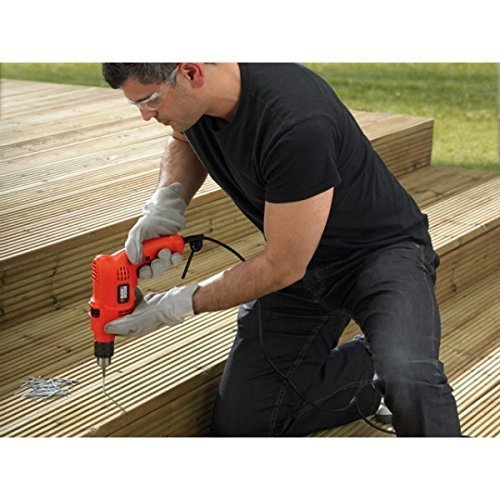
Figure 6: Example of drilling into wood.

Figure 7: Example of drilling into a masonry wall.
5. Maintenance
5.1 Cleaning
Regularly clean the ventilation slots on the drill to prevent overheating. Use a soft brush or dry cloth. Do not use water or chemical cleaners.
5.2 Chuck Care
Keep the chuck jaws clean and free of debris to ensure proper gripping of drill bits. Periodically apply a small amount of light machine oil to the chuck jaws for smooth operation.
5.3 Storage
Store the drill in a dry, secure location out of reach of children. Disconnect from power when not in use.
6. Troubleshooting
If you encounter issues with your drill, refer to the following common problems and solutions:
| Problem | Possible Cause | Solution |
|---|---|---|
| Drill does not start | No power supply; Faulty power cord/plug; Trigger switch issue | Check power outlet; Inspect cord/plug for damage; Contact service center if switch is faulty |
| Drill bit slips in chuck | Chuck not tightened sufficiently; Dirty chuck jaws; Damaged drill bit shank | Tighten chuck firmly with chuck key; Clean chuck jaws; Use drill bits with undamaged shanks |
| Poor drilling performance | Dull or incorrect drill bit; Incorrect drilling mode; Insufficient pressure | Replace with sharp, correct bit for material; Select appropriate mode (hammer for masonry); Apply steady, firm pressure |
| Overheating | Blocked ventilation slots; Prolonged heavy use | Clean ventilation slots; Allow drill to cool down; Reduce load or duration of use |
7. Specifications
| Model Number | KR504RE |
| Power Source | Corded Electric |
| Maximum Power | 500 Watts |
| Maximum Chuck Size | 10 Millimeters |
| Drill Type | Hammer Drill |
| Drilling Capacity (Wood) | 8 Millimetres |
| Material | Plastic (Housing) |
| Item Weight | 2.29 Pounds (approx. 1.04 kg) |
| Included Components | 500W 10mm Hammer Drill and Chuck Key |
8. Warranty Information
This BLACK+DECKER KR504RE Hammer Drill comes with a 1-year warranty provided by the manufacturer from the date of purchase. Please retain your purchase receipt as proof of purchase for warranty claims.
9. Support
For any warranty-related issues, product feedback, or technical assistance, please contact BLACK+DECKER customer care:
- Customer Care Number: 1860-425-1111
- Operating Hours: Monday to Friday, 10 AM to 5 PM (except government holidays)


