
Introduction
The Intermatic FM1D14-24U is a versatile one-circuit digital timer designed for panel mounting. It offers precise control over electrical loads with its 24-hour or 7-day programming capabilities. This manual provides essential information for the safe installation, programming, and operation of your digital timer. Please read these instructions thoroughly before installation and use.
Safety Information
WARNING: Risk of electric shock. Installation and servicing should be performed by qualified personnel only. Disconnect power at the circuit breaker or fuse box before installing or servicing.
- Ensure all wiring complies with national and local electrical codes.
- Do not exceed the maximum electrical ratings of the timer.
- Keep the device away from water and excessive moisture.
- This timer is intended for indoor use in dry locations unless installed in a suitable enclosure.
Product Overview
The FM1D14-24U digital timer features a clear display, programming buttons, and terminal connections for power and load. It is designed for panel mounting applications.
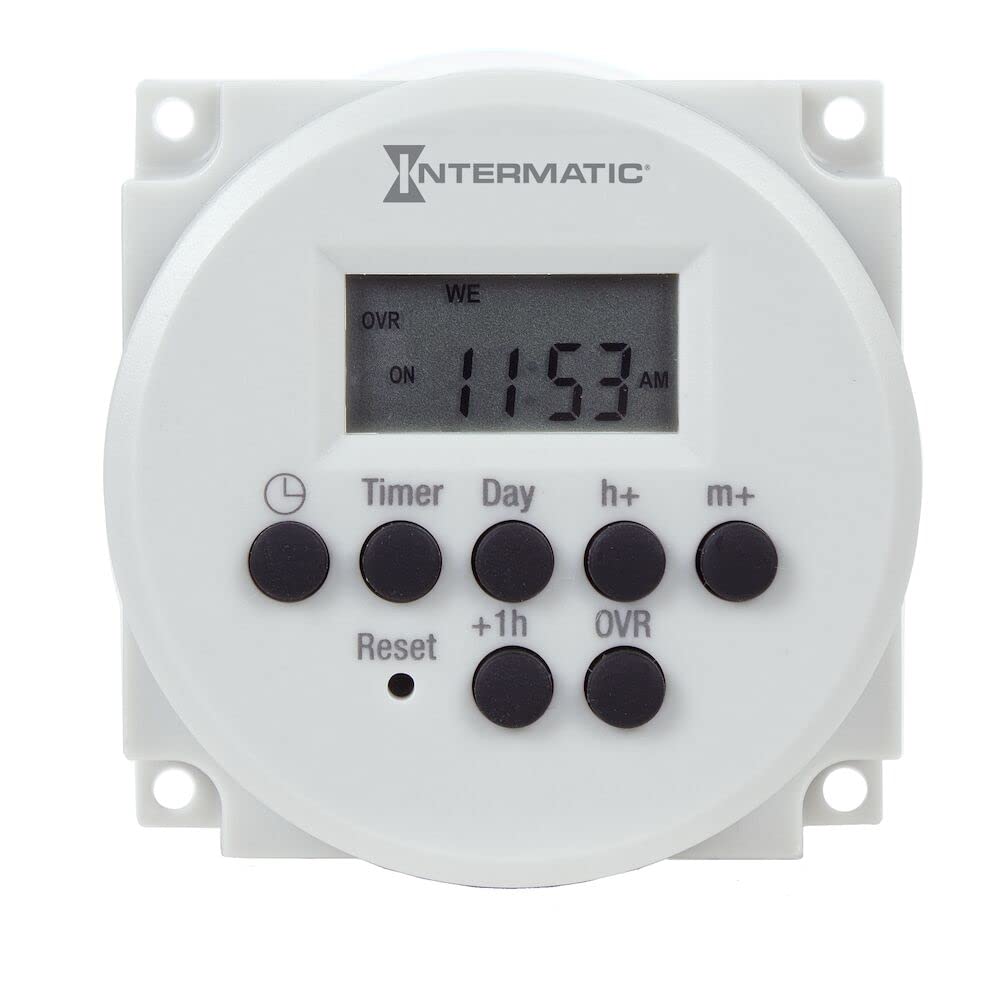
Figure 1: Front view of the Intermatic FM1D14-24U Digital Timer. This image shows the compact design suitable for panel mounting, with the digital display and control buttons visible.
Setup and Installation
This timer is designed for panel mounting. Follow these steps for proper installation:
- Disconnect Power: Before starting any electrical work, ensure power to the circuit is turned off at the main breaker or fuse box.
- Mounting: Securely mount the FM1D14-24U timer into the designated panel cutout. Ensure it is firmly seated.
- Wiring: Connect the 24VAC/VDC, 50/60Hz input voltage to the appropriate terminals as indicated on the timer's wiring diagram. Connect the load wires to the output terminals. Refer to the wiring diagram provided with the product packaging for specific terminal assignments.
- Verify Connections: Double-check all wiring connections for tightness and correctness before restoring power.
- Restore Power: Once all connections are secure and verified, restore power to the circuit. The timer display should illuminate.
Operating Instructions
The FM1D14-24U timer allows for flexible programming with up to 14 set point programs and 5 preset adjustable block programs.
Setting Current Time and Day
- Press the CLOCK button.
- Use the HOUR and MINUTE buttons to adjust the time.
- Use the DAY button to set the current day of the week.
- Press CLOCK again to save and exit.
Programming ON/OFF Events (14 Set Points)
- Press the PROG button. The display will show "1 ON".
- Use HOUR, MINUTE, and DAY buttons to set the desired ON time and day(s) for the first event. You can select individual days, weekdays, weekends, or all days.
- Press PROG again. The display will show "1 OFF". Set the desired OFF time and day(s) for the first event.
- Repeat steps 2 and 3 for up to 14 ON/OFF programs.
- Press CLOCK to exit programming mode.
Using Manual Override
The timer features a manual override function with status indication. Press the MANUAL button to temporarily switch the output ON or OFF, overriding the current program. The display will indicate the manual status. The next programmed event will restore automatic operation.
Preset Adjustable Block Programs
The timer includes 5 preset adjustable block programs for common scheduling needs. Consult the full product manual for detailed instructions on how to select and customize these block programs.
Maintenance
The Intermatic FM1D14-24U Digital Timer requires minimal maintenance.
- Cleaning: Periodically wipe the exterior of the timer with a soft, dry cloth. Do not use abrasive cleaners or solvents.
- Inspection: Annually inspect wiring connections for tightness and signs of wear. Ensure the timer is free from dust and debris.
- Battery Backup: This timer is designed to retain clock info when power goes out. It typically has an internal battery or capacitor for this purpose, which is not user-serviceable.
Troubleshooting
| Problem | Possible Cause | Solution |
|---|---|---|
| Timer display is blank. | No power supply to the timer. | Check circuit breaker/fuse. Verify wiring connections to the timer's input terminals. |
| Load does not turn ON/OFF as programmed. | Incorrect programming; Manual override active; Faulty wiring to load. | Review programming steps. Check if manual override is engaged. Verify load wiring. |
| Timer loses time or program settings. | Prolonged power outage beyond internal backup capacity; Internal fault. | Reprogram the timer. If issue persists after short power outages, contact support. |
Specifications
- Model: FM1D14-24U
- Input Voltage: 24VAC/VDC, 50/60Hz
- Number of Circuits: One
- Programming: 24-hour or 7-day applications
- Set Points: 14 ON/OFF programs
- Block Programs: 5 preset adjustable
- Override: Manual override with status indication
- Mounting Type: Panel Mount
- Material: Plastic, Resin
- Item Weight: Approximately 3.2 ounces (0.2 Pounds)
- Product Dimensions: 1.26 x 2.36 x 2.36 inches
Warranty and Support
For warranty information, please refer to the documentation included with your product or visit the official Intermatic website. For technical support or further assistance, contact Intermatic customer service.
Manufacturer: Intermatic, Inc.
