Introduction
This manual provides essential information for the safe and effective use of your Rossmax CH155 Digital Blood Pressure Monitor. Please read it thoroughly before first use and keep it for future reference. The Rossmax CH155 is designed for accurate and convenient blood pressure measurement at home.

Image: The Rossmax CH155 Digital Blood Pressure Monitor, showing the main unit with a large digital display and the accompanying arm cuff.
Product Features
- Accurate Measurements: Utilizes advanced technology to provide precise blood pressure readings.
- Large Display: Clear and easy-to-read LCD screen for convenient viewing of blood pressure readings.
- Memory Function: Stores previous readings, allowing users to track their blood pressure trends over time.
- One-Touch Operation: Simple and user-friendly design for hassle-free use.
- Comfortable Cuff: Adjustable cuff fits a wide range of arm sizes comfortably.
- Clinically Validated: Ensures reliability and accuracy in blood pressure monitoring.
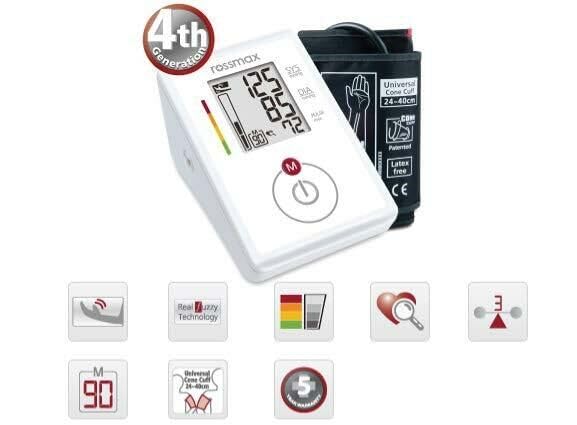
Image: Visual representation of key features of the Rossmax CH155, highlighting its 4th generation technology, Real Fuzzy Technology, and movement detection capabilities.
Setup
1. Unpacking and Inspection
Carefully remove the blood pressure monitor and all accessories from the packaging. Inspect the device for any signs of damage. If any damage is found, do not use the device and contact customer support.

Image: The Rossmax CH155 monitor alongside its retail box, illustrating the product as it appears when unboxed.
2. Battery Installation
The Rossmax CH155 requires 4 AA batteries (included). Locate the battery compartment on the underside of the device. Open the cover and insert the batteries, ensuring correct polarity (+/-). Close the battery compartment cover securely.
3. Cuff Connection
Connect the air tube from the arm cuff to the air jack located on the side of the main unit. Ensure the connection is firm and secure to prevent air leakage during measurement.
Operating Instructions
1. Preparing for Measurement
- Avoid eating, drinking alcohol, smoking, exercising, and bathing for 30 minutes before measurement.
- Rest for at least 15 minutes before taking a measurement.
- Sit in a comfortable position with your back supported and feet flat on the floor.
- Place your arm on a flat surface so the cuff is at heart level.
2. Applying the Arm Cuff
Wrap the cuff firmly around your bare upper arm, approximately 1-2 cm above the elbow joint. The air tube should run down the center of your arm in line with your middle finger. Ensure the cuff is snug but not too tight; you should be able to insert two fingers between the cuff and your arm.
3. Taking a Measurement
- Press the START/STOP button to turn on the device.
- The cuff will automatically inflate. Remain still and silent during the measurement.
- Once the measurement is complete, your systolic pressure, diastolic pressure, and pulse rate will be displayed on the screen.
- Press the START/STOP button again to turn off the device, or it will automatically shut off after 1 minute of inactivity.

Image: The Rossmax CH155 monitor showing a typical measurement result on its large LCD screen, including systolic, diastolic, and pulse readings.
Maintenance
- Cleaning: Wipe the device and cuff with a soft, dry cloth. Do not use abrasive cleaners or immerse the device in water.
- Storage: Store the device in a cool, dry place, away from direct sunlight and extreme temperatures. Keep it out of reach of children.
- Battery Replacement: Replace all four AA batteries when the low battery indicator appears on the display.
Troubleshooting
| Problem | Possible Cause | Solution |
|---|---|---|
| Device does not turn on. | Batteries are dead or incorrectly inserted. | Check battery polarity or replace with new batteries. |
| Error message (e.g., "E1"). | Cuff not applied correctly, movement during measurement, or air leakage. | Reapply cuff, remain still, ensure cuff connection is secure. If problem persists, contact support. |
| Inaccurate readings. | Improper measurement technique, old batteries, or device malfunction. | Review "Preparing for Measurement" section. Replace batteries. If issues continue, seek professional assistance. |
Specifications
- Model: CH155
- Display Type: Digital LCD
- Measurement Method: Oscillometric
- Power Source: 4 x AA Batteries (included)
- Product Dimensions: 17.1 x 11.6 x 10.8 cm
- Item Weight: 345 g
- Included Components: BP Monitor, Arm Cuff, Batteries, User Manual
- Manufacturer: Rossmax International Ltd.
- Country of Origin: China
- First Available Date: 24 January 2014
Warranty and Support
Information regarding product warranty and customer support is not available in the provided data. Please refer to the product packaging or contact Rossmax customer service directly for details on warranty coverage and support options.
For general inquiries or technical assistance, you may visit the official Rossmax website or consult your local distributor.


