
1. Introduction and Overview
The Behringer Ultralink ULM202USB is a high-performance 2.4 GHz digital wireless system designed for clear and reliable audio transmission. This system includes two ULM200M handheld microphones and a ULM200D dual-mode USB receiver, offering a convenient and versatile solution for various audio applications.

Image: The Behringer Ultralink ULM202USB system, showing two black handheld microphones and the compact USB receiver.
2. Package Contents
Ensure all items listed below are present in your package:
- 2 x ULM200M Handheld Microphones
- 1 x ULM200D Dual-Mode USB Receiver
- User Documentation (including safety information and warranty details)
3. Setup
3.1. Inserting Batteries into Microphones
Each ULM200M microphone requires two AA batteries (not included). Follow these steps to install them:
- Unscrew the bottom cap of the microphone.
- Carefully pull out the battery compartment.
- Insert two AA batteries, ensuring correct polarity (+/-).
- Slide the battery compartment back into the microphone and screw the bottom cap securely.
3.2. Connecting the USB Receiver
The ULM200D USB receiver connects directly to your computer or compatible audio device. No additional drivers are typically required for basic functionality.
- Locate an available USB port on your computer or audio device.
- Insert the ULM200D USB receiver firmly into the USB port.
- Your operating system should automatically detect and install the necessary drivers.
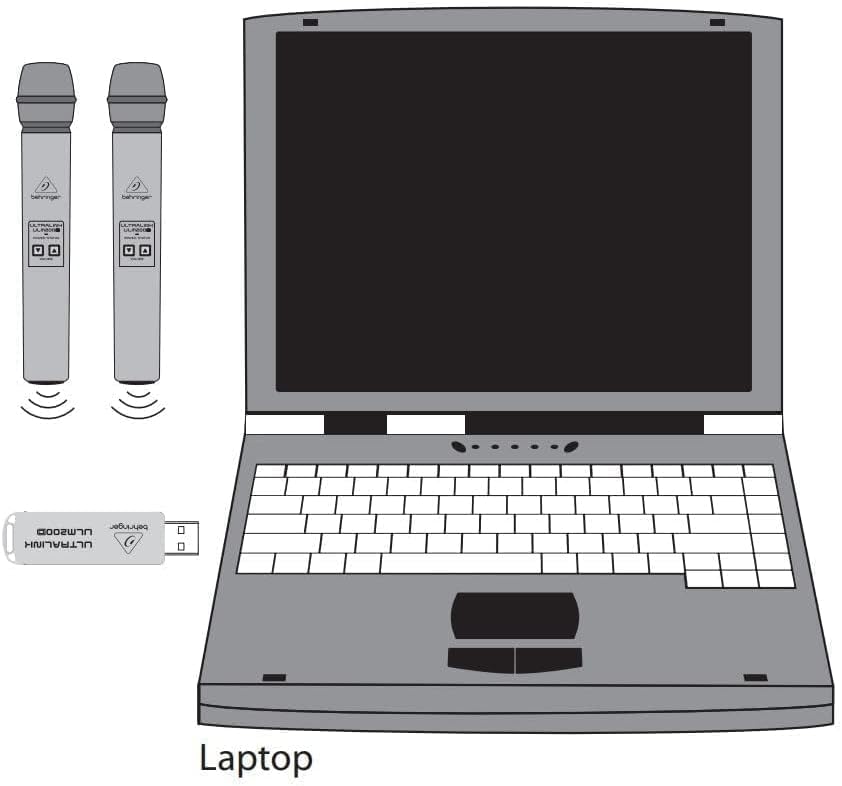
Image: A diagram illustrating the connection of the two ULM200M microphones and the ULM200D USB receiver to a laptop, symbolizing the wireless connection.
4. Operating Instructions
4.1. Powering On/Off
To power on a microphone, press and hold the power button located on the microphone body until the indicator light illuminates. To power off, press and hold the power button again until the light turns off.
4.2. Automatic Pairing
The ULM200M microphones and ULM200D USB receiver are designed for automatic pairing. Once the USB receiver is connected and the microphones are powered on, they should automatically establish a wireless connection. No manual pairing steps are typically required.
4.3. Adjusting Volume
Each microphone features dedicated volume up and volume down buttons. Use these buttons to adjust the microphone's output level directly.
5. Maintenance
- Cleaning: Use a soft, dry cloth to clean the exterior of the microphones and receiver. Avoid using abrasive cleaners or solvents.
- Storage: Store the system in a cool, dry place away from direct sunlight and extreme temperatures.
- Battery Care: To prevent battery drain and potential damage, remove the AA batteries from the microphones when they are not in use for extended periods.
6. Troubleshooting
If you encounter issues with your Behringer Ultralink ULM202USB system, refer to the table below for common problems and solutions:
| Problem | Possible Cause | Solution |
|---|---|---|
| No sound from microphone. | Microphone not powered on, low batteries, receiver not connected, volume too low. | Ensure microphone is powered on. Replace batteries. Verify USB receiver is securely plugged in. Increase microphone volume. Check computer/device audio settings. |
| Microphone loses connection intermittently. | Interference from other 2.4 GHz devices (Wi-Fi, Bluetooth), excessive distance from receiver. | Reduce distance between microphone and receiver. Minimize other 2.4 GHz wireless activity in the area. Ensure clear line of sight. |
| Batteries drain quickly even when off. | Microphones may consume power even when seemingly off. | Always remove batteries from microphones when not in use for extended periods to conserve battery life. Consider using rechargeable AA batteries. |
| Poor audio quality (static, distortion). | Interference, low battery, microphone too far from mouth. | Check for interference sources. Replace batteries. Ensure proper microphone technique (hold closer to mouth). |
7. Specifications
| Feature | Detail |
|---|---|
| Brand | Behringer |
| Model Name | ULM202USB |
| Microphone Form Factor | Handheld |
| Connectivity Technology | Wireless, USB (2.4 GHz Digital) |
| Number of Channels | 2 |
| Polar Pattern | Unidirectional |
| Power Source | AA Batteries (Microphones), USB (Receiver) |
| Signal-to-Noise Ratio | 80 dB |
| Item Weight | 1.6 Pounds |
| Product Dimensions (L x W x H) | 12.8 x 6.4 x 2.5 inches |
| Recommended Uses | Karaoke, Live Performance, Presentations |
8. Warranty and Support
Behringer products are designed for reliability and performance. For detailed warranty information, product registration, or further technical support, please refer to the official Behringer website or the comprehensive user manual available for download.
Additional Resources:Download Full User Manual (PDF)


