
RYOBI P118
Ryobi P118 18V Dual Chemistry Battery Charger and P102 Lithium-Ion Batteries User Manual
Model: P118 Charger, P102 Batteries
Introduction
This manual provides essential instructions for the safe and efficient operation and maintenance of your Ryobi P118 18V Dual Chemistry Battery Charger and P102 Compact Lithium-Ion Batteries. Please read this manual thoroughly before use and retain it for future reference.

Image: Ryobi P118 18V Dual Chemistry Battery Charger and two P102 Compact Lithium-Ion Batteries. The charger is black with green accents, featuring indicator lights. The two batteries are black with "ONE+" branding.
Important Safety Information
Always observe basic safety precautions when using electrical appliances to reduce the risk of fire, electric shock, and personal injury. This includes, but is not limited to:
- Read all instructions before using the charger and batteries.
- Do not charge batteries in damp or wet locations.
- Use only Ryobi 18V ONE+ batteries with this charger.
- Do not open, crush, heat above 40°C (104°F), or incinerate batteries.
- Remove battery from tool when storing, changing attachments, or making adjustments.
- Ensure proper ventilation during charging.
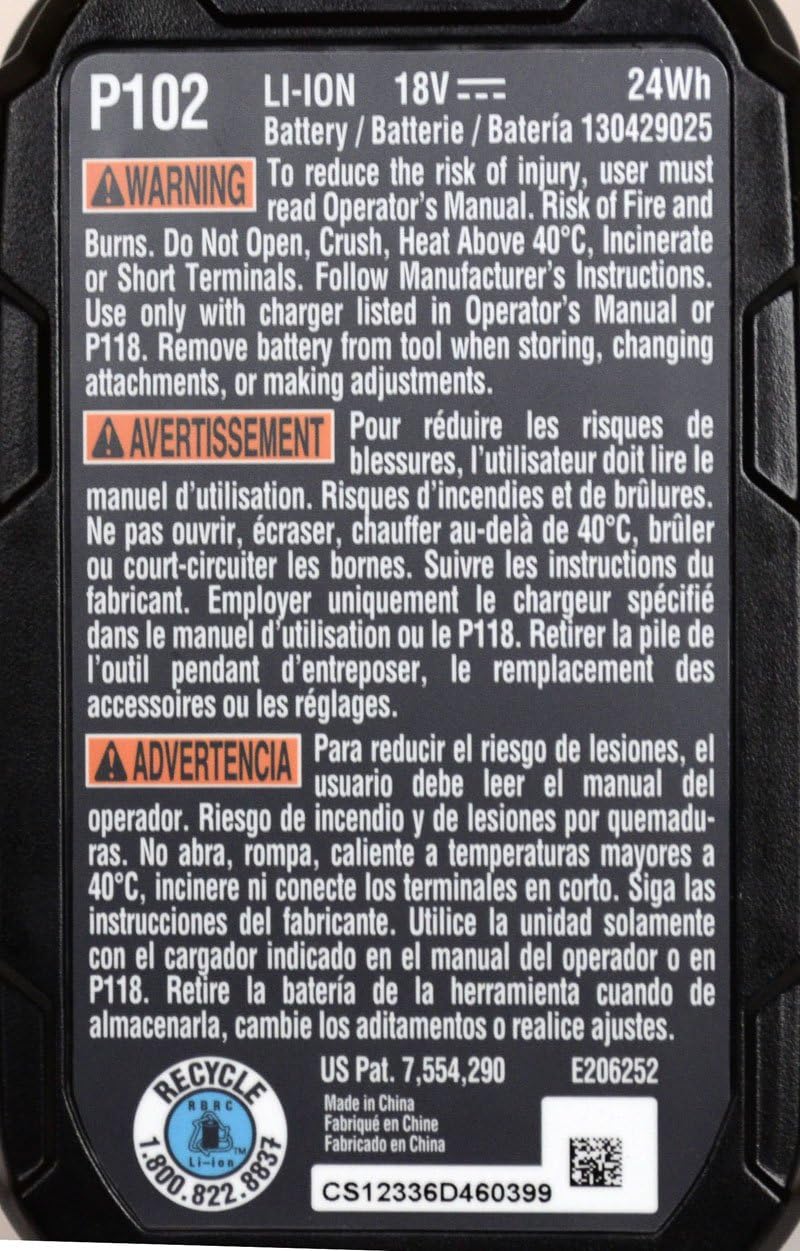
Image: Close-up of the warning label on a Ryobi P102 Lithium-Ion Battery, indicating safety precautions such as not opening, crushing, heating above 40°C, or incinerating the battery.
Setup
Unpacking
Carefully remove the charger and batteries from the packaging. Inspect all components for any damage. If any part is damaged or missing, do not use the product and contact customer service.
Mounting the Charger (Optional)
The P118 charger features brackets on its back, allowing it to be mounted to walls or pegboards. This helps in organizing your workspace and keeping the charging system accessible.
- Select a dry, well-ventilated location away from direct sunlight and heat sources.
- Use appropriate fasteners (not included) for your wall type to secure the charger.

Image: The Ryobi P118 18V Dual Chemistry Battery Charger, showing its compact design and attached power cord, suitable for wall mounting.
Operating Instructions
Charging a Battery
- Plug the charger into a standard 120V AC outlet. The "Power On" indicator light (red) will illuminate.
- Slide the battery pack onto the charger, ensuring it is fully seated. The charger is designed to accept both Lithium-Ion and NiCad 18V ONE+ batteries.
- The "Charging" indicator light (yellow) will blink, indicating that the battery is charging.
- Once charging is complete, the "Charged" indicator light (yellow) will illuminate steadily. The charger will then switch to a maintenance mode to keep the battery at peak performance.
- Remove the battery from the charger when ready for use.

Image: A detailed view of the Ryobi P118 charger's IntelliPort Technology indicator panel, showing lights for Power On, Testing, Defective, Charging, Charged, and Energy Save Mode.
Battery Compatibility
The P118 Dual Chemistry Charger is compatible with all Ryobi 18V ONE+ Ni-Cd, Lithium 18V, and Lithium+ 18V batteries.

Image: Labels on the Ryobi P118 charger illustrating compatibility with Ni-Cd 18V, Lithium 18V, and Lithium+ 18V batteries.
P102 Compact Lithium-Ion Batteries
The included P102 batteries are compact and lightweight, designed for reduced user fatigue and improved tool handling. They provide fade-free power, meaning they maintain consistent power output until fully discharged.

Image: Two Ryobi P102 Compact Lithium-Ion Batteries, black with yellow "ONE+" branding, shown from an angled perspective.
Maintenance
Cleaning
- Keep the charger and battery terminals clean and free of debris.
- Use a dry cloth to wipe down the exterior surfaces. Do not use water or chemical cleaners.
Storage
- Store the charger and batteries in a cool, dry place away from direct sunlight and extreme temperatures.
- For long-term storage, ensure batteries are partially charged (not fully depleted or fully charged).
- Remove batteries from tools when storing.
Troubleshooting
| Problem | Possible Cause | Solution |
|---|---|---|
| Charger not powering on (no red light) | Not plugged in; faulty outlet; damaged cord. | Ensure charger is securely plugged into a working outlet. Check for damage to the power cord. |
| Battery not charging (yellow light not blinking) | Battery not seated correctly; defective battery; charger malfunction. | Re-seat the battery firmly. Check if the "Defective" indicator (red) is on. If so, the battery may be faulty. Try another battery if available. |
| "Defective" indicator light (red) is on | Battery is damaged or too hot/cold. | Remove the battery and allow it to reach room temperature. If the light persists, the battery may be defective and require replacement. |
| Battery drains quickly in tool | Battery is old or damaged; tool drawing excessive power. | Ensure battery is fully charged. Consider replacing older batteries. If the issue persists with new batteries, the tool may require service. |
Specifications
- Model: P118 (Charger), P102 (Batteries)
- Brand: RYOBI
- Voltage: 18 Volts
- Charger Type: Dual Chemistry (Lithium-Ion / NiCad)
- Battery Type: Lithium-Ion (P102)
- Product Dimensions: 10 x 12 x 4 inches (approximate, for the bundle)
- Item Weight: 0.01 ounces (Note: This weight is listed for the bundle and may be a data entry error; actual weight will be higher.)
- Power Source: Battery-powered (for tools), AC (for charger)
- Material: Plastic
- Special Features: IntelliPort Technology, Wall Mountable (Charger)
Warranty and Support
For warranty information or technical support, please refer to the documentation included with your purchase or visit the official RYOBI website. Keep your proof of purchase for warranty claims.
Manufacturer: Ryobi
Related documentsP118


Ask a question about this manual
Ask about setup, troubleshooting, compatibility, parts, safety, or missing instructions. Manuals+ will review the question and use this page’s manual context to help answer it.