
Alarm Lock BP6
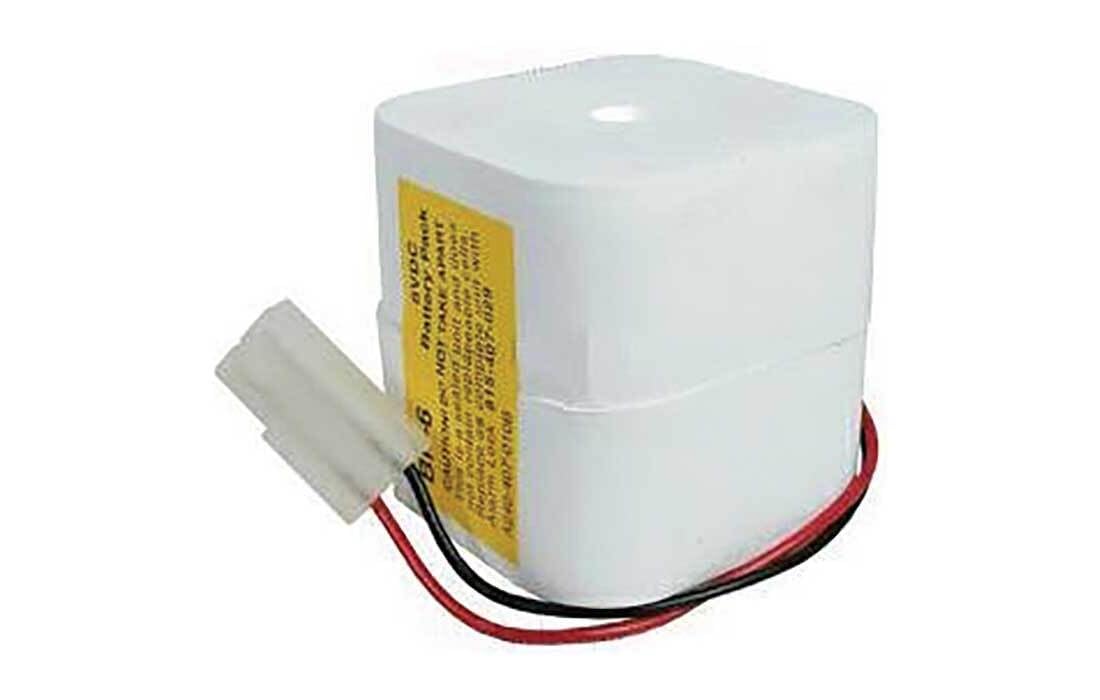
ALARM LOCK BP-6 Battery Pack 6VDC Instruction Manual
Introduction
This manual provides essential information for the safe and effective use of the Alarm Lock BP-6 Battery Pack. Please read these instructions carefully before installation and operation to ensure proper function and to prevent damage or injury.
Important Safety Information
WARNING: Failure to follow these safety instructions may result in fire, electric shock, or other injury or damage.
- DO NOT TAKE APART: The BP-6 Battery Pack is a sealed unit and does not contain user-replaceable cells. Attempting to open the unit can cause damage and void any warranty.
- Replacement: Replace the complete unit with Alarm Lock part number 815-407-029 or A240-407-010B.
- Voltage: This battery pack provides 6VDC. Ensure compatibility with the device it is intended to power.
- Disposal: Dispose of used batteries according to local regulations. Do not incinerate or expose to high temperatures.
- Storage: Store in a cool, dry place away from direct sunlight and extreme temperatures.

Setup and Installation
The Alarm Lock BP-6 Battery Pack is designed for easy installation. Follow these steps to properly connect the battery pack to your compatible device.
- Identify Connection Port: Locate the battery connection port on your Alarm Lock device. This port is typically a matching white connector.
- Align Connector: Carefully align the white connector of the BP-6 Battery Pack with the device's connection port. Ensure the pins are correctly oriented.
- Connect Battery Pack: Gently push the connector into the port until it is securely seated. Do not force the connection.
- Secure Battery Pack: Place the battery pack within the designated battery compartment of your device. Ensure it fits snugly and does not obstruct any other components.
- Test Functionality: After installation, power on your device to confirm that the battery pack is providing power correctly.
Operation
The BP-6 Battery Pack provides 6VDC power to compatible Alarm Lock devices. Once installed, the battery pack will supply power as needed by the device. There are no user-operable controls on the battery pack itself.
- Power Source: Functions as the primary or backup power source for your Alarm Lock system.
- Automatic Operation: The battery pack operates automatically once connected and the device is powered on.
- Charging: If your Alarm Lock device includes a charging circuit for this battery type, the battery pack will recharge when the device is connected to an external power source. Refer to your device's manual for specific charging instructions.
Maintenance
The Alarm Lock BP-6 Battery Pack requires minimal maintenance. Adhering to these guidelines will help prolong its lifespan.
- Regular Inspection: Periodically inspect the battery pack and its connections for any signs of damage, corrosion, or wear.
- Cleaning: If necessary, gently wipe the exterior of the battery pack with a dry, soft cloth. Do not use liquid cleaners or solvents.
- Replacement: Replace the battery pack when it no longer holds a charge or shows signs of degradation. Refer to the "Important Safety Information" section for replacement part numbers.
- Environmental Conditions: Ensure the battery pack is operated and stored within the recommended temperature and humidity ranges specified by your Alarm Lock device.
Troubleshooting
If you encounter issues with your BP-6 Battery Pack, consider the following troubleshooting steps:
| Problem | Possible Cause | Solution |
|---|---|---|
| Device not powering on. | Battery pack not connected properly. | Ensure the battery pack connector is fully seated in the device's port. |
| Device not powering on. | Battery pack is depleted or faulty. | If the device has a charging indicator, check its status. If the battery is old or suspected to be faulty, replace it with a new BP-6 unit. |
| Short operating time after full charge. | Battery pack capacity has degraded. | Batteries have a finite lifespan. Replace the battery pack with a new BP-6 unit. |
| Battery pack appears physically damaged. | Physical impact or improper handling. | Immediately discontinue use and replace the battery pack. Do not attempt to repair. |
If troubleshooting steps do not resolve the issue, contact Alarm Lock customer support or a qualified technician.
Specifications
- Model: BP-6
- Voltage: 6VDC
- Part Numbers: 815-407-029, A240-407-010B (for replacement)
- Product Dimensions: 7.5 x 9.25 x 2.75 inches (approximate, as per product listing)
- Item Weight: 9.6 ounces (approximate, as per product listing)
- Manufacturer: ALARM LOCK
- ASIN: B00HNO2E2I
- First Available Date: January 3, 2014
Warranty and Support
Specific warranty information for the Alarm Lock BP-6 Battery Pack is not provided within this manual. For details regarding warranty coverage, technical support, or service, please refer to the documentation included with your Alarm Lock device or contact Alarm Lock directly through their official website or customer service channels.
Manufacturer: ALARM LOCK
Related documentsBP6


Ask a question about this manual
Ask about setup, troubleshooting, compatibility, parts, safety, or missing instructions. Manuals+ will review the question and use this page’s manual context to help answer it.