
Intermatic 146MT574
Intermatic 146MT574 Timer Knob for FD Series Spring Wound Timers - Instruction Manual
Model: 146MT574
Introduction
This document provides comprehensive instructions for the Intermatic 146MT574 white replacement knob. This knob is specifically designed for use with Intermatic FD series decorator spring wound auto-off timers, which control various loads such as fans, lights, motors, and heaters. It serves as a direct replacement for older models like 145MT494A, 146MT574A, and 146MT494A.
The Intermatic 146MT574 knob features a press-on design for quick and easy installation onto a 3/16-inch D-shape shaft. Its snug-fit design, incorporating four raised ribs, ensures a secure attachment.
Installation
The Intermatic 146MT574 timer knob is designed for straightforward installation. Follow these steps to replace or install the knob:
- Identify the Timer Shaft: Ensure your timer has a 3/16-inch D-shape shaft. This knob is compatible only with this specific shaft type.
- Align the Knob: Carefully align the D-shaped opening on the back of the new 146MT574 knob with the D-shape shaft of the timer.
- Press On: Gently but firmly press the knob onto the shaft until it is fully seated. The snug-fit design with internal ribs will create a secure connection. Avoid excessive force to prevent damage to the knob or the timer shaft.
- Test Functionality: Once installed, rotate the knob to ensure it turns smoothly and engages with the timer mechanism correctly.

Image: The Intermatic 146MT574 timer knob shown installed on a compatible FD series spring wound timer, demonstrating its appearance and fit.

Image: Detailed front and back views of the Intermatic 146MT574 knob, highlighting the 1-inch outer diameter and the 3/16-inch D-shape shaft opening for proper installation.
Operation
The 146MT574 knob functions as the interface for setting your Intermatic FD series spring wound timer. To operate the timer:
- Setting the Timer: Rotate the knob clockwise to the desired time setting (e.g., 15 minutes, 30 minutes). The timer will begin to count down automatically.
- Automatic Shut-off: Once the set time has elapsed, the timer will automatically turn off the connected load.
- Manual Override (if applicable): Some FD series timers may have a "Hold" feature. Refer to your specific timer's manual for details on manual override functions.
Caution: Avoid twisting the knob with excessive force, especially when reaching the end of its rotation range, as this can cause damage to the knob or the timer mechanism.
Maintenance
The Intermatic 146MT574 timer knob requires minimal maintenance to ensure its longevity and proper function.
- Cleaning: Wipe the knob periodically with a soft, damp cloth to remove dust and grime. Avoid using harsh chemical cleaners, which may damage the plastic finish.
- Inspection: Periodically inspect the knob for any signs of cracks or damage. If the knob becomes loose or damaged, replace it promptly to maintain proper timer operation and prevent further issues.
- Proper Use: Always turn the knob gently. Applying excessive force, particularly when turning it to its maximum or minimum settings, can stress the plastic and lead to premature cracking or breakage.
Troubleshooting
If you encounter issues with your Intermatic 146MT574 timer knob, consider the following:
- Knob Does Not Fit:
- Verify that your timer has a 3/16-inch D-shape shaft. This knob is designed specifically for this size.
- Ensure the D-shaped opening on the knob is correctly aligned with the shaft.
- If the shaft is not D-shaped or is a different size, this knob is not compatible.
- Knob Feels Loose:
- Re-press the knob firmly onto the shaft to ensure it is fully seated.
- If the knob continues to feel loose, the internal ribs or the shaft may be worn. Consider replacing the knob.
- Knob is Cracked or Broken:
- This typically occurs due to excessive force during operation. The knob is a replacement part and should be replaced if damaged.
For further assistance, refer to the instruction manual for your specific Intermatic FD series timer or contact Intermatic customer support.
Specifications
| Feature | Detail |
|---|---|
| Model Number | 146MT574 |
| Brand | Intermatic |
| Color | White |
| Material | Plastic |
| Product Dimensions | 1"D x 1"W x 0.5"H (Approximate) |
| Outer Diameter | 1 inch |
| Shaft Compatibility | 3/16 inch D-shape shaft |
| Item Weight | 0.16 ounces (4.54 g) |
| UPC | 735343319396, 793842094503, 078275600850 |
| Compatibility | Intermatic FD Series Spring Wound Timers |
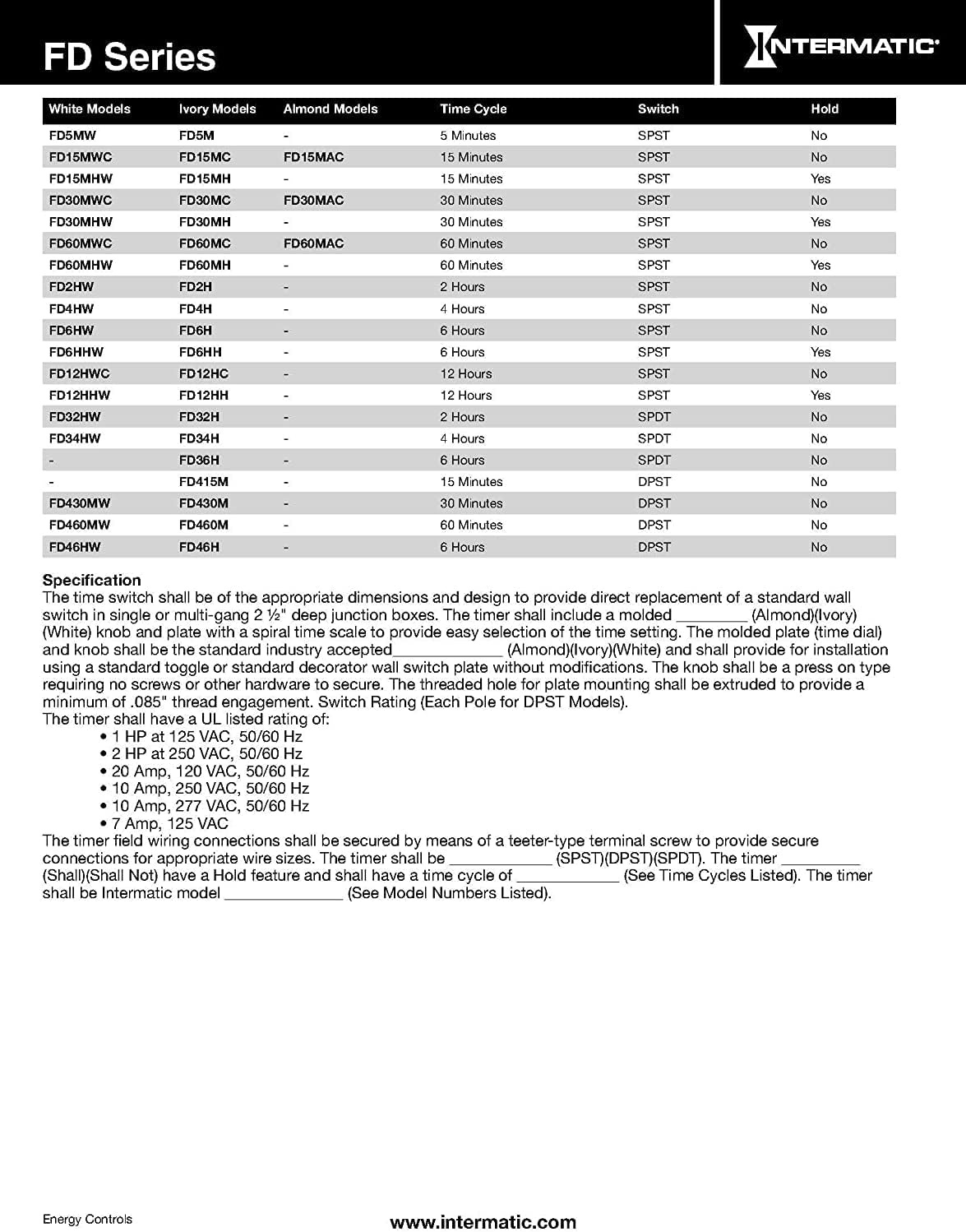
Image: A table detailing various Intermatic FD Series timer models, including their time cycles, switch types, and "Hold" functionality. This helps confirm compatibility with the 146MT574 knob.
Warranty and Support
Specific warranty information for the Intermatic 146MT574 timer knob is typically provided with the original product packaging or can be found on the official Intermatic website. As a replacement part, its warranty may be subject to the terms and conditions of the original timer or the replacement part itself.
For technical support, product inquiries, or to obtain detailed warranty information, please visit the official Intermatic website or contact their customer service department directly. Contact information can usually be found on the Intermatic website or on the packaging of your Intermatic timer.
Related documents146MT574


Ask a question about this manual
Ask about setup, troubleshooting, compatibility, parts, safety, or missing instructions. Manuals+ will review the question and use this page’s manual context to help answer it.