
1. Introduction
The SkyTec SPL300 is a semi-professional stereo PA amplifier designed for various audio applications, including small DJ setups, home parties, and public address systems. It delivers a maximum output of 2 x 150 watts at 4 ohms, providing clear and powerful sound. This amplifier features separate volume controls for each channel and a peak indicator to prevent signal overload. Its robust 19-inch rack-mountable design ensures durability and ease of integration into existing setups.
2. Safety Instructions
- Electrical Safety: Always connect the amplifier to a grounded power outlet with the correct voltage (220-240VAC 50Hz). Do not expose the unit to rain or moisture.
- Ventilation: Ensure adequate ventilation around the amplifier. Do not block ventilation openings. Overheating can cause damage.
- Handling: Avoid dropping or subjecting the unit to heavy impacts.
- Servicing: Do not attempt to open the amplifier casing. There are no user-serviceable parts inside. Refer all servicing to qualified personnel. CAUTION: Risk of electric shock. Do not open.
- Placement: Place the amplifier on a stable, flat surface. Keep it away from heat sources, direct sunlight, and strong magnetic fields.
3. Product Overview
3.1 Front Panel
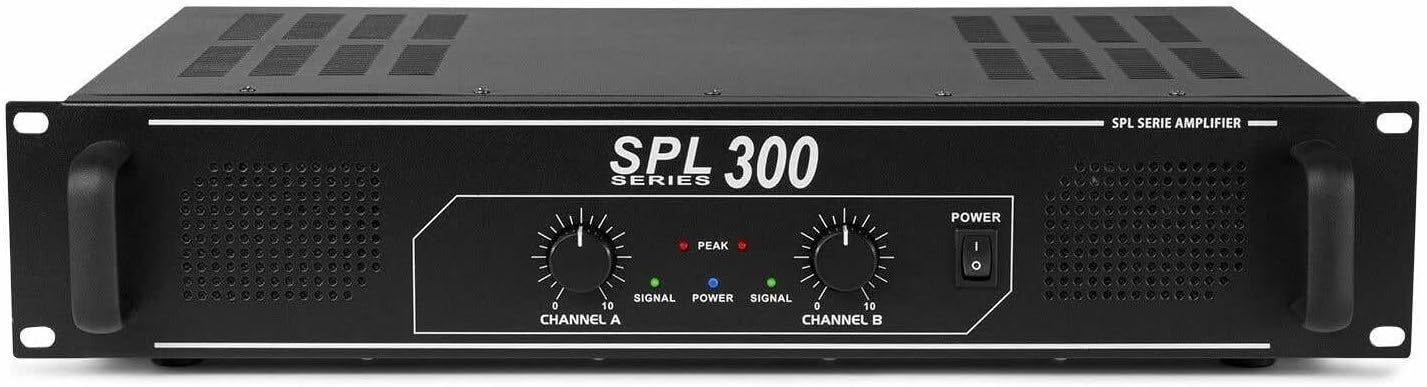
Image: Front view of the SkyTec SPL300 amplifier, showing controls and indicators.
- Channel A/B Volume Controls: Rotary knobs to adjust the output level for each channel independently.
- Signal Indicators (Green LED): Illuminates when an audio signal is present on the respective channel.
- Peak Indicators (Red LED): Illuminates when the signal level is too high, indicating potential clipping or distortion. Reduce the volume if this LED lights up frequently.
- Power Switch: Toggles the amplifier's power ON/OFF.
3.2 Rear Panel

Image: Rear view of the SkyTec SPL300 amplifier, showing input and output connections.
- Power Input: IEC connector for the main power cable (230-240Vac, 50/60Hz, 80W). Includes a fuse holder (Fuse: T1A).
- RCA Inputs (A & B): Stereo RCA jacks for connecting audio sources such as CD players, mixers, or computers.
- Speaker Outputs: Screw terminals for connecting passive speakers. Ensure a minimum load of 4 Ohms per channel. Connect positive (+) to positive (+) and negative (-) to negative (-).
4. Setup
- Placement: Position the amplifier in a well-ventilated area, preferably in a 19-inch rack if applicable. Ensure sufficient space around the unit for airflow.
- Connect Speakers: Using appropriate speaker cables, connect your passive speakers to the Speaker Outputs on the rear panel. Ensure the polarity is correct (+ to + and - to -). The minimum impedance for connected speakers is 4 Ohms per channel. Connecting speakers with lower impedance can damage the amplifier.
- Connect Audio Sources: Use RCA cables to connect your audio source (e.g., mixer, CD player, smartphone via adapter) to the RCA Inputs (A or B) on the rear panel.
- Connect Power: Ensure the amplifier's power switch is in the OFF position. Connect the provided power cable to the Power Input on the rear panel and then to a suitable grounded electrical outlet.
- Initial Volume Check: Before powering on, set both Channel A and Channel B volume controls on the front panel to their minimum (fully counter-clockwise) position.
5. Operating Instructions
- Power On: Flip the Power switch on the front panel to the ON position. The power indicator should illuminate.
- Start Audio Playback: Begin playing audio from your connected source at a low volume level.
- Adjust Volume: Slowly increase the Channel A and/or Channel B volume controls on the amplifier to achieve the desired listening level.
- Monitor Indicators: Observe the Signal and Peak LEDs. The green Signal LED should light up when audio is present. If the red Peak LED flashes frequently or stays lit, reduce the volume to prevent distortion and potential damage to speakers or the amplifier. The built-in limiter helps prevent severe overloads.
- Power Off: Before disconnecting any cables or when finished using the amplifier, turn the volume controls down to minimum and then switch the Power switch to the OFF position.
6. Maintenance
- Cleaning: Disconnect the amplifier from the power supply before cleaning. Use a soft, dry cloth to wipe the exterior. Do not use liquid cleaners, solvents, or abrasive materials.
- Ventilation: Regularly check that the ventilation grilles are free from dust and debris to ensure proper airflow and prevent overheating.
- Storage: If storing the amplifier for an extended period, ensure it is in a dry, dust-free environment, protected from extreme temperatures.
7. Troubleshooting
| Problem | Possible Cause | Solution |
|---|---|---|
| No power | Power cable disconnected; Power switch off; Blown fuse | Check power cable connection; Turn power switch on; Replace fuse (T1A) if necessary (only by qualified personnel). |
| No sound output | Volume controls at minimum; Input source not playing; Incorrect input connection; Speaker cables disconnected/incorrectly connected; Faulty speaker | Increase volume; Check audio source playback; Verify RCA input connections; Check speaker cable connections and polarity; Test with another speaker. |
| Distorted sound | Input signal too high; Amplifier overloaded (Peak LED on); Incorrect speaker impedance; Faulty speaker/cable | Reduce input source volume; Reduce amplifier volume; Ensure speakers are 4 Ohm minimum; Check speaker and cable integrity. |
| Amplifier overheats | Poor ventilation; Excessive load; Prolonged high volume use | Ensure vents are clear; Provide adequate airflow; Reduce volume or load; Allow amplifier to cool down. |
8. Specifications
| Feature | Specification |
|---|---|
| Output Power (@ 4 Ohm per channel) | 2 x 150W |
| Total Output Power | 300W |
| Frequency Response | 20 - 20,000 Hz |
| Crosstalk | >82 dB |
| THD (Total Harmonic Distortion) | <0.05% |
| Signal-to-Noise Ratio | >95 dB |
| Input Sensitivity (Line) | 775mV - 1.2V |
| Input Impedance | 10 kOhm |
| Power Supply | 220-240VAC 50Hz |
| Dimensions (L x W x H) | 482 x 270 x 88 mm (19" x 2U) |
| Weight | 4 kg |
| Amplifier Type | Solid State |
| Number of Output Channels | 2 |
| Material | Metal |
9. Warranty and Support
This product is covered by the standard manufacturer's warranty. For specific warranty terms and conditions, please refer to the documentation provided with your purchase or contact your retailer. For technical support, troubleshooting assistance beyond this manual, or service inquiries, please contact the authorized SkyTec service center or your point of purchase.


