
1. Introduction
This manual provides detailed instructions for the installation, operation, and maintenance of your Jensen JHD40BT Bluetooth Radio. Please read this manual thoroughly before using the product to ensure proper operation and to prevent damage.
The Jensen JHD40BT is a robust Bluetooth-enabled stereo designed for various applications, offering audio streaming, radio tuning, and USB connectivity. It features a waterproof design and a 7-channel NOAA weather band tuner.
2. Safety Information
Always observe the following safety precautions when installing and operating the JHD40BT radio:
- Ensure the vehicle's power is disconnected before installation to prevent electrical shock or damage.
- Connect wiring correctly as per the wiring diagram to avoid short circuits.
- Do not operate the unit in a manner that distracts you from driving or operating machinery safely.
- This unit is waterproof, but avoid submerging it or exposing it to high-pressure water jets.
3. Product Overview
3.1 Key Features
- Maximum power output: 160W (4x40W)
- Bluetooth streaming audio and control for Bluetooth-enabled devices
- 7-Channel NOAA weather band tuner
- Waterproof design
- iPod/iPhone ready via rear USB (pigtail connection)
3.2 Front Panel Controls
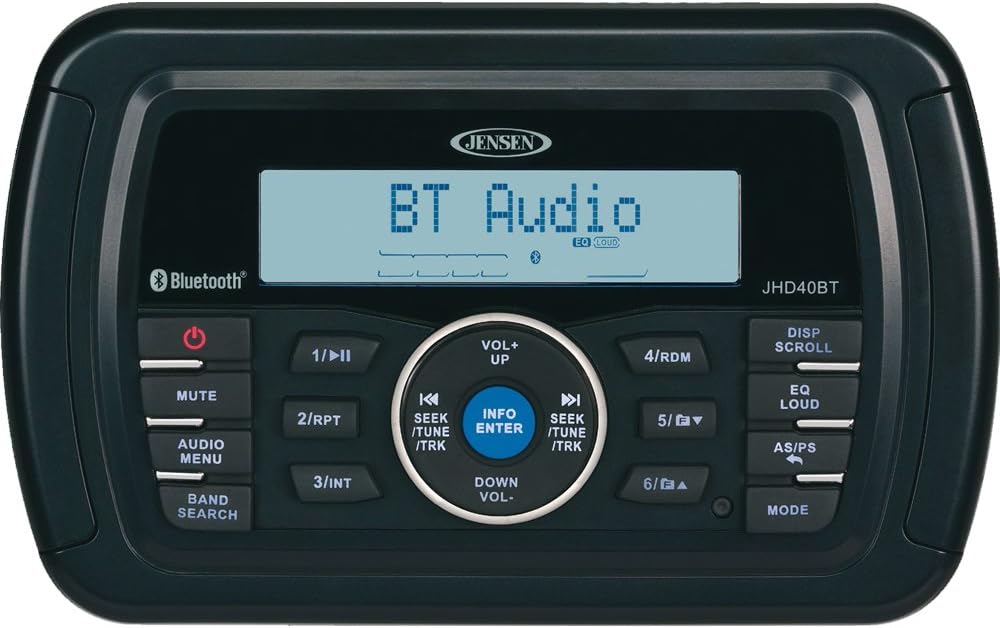
The front panel of the JHD40BT features a clear display and intuitive controls for various functions:
- Power Button (⏻): Turns the unit on or off.
- MUTE Button: Mutes or unmutes the audio output.
- AUDIO MENU Button: Accesses audio settings like Bass, Treble, Balance, Fader.
- BAND SEARCH Button: Cycles through available radio bands (AM, FM, NOAA Weather Band).
- 1/⏸II Button: Play/Pause in media modes; Preset 1 in radio mode.
- 2/RPT Button: Repeat function in media modes; Preset 2 in radio mode.
- 3/INT Button: Intro scan in media modes; Preset 3 in radio mode.
- 4/RDM Button: Random play in media modes; Preset 4 in radio mode.
- 5/▼ Button: Track down in media modes; Preset 5 in radio mode.
- 6/▲ Button: Track up in media modes; Preset 6 in radio mode.
- DISP SCROLL Button: Scrolls through display information.
- EQ LOUD Button: Activates/deactivates Equalizer presets and Loudness function.
- AS/PS Button: Auto Store/Preset Scan in radio mode.
- MODE Button: Changes the operating mode (Radio, Bluetooth, USB, AUX).
- Rotary Encoder (VOL+/VOL-): Adjusts volume up or down.
- SEEK/TUNE/TRK Buttons (⏪ / ⏩): Seek/Tune in radio mode; Track skip in media modes.
- INFO/ENTER Button: Displays track information or confirms selections.
4. Setup and Installation
Proper installation is crucial for optimal performance. It is recommended that installation be performed by a qualified professional.
4.1 Wiring Connections
The JHD40BT requires a 12-volt DC power source. Connect the wiring harness according to the diagram provided with your unit. Ensure all connections are secure and insulated to prevent short circuits.
- Red Wire: Switched 12V (Ignition)
- Yellow Wire: Constant 12V (Battery)
- Black Wire: Ground
- Blue Wire: Remote Turn-On (for amplifier or power antenna)
- Speaker Wires: Connect to appropriate speakers (typically 4 pairs for front/rear, left/right).
- USB Pigtail: For iPod/iPhone connection or USB media.
5. Operating Instructions
5.1 Power On/Off
Press the ⏻ (Power) button to turn the unit on. Press and hold the ⏻ button to turn the unit off.
5.2 Volume Control
Rotate the central knob clockwise to increase volume (VOL+) and counter-clockwise to decrease volume (VOL-).
5.3 Mode Selection
Press the MODE button to cycle through available audio sources: FM, AM, NOAA Weather Band, Bluetooth, USB, and Auxiliary Input.
5.4 Radio Operation (AM/FM/NOAA)
- Band Selection: Press BAND SEARCH to switch between FM1, FM2, FM3, AM1, AM2, and NOAA Weather Band.
- Tuning: Press the ⏪ or ⏩ (SEEK/TUNE) buttons to manually tune the frequency. Press and hold for automatic seek tuning.
- Storing Presets: Tune to the desired station, then press and hold one of the preset buttons (1-6) until the station number appears on the display.
- Recalling Presets: Briefly press one of the preset buttons (1-6) to recall a stored station.
- Auto Store/Preset Scan (AS/PS): Press AS/PS to automatically scan and store the strongest stations or to briefly play each stored preset.
5.5 Bluetooth Operation
- Pairing:
- Ensure Bluetooth mode is selected on the JHD40BT.
- On your Bluetooth device, search for "JHD40BT" in the Bluetooth settings.
- Select "JHD40BT" to pair. A confirmation tone will sound upon successful pairing.
- Audio Streaming: Once paired, audio from your device will stream to the JHD40BT. Use the ⏸II (Play/Pause), ⏪ (Previous Track), and ⏩ (Next Track) buttons to control playback.
5.6 USB Playback
Connect a USB device (e.g., flash drive, iPod/iPhone) to the rear USB pigtail. The unit will automatically switch to USB mode and begin playback. Use the track and play/pause buttons for control.
5.7 Audio Settings
- AUDIO MENU: Press this button to access settings like Bass, Treble, Balance (Left/Right), and Fader (Front/Rear). Use the volume knob to adjust values.
- EQ LOUD: Press to cycle through preset equalizer settings (e.g., Flat, Pop, Rock) or to activate/deactivate the Loudness feature, which enhances bass and treble at low volumes.
6. Maintenance
- Cleaning: Use a soft, damp cloth to clean the unit's surface. Do not use abrasive cleaners or solvents.
- Connections: Periodically check all wiring connections to ensure they are secure and free from corrosion.
- Water Exposure: While waterproof, avoid prolonged exposure to direct sunlight or extreme temperatures.
7. Troubleshooting
| Problem | Possible Cause | Solution |
|---|---|---|
| No Power | Blown fuse; Incorrect wiring; Loose power connection. | Check and replace fuse; Verify wiring connections; Secure power cables. |
| No Sound | Volume too low; Mute activated; Incorrect speaker wiring; Amplifier not powered. | Increase volume; Deactivate mute; Check speaker connections; Ensure amplifier is on. |
| Bluetooth Not Connecting | Device not in pairing mode; Incorrect device selected; Interference. | Ensure JHD40BT is in Bluetooth mode; Re-attempt pairing; Move closer to the unit. |
| Poor Radio Reception | Antenna not connected; Weak signal; Interference. | Check antenna connection; Try auto-store function; Move to a different location. |
8. Specifications
| Feature | Detail |
|---|---|
| Brand | Jensen |
| Model | JHD40BT |
| Power Output | 160W (4x40W) |
| Connectivity | Bluetooth, USB |
| Tuner Technology | NOAA Weather Band |
| Special Features | Waterproof |
| Voltage | 12 Volts (DC) |
| Item Weight | 2 pounds |
| Product Dimensions | 2 x 6.5 x 4 inches |
9. Warranty and Support
For warranty information and technical support, please refer to the documentation included with your product or visit the official Jensen website. Keep your proof of purchase for warranty claims.
Manufacturer: JENSEN


