

Introduction
This manual provides essential information for the safe and effective use of your Banshee Titan 2200mAh 9.6V replacement battery. This battery is designed for compatibility with various SPX Genisys type scan tools, including Cornwell Tech/Force and EVO models.
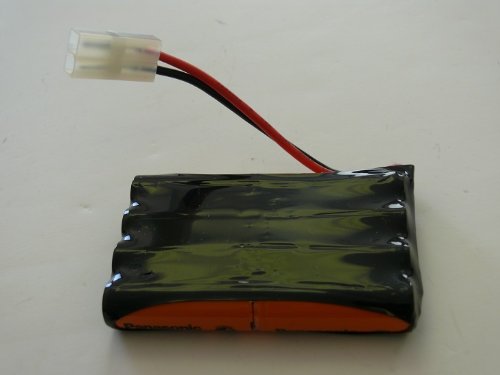
Image: The Banshee Titan 2200mAh 9.6V replacement battery, showing its compact design and connector.
What's in the Box
- 1 x Banshee Titan 2200mAh 9.6V Replacement Battery
Compatibility
The Banshee Titan battery is compatible with SPX Genisys type scan tools, including:
- Cornwell Tech/Force
- EVO Scan Scanner Diagnostic
- Genisys
- Genisys EVO
- Mac
- Mac Mento
- Matco Determinator
- Matco Solarity Scope
- Pro
- Supreme/EVO
- X-treme

Image: Close-up of a Banshee replacement battery, labeled Ni-MH 4/5AA 9.6V 1300mAh 5C OTC239180, indicating its specifications and model compatibility.
Setup and Installation
Follow these steps to properly install and prepare your new Banshee replacement battery for use.
- Unpack the Battery: Carefully remove the battery from its packaging. Inspect it for any visible damage.
- Locate Battery Compartment: Refer to your scan tool's original manual to locate and open the battery compartment.
- Remove Old Battery (if applicable): Disconnect and remove the old battery from the scan tool. Dispose of old batteries responsibly according to local regulations.
- Insert New Battery: Align the Banshee replacement battery with the compartment and gently insert it. Ensure the connectors are properly aligned.
- Connect Battery: Securely connect the battery's plug to the corresponding port within the scan tool's battery compartment. Ensure a firm connection.
- Close Compartment: Close the battery compartment cover securely.
- Initial Charge: For optimal performance, fully charge the new battery before its first use. Connect your scan tool to its charger and allow it to charge until the charging indicator shows a full charge.

Image: A person operating a power tool, illustrating the application of Banshee power tool batteries in various devices.
Operating Instructions
Once installed and charged, your Banshee battery is ready for use with your compatible scan tool.
- Power On: Turn on your scan tool as per its manufacturer's instructions. The battery will provide power for its operation.
- Monitor Battery Level: Regularly check the battery level indicator on your scan tool to avoid unexpected power loss during critical operations.
- Recharging: When the battery level is low, connect your scan tool to its charger. It is recommended to fully charge the battery rather than performing frequent partial charges to prolong battery life.
- Optimal Performance: For best results, operate the scan tool within its recommended temperature range. Extreme temperatures can affect battery performance and lifespan.
Maintenance
Proper maintenance will help extend the life and performance of your Banshee battery.
- Regular Charging: Do not allow the battery to fully discharge for extended periods. If the tool is not used frequently, charge the battery at least once every 1-2 months.
- Storage: Store the battery in a cool, dry place away from direct sunlight and extreme temperatures. Ideally, store it at a partial charge (around 50%) if not used for a long time.
- Cleaning: Keep the battery contacts clean and free from dirt or corrosion. Use a dry cloth to wipe them if necessary.
- Avoid Physical Damage: Protect the battery from drops, impacts, and punctures. Do not disassemble the battery pack.

Image: A collection of various power tool chargers, emphasizing the importance of using appropriate charging systems for battery maintenance.
Troubleshooting
If you encounter issues with your Banshee battery, refer to the following common problems and solutions.
| Problem | Possible Cause | Solution |
|---|---|---|
| Battery not charging | Charger not connected, faulty charger, dirty battery contacts, battery too hot/cold. | Ensure charger is properly connected and functional. Clean battery contacts. Allow battery to reach room temperature before charging. |
| Scan tool not powering on | Battery not installed correctly, battery fully discharged, faulty battery. | Check battery installation and connection. Charge the battery fully. If issues persist, the battery may need replacement. |
| Reduced run time | Battery not fully charged, battery aging, operating in extreme conditions. | Ensure full charge cycles. Battery capacity naturally decreases over time. Avoid using in very hot or cold environments. |
If these solutions do not resolve the issue, please contact Banshee customer support.
Specifications
Key technical specifications for the Banshee Titan replacement battery.
- Brand: Banshee
- Model: Titan (Compatible with Cornwell Tech/Force, EVO, etc.)
- Battery Cell Composition: Lithium Ion
- Voltage: 9.6V
- Battery Capacity: 2200 Milliamp Hours (mAh)
- Number of Batteries: 1 Nonstandard Battery required.
- ASIN: B00FRI7F6C
- Manufacturer: BatteryJack inc.
- First Available: October 10, 2013
- Recommended Uses: Radio (Note: "Radio" is a general recommendation; this battery is specifically designed for compatible scan tools.)
Warranty Information
Your Banshee Titan replacement battery is covered by a manufacturer's warranty.
- Warranty Period: 18 Months
- This warranty covers defects in materials and workmanship under normal use. It does not cover damage caused by misuse, abuse, unauthorized modification, or natural wear and tear.
- For warranty claims, please retain your proof of purchase and contact Banshee customer support.
Support
For further assistance, technical support, or to inquire about warranty services, please contact Banshee customer support.
- Online Support: Visit the official Banshee store on Amazon for product information and support resources. Banshee Store
- Please have your product model (Titan 2200mAh 9.6V) and ASIN (B00FRI7F6C) ready when contacting support.