Introduction
This manual provides comprehensive instructions for the Invicta Men's 15145 Pro Diver Watch. Please read this manual thoroughly to ensure proper use, maintenance, and longevity of your timepiece. The Invicta Pro Diver series is designed for precision and durability, featuring a bold design and multi-functional subdials.
Safety Precautions
Important instructions are categorized and depicted with symbols:
- ⚠ DANGER: Highly likely to cause death or serious injury.
- ⚠ WARNING: Can cause serious injury or death.
- ⚠ CAUTION: Can or will cause minor or moderate injury or damage.
Battery Safety:
- This product contains a button cell or coin battery.
- DANGER: Death or serious injury can occur if ingested. A swallowed button cell or coin battery can cause Internal Chemical Burns in as little as 2 hours.
- Keep new and used batteries OUT OF REACH OF CHILDREN.
- Seek immediate medical attention if a battery is suspected to be swallowed or inserted inside any part of the body.
- This product is intended to be opened only by professionals.
- Remove and immediately recycle or dispose of used batteries according to local regulations and keep away from children.
- Do NOT dispose of batteries in household trash or incinerate.
- Even used batteries may cause severe injury or death.
- Non-rechargeable batteries are not to be recharged.
- Do not force discharge, recharge, disassemble, heat above (manufacturer's specified temperature rating) or incinerate. Doing so may result in injury due to venting, leakage or explosion resulting in chemical burns.
Product Overview and Components

Figure 1: Front view of the Invicta Men's 15145 Pro Diver Watch, showcasing the black dial, luminous hands, and chronograph subdials.
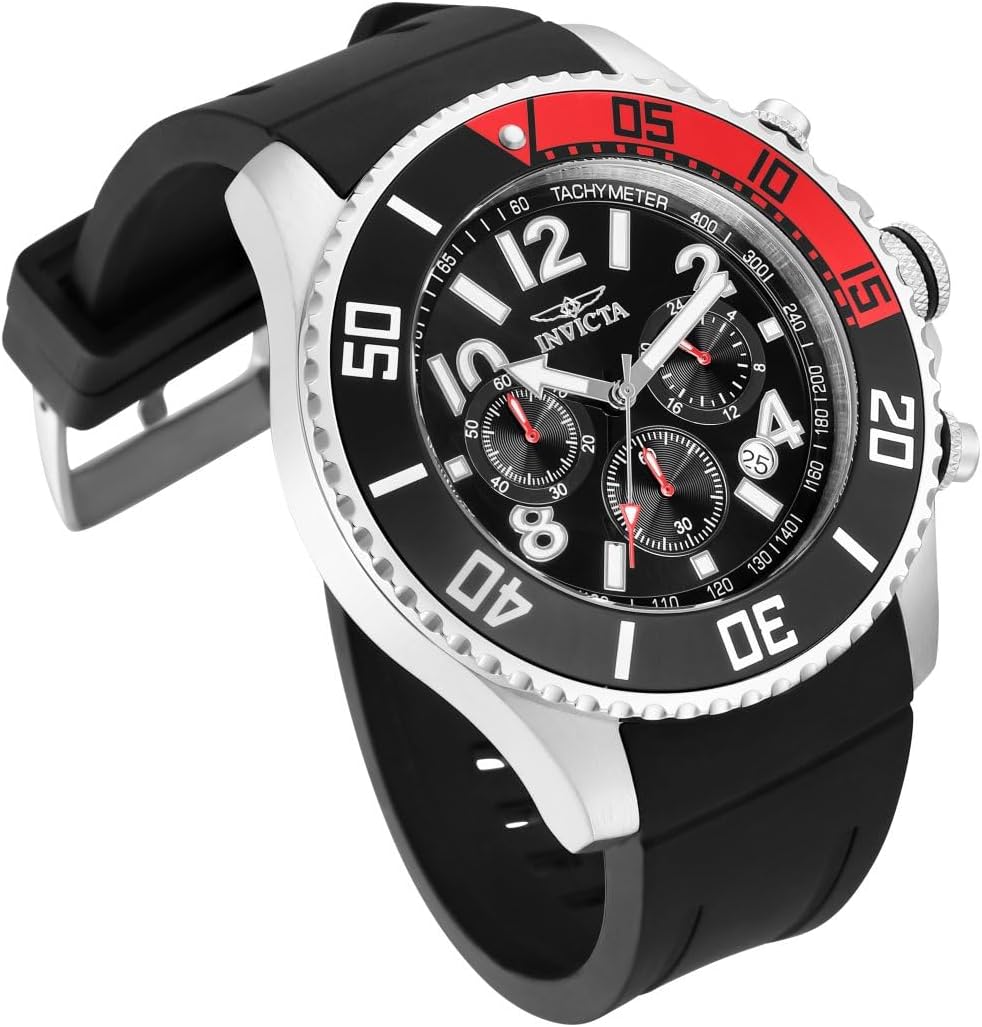
Figure 2: Angled view highlighting the watch's profile and the red and black unidirectional bezel.

Figure 3: Diagram illustrating key features: Crown (push crown for water-tight seal), Bezel (unidirectional rotating for tracking passing time), Case Size (48mm for optimal fit), and Crystal Type (Flame Fusion for scratch resistance).

Figure 4: Details of the black polyurethane band, featuring a buckle clasp for easy size adjustment and a premium silicone material for comfort.

Figure 5: Side view showing the crown and pushers for chronograph operation.

Figure 6: Rear view of the watch case, displaying the stainless steel back and strap attachment.
Setup
Setting the Time and Date
- Pull out the crown: Gently pull the crown (center knob on the side) to the first or second click position, depending on whether you are setting the date or time.
- Set the date: If applicable, rotate the crown in one direction (usually clockwise) to adjust the date.
- Set the time: Rotate the crown in the opposite direction to set the hour and minute hands. Ensure AM/PM is correctly set if your watch has a 24-hour indicator or date changes at midnight.
- Push in the crown: Once the time and date are set, push the crown back into its original position to secure the settings and maintain water resistance.
Adjusting the Band
The black polyurethane band features a buckle clasp for easy adjustment. To adjust, simply move the buckle pin to the desired hole on the strap for a comfortable and secure fit on your wrist.
Operating Instructions
Chronograph Function

Figure 7: Illustration of the Quartz Chronograph movement, timekeeping subdials (60min, 60sec, 24hr), and date display.
The Invicta 15145 features a quartz chronograph movement with functional subdials for precise timekeeping and measurement of elapsed time.
- Start/Stop: Press the top pusher (button above the crown) to start and stop the chronograph.
- Reset: Press the bottom pusher (button below the crown) to reset the chronograph hands to zero.
- Subdials: The watch includes 60-minute, 60-second, and 24-hour subdials for comprehensive time measurement.
Unidirectional Bezel
The watch is equipped with a unidirectional rotating bezel. This feature is useful for tracking elapsed time, such as dive times or other timed events. Rotate the bezel counter-clockwise to align the zero marker with the minute hand at the start of your timed activity.
Water Resistance

Figure 8: Water resistance chart indicating the 100M (10 ATM) rating, suitable for recreational surfing, swimming, snorkeling, sailing, and water sports.
The Invicta 15145 Pro Diver watch is water resistant to 100 meters (10 ATM). This rating makes it suitable for recreational surfing, swimming, snorkeling, sailing, and other water sports. It is NOT suitable for diving. Always ensure the crown is fully pushed in to maintain water resistance.
Maintenance
- Cleaning: Wipe the watch case and band with a soft, damp cloth. For the polyurethane band, mild soap and water can be used. Avoid harsh chemicals or abrasive materials.
- Storage: When not in use, store your watch in a cool, dry place, away from direct sunlight and extreme temperatures. Keep it away from strong magnetic fields.
- Battery Replacement: The watch uses an SR920SW battery. Battery replacement should be performed by a qualified watch technician to ensure proper sealing and water resistance.
- Regular Checks: Periodically check the crown and pushers to ensure they are securely closed.
Troubleshooting
| Problem | Possible Cause | Solution |
|---|---|---|
| Watch stops or runs intermittently. | Low or dead battery. | Replace the battery (SR920SW). Consult a professional watch technician. |
| Date does not change at midnight. | AM/PM setting is incorrect. | Advance the time by 12 hours. |
| Condensation inside the crystal. | Exposure to extreme temperature changes or compromised water resistance. | Immediately take the watch to a qualified service center for inspection and repair. |
| Chronograph hands do not reset to zero. | Requires calibration or internal issue. | Refer to the movement's specific calibration procedure (if available) or consult a service center. |
Specifications
- Model Number: 15145
- Case Material: Stainless Steel
- Case Diameter: 48mm
- Case Thickness: 12.5mm
- Dial Color: Black
- Crystal Type: Flame Fusion
- Movement: Japanese Quartz (VD53 Caliber)
- Battery: SR920SW (included)
- Band Material: Black Polyurethane
- Band Length: 234mm
- Band Width: 24mm
- Clasp Type: Buckle
- Water Resistance: 100 meters (10 ATM)
- Functions: Chronograph (60min, 60sec, 24hr subdials), Date Display, Luminous Hands and Hour Markers, Unidirectional Bezel
- Watch Weight: 128 grams
Warranty and Support
Invicta offers a warranty for its products. To upgrade to a 3-year warranty, you can register your watch online.

Figure 9: Image showing the warranty information on the product box, including a QR code to scan for the manual and details for warranty registration.
For detailed warranty terms and conditions, and to register your watch for an extended warranty, please visit the official Invicta website:
For additional support or to download the user manual in PDF format, you may also refer to:
www.invictaservice.com/manual/
You can also find the official user manual PDF here: Invicta User Manual (PDF)
For customer service inquiries, you can contact Invicta support via email at support@invictastores.eu.


