
Chuango CG-G3
Chuango CG-G3 GSM Wireless Home Alarm System User Manual
Model: CG-G3
Introduction
The Chuango CG-G3 is a wireless GSM home alarm system designed to provide security and peace of mind. This system utilizes GSM communication to send alerts via SMS for various conditions, including alarms, power failures, power recovery, and low battery. It supports remote monitoring and control via phone, SMS, or a dedicated app. This manual provides detailed instructions for setting up, operating, and maintaining your CG-G3 alarm system.
Safety Information
- Read all instructions carefully before installation and use.
- Do not expose the control panel to water or extreme temperatures.
- Ensure the power adapter is connected to a suitable power source.
- Keep the system away from strong electromagnetic fields.
- Only use accessories and power adapters approved by Chuango.
Package Contents
Verify that all items listed below are included in your package:
- Control Panel (with battery backup and siren) x 1
- Remote Control x 2
- Door/Window Contact x 1
- PIR Motion Detector x 1
- Power Adapter x 1
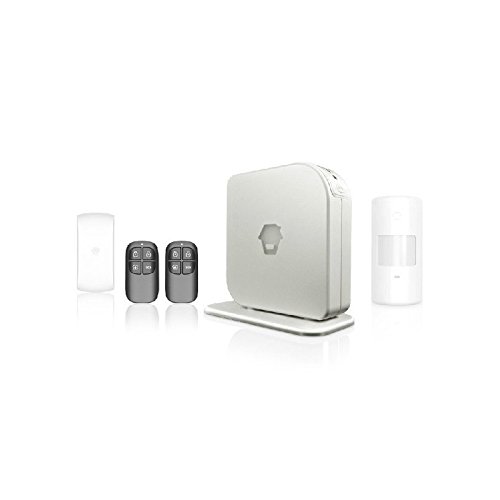
Image: Chuango CG-G3 GSM Wireless Home Alarm System with included components. This image displays the main control panel, two remote controls, a door/window contact sensor, a PIR motion detector, and the power adapter, illustrating the complete package contents.
Product Overview
The CG-G3 system consists of a central control panel and various wireless accessories. The control panel acts as the brain of the system, processing signals from sensors and communicating alerts. It features a built-in siren and GSM antenna.
Control Panel Features:
- GSM / SMS Communicating Alarm with integrated Mobile Phone Technology
- Controlled by SMS Text, App, Remote Control or Free Call
- Self-Monitoring with SMS notifications for Alarm, Emergency & Tamper
- Remote Monitoring with "Listen In" Feature
- Built-in 110dB loud siren & GSM antenna
- Battery backup for continued operation during power outages
Accessories:
- Remote Control Keyfob: Used for arming, disarming, and part-arming the system.
- Door/Window Contact: Detects the opening of doors or windows.
- PIR Motion Detector: Detects movement within its coverage area.
Setup
1. SIM Card Installation
- Ensure the control panel is powered off.
- Locate the SIM card slot on the control panel.
- Insert a valid GSM SIM card into the slot. Ensure the SIM card has sufficient credit for SMS and calls.
- Close the SIM card slot cover securely.
2. Power Connection
- Connect the provided power adapter to the control panel's power input.
- Plug the power adapter into a standard electrical outlet.
- The system will power on, and the internal battery will begin charging.
3. Sensor and Remote Control Pairing
All included accessories (remote controls, door/window contact, PIR motion detector) are pre-programmed to the control panel at the factory. If you purchase additional accessories, they will need to be manually paired.
To add new accessories:
- Refer to the specific instructions provided with the new accessory for its pairing mode.
- On the control panel, enter the learning/pairing mode (consult the control panel's specific button sequence or menu option).
- Activate the new accessory (e.g., press a button on the remote, trigger the sensor).
- The control panel will confirm successful pairing (e.g., a beep or LED indicator).
4. Setting Alarm Phone Numbers
The system can store up to 5 alarm phone numbers for SMS and phone call notifications.
- Access the control panel's programming mode (refer to the control panel's specific instructions for entering this mode, often via a master code).
- Navigate to the "Set Phone Numbers" or similar menu option.
- Enter the desired phone numbers one by one, confirming each entry.
- Exit programming mode to save changes.
Operating Instructions
Arming and Disarming
The system can be armed or disarmed using several methods:
- Remote Control Keyfob: Press the "Arm" button to fully arm, "Part Arm" (home arm) for silent arming delay, or "Disarm" button.
- SMS Text: Send specific SMS commands to the SIM card number in the control panel (refer to the control panel's specific SMS command list).
- Mobile App: Use the dedicated Chuango mobile application (if available for your region) to control the system.
- Free Call: Make a free call to the system's SIM card number and follow voice prompts to arm or disarm.
Part Arm (Home Arm)
The Part Arm mode allows you to arm specific zones while leaving others disarmed, typically for when you are home. This mode often has a silent arming delay.
Remote Monitoring ("Listen In")
If enabled, you can call the system's SIM card number and activate the "Listen In" feature to remotely monitor audio in the vicinity of the control panel.
SMS Notifications
The system sends SMS alerts for:
- Alarm conditions (triggered sensors)
- Power failure
- Power recovery
- Low battery for the control panel and connected accessories (first 9 named accessories)
- Arming/Disarming status changes
Siren Volume Adjustment
The built-in siren's volume can be adjusted through the control panel's settings menu. Refer to the control panel's specific instructions for this procedure.
Exit & Entry Delay
The system features configurable exit and entry delays, allowing you time to leave after arming or disarm the system upon entry before the alarm triggers.
Maintenance
Battery Backup
The control panel includes a built-in battery backup to ensure continuous operation during power outages. Ensure the system is regularly connected to power to keep the battery charged.
Accessory Battery Monitoring
The system monitors the battery levels of connected accessories and will send SMS notifications when a low battery is detected for the first 9 named accessories. Replace batteries promptly to ensure optimal performance.
General Care
- Keep the control panel and sensors clean and free from dust. Use a soft, dry cloth for cleaning.
- Avoid placing the system in direct sunlight or near heat sources.
- Regularly test the system (e.g., trigger a sensor) to ensure all components are functioning correctly.
Troubleshooting
| Problem | Possible Cause | Solution |
|---|---|---|
| System does not power on. | No power from adapter; adapter faulty; internal battery depleted. | Check power connection and outlet. Ensure adapter is working. Allow time for internal battery to charge. |
| No SMS alerts received. | SIM card not inserted correctly; SIM card has no credit; incorrect phone numbers programmed; poor GSM signal. | Reinsert SIM card. Check SIM card balance. Verify programmed phone numbers. Relocate control panel for better signal. |
| Sensor not triggering alarm. | Sensor battery low/dead; sensor not paired; sensor out of range; incorrect sensor placement. | Replace sensor battery. Re-pair sensor. Ensure sensor is within wireless range of control panel. Adjust sensor placement. |
| Remote control not working. | Remote control battery low/dead; remote not paired. | Replace remote control battery. Re-pair remote control. |
Specifications
- Model: CG-G3
- Brand: Chuango
- Colour: White
- Power Source: Battery Powered (with adapter for charging/main power)
- Compatible Devices: Smartphone (for app/SMS control)
- Connectivity Technology: Wireless, GSM
- Alert Type: Audio Only (siren), Motion Only (PIR), SMS notifications
- Supported Sensors: Up to 50 wireless sensors
- Supported Remote Controls: Up to 10 remote controls
- Alarm Phone Numbers: Stores 5 numbers for SMS/call notification
- Siren: Built-in 110dB
- Battery Backup: Included in control panel
- Package Dimensions: 12.6 x 3.6 x 3 cm (Control Panel, approximate)
Warranty and Support
For warranty information and technical support, please refer to the documentation provided with your purchase or visit the official Chuango website. Keep your purchase receipt as proof of purchase for warranty claims.
Official Website: www.chuango.com (This is a placeholder link, please verify the actual support website for Chuango products in your region.)
Related documentsCG-G3


Ask a question about this manual
Ask about setup, troubleshooting, compatibility, parts, safety, or missing instructions. Manuals+ will review the question and use this page’s manual context to help answer it.