
1. Introduction
Thank you for choosing HoMedics Demineralization Cartridges. These cartridges are designed to enhance the performance of your HoMedics ultrasonic humidifier by reducing mineral buildup and white dust caused by hard water. Please read this manual carefully to ensure proper use and maintenance of your cartridges.
2. Product Overview
The HoMedics Demineralization Cartridge (Model UHE-HDC4) is a replacement filter specifically engineered to filter mineral deposits such as calcium, lime, and magnesium from your humidifier's water. This process helps prevent the release of 'white dust' into the air, which can settle on furniture and surfaces.

Image: Four HoMedics Demineralization Cartridges, indicating they are genuine official replacements.
Each package contains four cartridges, providing an extended period of use before replacement is needed. Each cartridge is designed to last for approximately 30-40 full tank uses, though this can vary based on the hardness of your water.

Image: Key features of the 4-pack cartridges, highlighting usage and compatibility.
3. Compatibility
These demineralization cartridges are compatible with any HoMedics ultrasonic humidifier that has a water tank capacity of 0.5 gallons (approximately 1.9 liters) or larger. Ensure your humidifier model meets this requirement for optimal performance.

Image: Illustrates compatibility with HoMedics ultrasonic humidifiers.
4. Setup and Installation
Installing the HoMedics Demineralization Cartridge is a simple process:
- Ensure your humidifier is turned off and unplugged from the power outlet.
- Remove the water tank from the humidifier base.
- Fill the water tank with clean, cool tap water.
- Carefully drop one demineralization cartridge directly into the filled water tank. There is no specific orientation required.
- Securely replace the water tank onto the humidifier base.
- Plug in your humidifier and turn it on. The cartridge will begin working immediately.

Image: A HoMedics humidifier, demonstrating the simplicity of installation.

Image: Visual guide for dropping the cartridge into the humidifier tank.
5. Operating and Usage
Once installed, the demineralization cartridge works continuously to filter minerals from the water as your humidifier operates. For optimal performance, it is recommended to replace the cartridge after 30-40 full tank uses. This duration may be shorter if you have extremely hard water.
Using these cartridges helps maintain the efficiency of your humidifier and reduces the need for frequent cleaning due to mineral buildup.
6. Maintenance
Regular replacement of the demineralization cartridge is crucial for effective mineral reduction and to prolong the life of your humidifier. When you notice an increase in white dust around your humidifier, it is an indicator that the cartridge needs to be replaced.
- Replacement Frequency: Replace the cartridge every 30-40 tank fillings, or approximately once a month with regular use, depending on water hardness.
- Disposal: Dispose of used cartridges with regular household waste.

Image: Highlighting the benefit of eliminating mineral buildup and white dust.

Image: Emphasizing how the cartridges protect your humidifier from hard water effects.
7. Troubleshooting
If you experience any of the following issues, consider the suggested solutions:
- Increased White Dust: If you notice an increase in white dust despite using a demineralization cartridge, it is likely time to replace the cartridge. The effectiveness of the cartridge diminishes over time and with water hardness.
- Humidifier Not Producing Mist: Ensure the humidifier is properly assembled, filled with water, and the power is connected. This issue is typically not related to the demineralization cartridge itself.
- Unusual Odor: If an odor develops, clean your humidifier thoroughly according to its specific instruction manual. Replace the water and consider using a new demineralization cartridge.
8. Specifications
| Feature | Detail |
|---|---|
| Brand | HoMedics |
| Model Name | UHE-HDC4 |
| Product Dimensions (each) | 0.87"D x 1.75"W x 0.87"H (approx. 2.2 cm D x 4.4 cm W x 2.2 cm H) |
| Item Weight (each) | 7.26 g (0.256 ounces) |
| Included Components | Package of 4 HoMedics Ultrasonic Humidifier Demineralization Cartridges |
| Number of Pieces | 4 |
| UPC | 031262059413 |
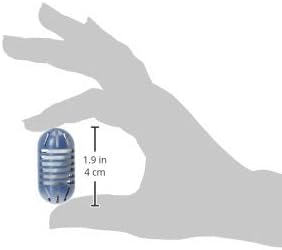
Image: A demineralization cartridge held in a hand, illustrating its compact size.
9. Warranty and Support
Information regarding product warranty and customer support for HoMedics products is typically provided with the main humidifier unit or can be found on the official HoMedics website. This instruction manual focuses solely on the usage and maintenance of the demineralization cartridges and does not contain specific warranty or support contact details.


