
Introduction
This manual provides essential instructions for the safe and effective use of your Empire NiMh 2.4V 300 mAh cordless phone battery. This battery is designed as a replacement for compatible Vtech LS6191 cordless phone models. Please read this manual thoroughly before installation and use to ensure optimal performance and safety.
Important Safety Information
Failure to follow these safety instructions may result in fire, electric shock, injury, or damage to the battery or phone.
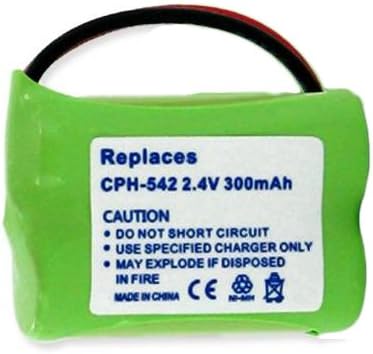
- DO NOT SHORT CIRCUIT: Avoid direct contact between the positive (+) and negative (-) terminals with metal objects. Short-circuiting can cause severe heat, fire, or explosion.
- USE SPECIFIED CHARGER ONLY: Only charge the battery using the original or a compatible charger designed for your cordless phone model. Using an incompatible charger may damage the battery or phone and poses a fire risk.
- MAY EXPLODE IF DISPOSED IN FIRE: Do not dispose of the battery in fire. Batteries can explode when exposed to high temperatures.
- Keep the battery out of reach of children and pets.
- Do not disassemble, puncture, or modify the battery.
- If the battery leaks, avoid contact with skin and eyes. If contact occurs, rinse immediately with water and seek medical attention.
- Do not expose the battery to water or extreme temperatures.
Setup and Installation
Follow these steps to correctly install your new Empire cordless phone battery:
- Power Off Phone: Ensure your cordless phone handset is powered off and disconnected from its charging base.
- Locate Battery Compartment: Identify and open the battery compartment cover on the back of your cordless phone handset. This usually involves sliding a cover or pressing a latch.
- Remove Old Battery: Carefully disconnect the old battery from its connector. Gently pull the connector, not the wires. Remove the old battery from the compartment.
- Insert New Battery: Connect the new Empire battery's plug to the corresponding socket inside the battery compartment. Ensure the connector is fully seated and correctly oriented (it usually only fits one way).
- Position Battery: Place the new battery neatly into the compartment. Ensure no wires are pinched.
- Close Compartment: Replace the battery compartment cover, ensuring it clicks securely into place.
- Initial Charge: Place the handset on its charging base. Allow the battery to charge continuously for 12-16 hours before its first use, even if the phone indicates a full charge sooner. This conditions the NiMh battery for optimal performance.
Operating the Battery
Once installed, the battery operates as the power source for your cordless phone handset.
- Charging: Always return the handset to its charging base when not in use to ensure the battery remains charged.
- Battery Indicator: Monitor your phone's battery level indicator. Recharge the battery when the indicator shows low power.
- Full Discharge Cycles: For NiMh batteries, it is beneficial to allow the battery to fully discharge occasionally (once every few months) before performing a full 12-16 hour recharge. This can help maintain battery capacity.
Maintenance
Proper maintenance extends the life of your battery:
- Temperature: Store and use the battery at room temperature. Avoid extreme heat or cold, which can degrade battery performance and lifespan.
- Cleaning: Keep the battery terminals and phone contacts clean and free of dust or debris. Use a dry cloth if cleaning is necessary.
- Storage: If storing the battery for an extended period, charge it to about 50% capacity and store it in a cool, dry place. Recharge it every 3-6 months to prevent deep discharge.
- Disposal: Do not dispose of batteries in household waste. NiMh batteries contain recyclable materials. Consult your local waste management authority for proper recycling or disposal options.
Troubleshooting
If you encounter issues with your battery, consider the following:
- Phone Not Powering On:
- Ensure the battery is correctly installed and fully connected.
- Verify the handset is properly seated on the charging base.
- Confirm the charging base is plugged into a working power outlet.
- Battery Not Charging:
- Check for proper connection between the battery and the phone, and the phone and the charging base.
- Clean the charging contacts on both the handset and the base with a dry cloth.
- Ensure the initial charge cycle of 12-16 hours has been completed.
- Short Talk Time/Standby Time:
- Ensure the battery has undergone a full initial charge cycle.
- Perform a full discharge and then a full 12-16 hour recharge cycle.
- Battery capacity naturally diminishes over time and with usage. If the battery is old, replacement may be necessary.
Specifications
| Brand | Empire |
| Model Number | 225946-EM-CPH-542 (Replaces CPH-542) |
| Battery Type | Nickel-Metal Hydride (NiMh) |
| Voltage | 2.4 Volts |
| Capacity | 300 mAh |
| Compatible With | Vtech LS6191 Cordless Phone |
| Product Dimensions | 0.83 x 1.21 x 0.41 inches |
| Item Weight | 5.3 ounces |
Warranty and Support
For specific warranty information or technical support regarding your Empire cordless phone battery, please refer to the documentation provided with your purchase or contact the retailer where the battery was acquired. Keep your proof of purchase for warranty claims.