
1. Introduction
This manual provides essential information for the safe and effective operation of your Telwin Dynamic 620 Battery Charger Starter. This wheeled, single-phase unit is designed for charging lead-acid batteries with 12V or 24V voltage and for starting various vehicles, including cars, vans, light trucks, tractors, and heavy trucks. Please read this manual thoroughly before use.
2. Safety Instructions
WARNING: Improper use can result in serious injury or damage to the unit or vehicle. Always follow these safety guidelines.
- Electrical Safety: Ensure the unit is connected to a properly grounded 230V (1ph) 50/60Hz power outlet. Do not operate in wet conditions. Disconnect from mains power before making or breaking battery connections.
- Battery Safety: Batteries produce explosive gases. Ensure adequate ventilation. Wear eye protection and protective clothing. Avoid sparks or flames near the battery. Battery acid is corrosive; avoid contact with skin or eyes. Never charge a frozen battery.
- Overload and Reverse Polarity Protection: The Dynamic 620 is equipped with protection against overloads and reverse polarity. However, always ensure correct connections to prevent damage.
- Ventilation: Operate the unit in a well-ventilated area to dissipate heat and battery gases.
- Children and Unauthorized Personnel: Keep the unit out of reach of children and ensure only trained personnel operate it.
3. Product Components
The Telwin Dynamic 620 is a robust, wheeled unit designed for portability and ease of use. Key components include:
- Main Unit: Housing the transformer, control circuitry, and cooling system. Features integrated wheels and a handle for transport.
- Control Panel: Located on the top, includes an ammeter, voltage selector, charge mode selector (Normal/BOOST), quick start selector, and a timer for rapid charging.
- Charging Cables: Heavy-duty cables with insulated clamps (red for positive, black for negative).
- Power Cable: For connecting the unit to the mains electricity supply.
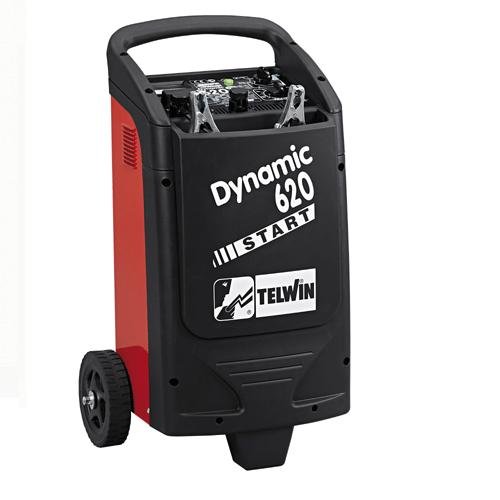
Figure 1: Overall view of the Telwin Dynamic 620 Battery Charger Starter, showing its wheeled design and handle.

Figure 2: Close-up of the control panel, detailing the ammeter, voltage and charge mode selectors, and the timer function.
4. Setup
Before operating the unit, ensure it is properly set up.
- Unpacking: Carefully remove the unit from its packaging. Inspect for any signs of damage during transit.
- Assembly: If the wheels or handle are not pre-assembled, attach them according to the diagrams in the separate assembly guide (if provided).
- Placement: Position the charger starter on a stable, level surface in a dry, well-ventilated area, away from flammable materials.
- Power Connection: Ensure the unit's power cable is easily accessible for connection to a 230V (1ph) 50/60Hz mains power supply. Do not connect to mains power yet.
5. Operating Instructions
5.1. Charging a Battery
Follow these steps to charge a lead-acid battery:
- Vehicle Preparation: Ensure the vehicle's ignition is off. If charging a battery still connected to a vehicle, consult the vehicle's owner manual for specific instructions on disconnecting the battery or charging in-situ. Ensure good ventilation.
- Connect Clamps: Connect the red (+) clamp to the positive terminal of the battery. Connect the black (-) clamp to the negative terminal of the battery (or to the vehicle chassis, away from the battery and fuel line, if charging in-situ). Ensure connections are firm and secure.
- Select Voltage: Use the voltage selector switch on the control panel to choose the correct voltage for your battery (12V or 24V).
- Select Charge Mode: Use the charge mode selector to choose between NORMAL charge or BOOST (rapid) charge. BOOST mode provides a higher current for faster charging.
- Set Timer (for BOOST mode): If using BOOST mode, set the timer for the desired rapid charge duration. Refer to battery specifications for recommended rapid charge times.
- Connect to Mains Power: Plug the unit's power cable into a suitable 230V (1ph) 50/60Hz mains outlet.
- Monitor Charging: The ammeter on the control panel will indicate the charging current. The current will gradually decrease as the battery charges.
- Disconnect: Once charging is complete, first disconnect the unit from the mains power supply. Then, disconnect the black (-) clamp, followed by the red (+) clamp.
5.2. Starting a Vehicle
Use the quick start function to assist in starting a vehicle with a discharged battery.
- Vehicle Preparation: Ensure the vehicle's ignition is off. Ensure all non-essential electrical loads are turned off. Ensure good ventilation.
- Connect Clamps: Connect the red (+) clamp to the positive terminal of the vehicle battery. Connect the black (-) clamp to a good ground point on the vehicle chassis, away from the battery and fuel lines. Ensure connections are firm and secure.
- Select Voltage: Use the voltage selector switch to choose the correct voltage for the vehicle's battery (12V or 24V).
- Select Start Mode: Set the selector to the START position.
- Connect to Mains Power: Plug the unit's power cable into a suitable 230V (1ph) 50/60Hz mains outlet.
- Pre-charge: Allow the unit to pre-charge the battery for approximately 5 minutes before attempting to start the vehicle.
- Attempt Start: Turn the vehicle's ignition key to the start position. Do not crank for more than 3-5 seconds. If the vehicle does not start, wait at least 1 minute before attempting again to allow the starter motor and charger to cool.
- Disconnect: Immediately after the vehicle starts, disconnect the unit from the mains power supply. Then, disconnect the black (-) clamp, followed by the red (+) clamp.
6. Maintenance
Regular maintenance ensures the longevity and safe operation of your Telwin Dynamic 620.
- Cleaning: Keep the unit clean and free from dust and debris. Use a dry cloth to wipe surfaces. Do not use solvents or abrasive cleaners.
- Cable Inspection: Periodically inspect the charging cables, clamps, and power cable for any signs of damage, fraying, or corrosion. Replace damaged components immediately.
- Storage: When not in use, store the unit in a dry, cool, and protected area, away from direct sunlight and moisture. Ensure cables are neatly coiled.
- Fuse Replacement: If the unit stops functioning, check the internal fuse. Refer to the specifications for the correct fuse type and rating. Always disconnect from mains power before replacing fuses.
7. Troubleshooting
If you encounter issues with your Dynamic 620, refer to the following common problems and solutions:
| Problem | Possible Cause | Solution |
|---|---|---|
| Unit does not power on | No mains power; Blown fuse | Check power outlet and cable; Replace fuse (refer to manual for type) |
| Battery not charging | Incorrect voltage/mode selection; Poor clamp connection; Severely discharged/damaged battery | Verify 12V/24V and charge mode; Ensure clamps are clean and secure; Have battery tested by a professional |
| Vehicle not starting | Poor clamp connection; Insufficient pre-charge time; Vehicle issue (not battery related) | Ensure clamps are clean and secure; Allow 5 minutes pre-charge; Consult a mechanic for vehicle diagnosis |
| Overload protection activated | Short circuit; Excessive current draw | Disconnect from mains, check for short circuits in connections; Allow unit to cool down before restarting |
If the problem persists after attempting these solutions, contact Telwin customer support or an authorized service center.
8. Specifications
Technical specifications for the Telwin Dynamic 620 Battery Charger Starter:
- Model: Dynamic 620
- Manufacturer Part Number: 829384
- Input Voltage (Mains): 230V (1ph) 50/60Hz
- Absorbed Power (Charge/Start): 2 KW / 10 KW
- Output Voltage (Charge/Start): 12V / 24V (DC)
- Charge Current (Rated): 90 A
- Charge Current (EN60335-2-29): 70 A
- Start Current (Max): 570 A (CC max)
- Start Current (Conventional): 360 A
- Reference Battery Capacity (15h min/max): 20 Ah / 1550 Ah
- Charge Current Adjustment Positions: 4
- Dimensions (LxWxH): 36.5 x 46 x 75.5 cm
- Weight: 25 kg
- Safety Standards: CE compliant
9. Warranty Information
The Telwin Dynamic 620 Battery Charger Starter comes with a 1-year warranty from the date of purchase. This warranty covers manufacturing defects under normal use. It does not cover damage resulting from misuse, unauthorized modifications, or improper maintenance. Please retain your proof of purchase for warranty claims.
10. Support
For technical assistance, spare parts, or warranty claims, please contact your authorized Telwin dealer or visit the official Telwin website for further support resources.
Telwin Official Website: www.telwin.com


