
Introduction
Thank you for choosing the Philips AquaTouch AT899/16 Electric Shaver. This manual provides essential information for the safe and effective use, maintenance, and troubleshooting of your new shaver. Please read these instructions carefully before first use and keep them for future reference.
Safety Information
WARNING:
- Always unplug the shaver before cleaning or performing any maintenance.
- Do not use the shaver while it is charging.
- Keep the charging port dry to prevent electrical hazards.
- Clean the shaver after each use to prevent bacterial growth and maintain hygiene.
- This appliance is not intended for use by persons (including children) with reduced physical, sensory or mental capabilities, or lack of experience and knowledge, unless they have been given supervision or instruction concerning use of the appliance by a person responsible for their safety.
Product Overview
The Philips AquaTouch AT899/16 is a rotary electric shaver designed for both wet and dry shaving. Its key features include:
- Aquatec Seal: Enables a refreshing wet shave with foam or gel, or a convenient dry shave.
- ComfortCut Blades: Engineered to glide smoothly over the skin for a close and comfortable shave.
- Dynamic Contour Response: Shaver heads flex to follow the curves of your face and neck.
- Integrated Pop-up Trimmer: For precise trimming of sideburns and mustache.

Image: Front view of the Philips AquaTouch AT899/16 Electric Shaver, showcasing its ergonomic design and rotary shaving heads.
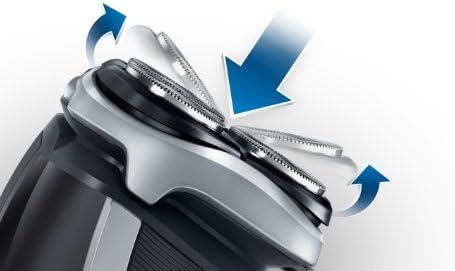
Image: Close-up of the shaver head demonstrating its flexing capability to adapt to facial contours.

Image: Detail of the shaver's indicator lights, showing battery status and cleaning reminder.
Setup
Before using your shaver for the first time, ensure it is fully charged. Refer to the 'Charging' section for instructions.
- Initial Charge: Charge the shaver for at least 8 hours before its first use to ensure optimal battery life.
- Check Shaving Heads: Ensure the shaving heads are securely attached and free from any debris.
Operating Instructions
Dry Shaving
- Ensure your face is clean and dry.
- Press the on/off button to switch on the shaver.
- Move the shaver in small, circular motions over your skin.
- Stretch your skin with your free hand to make the hairs stand upright.
Wet Shaving
The Aquatec seal allows for a comfortable wet shave.
- Wet your face and apply shaving foam or gel.
- Press the on/off button to switch on the shaver.
- Move the shaver in small, circular motions over your skin.
- Rinse the shaving heads under running water during shaving to prevent clogging.

Image: The Philips AquaTouch AT899/16 shaver covered in water droplets, illustrating its wet-use capability.

Image: A man using the Philips AquaTouch AT899/16 electric shaver on his face.
Using the Pop-up Trimmer
- Slide the trimmer release button to activate the pop-up trimmer.
- Use the trimmer to shape sideburns, mustache, or trim longer hairs before shaving.
- After use, push the trimmer back into its closed position.
Charging
The shaver is powered by a rechargeable Lithium-ion battery.
- Ensure the shaver is switched off.
- Insert the small plug of the charger into the shaver's charging socket.
- Plug the adapter into a wall outlet.
- The charging indicator light will illuminate to show that the shaver is charging.
- A full charge takes approximately 8 hours and provides up to 50 minutes of shaving time.
Maintenance
Cleaning
Regular cleaning ensures optimal performance and hygiene.
- After each use, switch off the shaver and unplug it from the power outlet.
- Open the shaving unit by pressing the release button.
- Rinse the shaving unit thoroughly under warm running water.
- You can also rinse the individual shaving heads.
- Shake off excess water and allow the shaving unit to air dry before closing.

Image: The Philips AquaTouch AT899/16 shaver head being rinsed under running water for cleaning.
Replacing Shaving Heads
For optimal shaving performance, replace the shaving heads every two years.
- Switch off the shaver and unplug it.
- Open the shaving unit.
- Remove the retaining frame by turning the lock counter-clockwise.
- Take out the old shaving heads.
- Insert new Philips replacement shaving heads (e.g., SH50/50).
- Place the retaining frame back and turn the lock clockwise until it clicks into place.

Image: Close-up of the ComfortCut blades with an icon indicating a recommended replacement every 2 years.
Troubleshooting
| Problem | Possible Cause | Solution |
|---|---|---|
| Shaver does not switch on. | Battery is empty or shaver is plugged in. | Charge the shaver. Ensure it is unplugged before attempting to switch on. |
| Poor shaving performance. | Shaving heads are dirty or worn out. | Clean the shaving heads thoroughly. Replace shaving heads if they are older than two years. |
| Shaver pulls hairs. | Shaving heads are worn or shaver is not fully charged. | Charge the shaver fully. Replace shaving heads if necessary. |
| Charging indicator does not light up. | Charger not properly connected or faulty. | Check connections. Try a different power outlet. Contact customer support if issue persists. |
Specifications
- Model Number: AT899/16
- Brand: PHILIPS
- Power Source: Battery Powered (Rechargeable)
- Battery Type: 1 Lithium-ion (included)
- Shaving System: Rotary heads, ComfortCut blades
- Blade Material: Stainless Steel
- Number of Blades: 3
- Special Feature: Wet & Dry use
- Color: Black
- Dimensions (L x W x H): 7.01 x 14 x 22.4 cm
- Weight: 210 grams
- Country of Origin: Netherlands
Warranty and Support
This Philips product comes with a standard manufacturer's warranty. For detailed warranty information, product registration, or technical support, please visit the official Philips website or contact their customer service in your region.
You can find more information and support at the Philips Brand Store.


