
Introduction
The Hunter 42 inch Indoor Ceiling Fan, Low Profile IV model 51059, is designed to provide efficient airflow and comfort in various indoor spaces. This flush mount fan features a sleek design without a light kit, making it ideal for rooms with lower ceilings. This manual provides essential information for safe installation, operation, maintenance, and troubleshooting to ensure optimal performance and longevity of your ceiling fan.
Safety Information
- Always disconnect power at the circuit breaker before installation or servicing.
- Ensure all electrical connections comply with local codes and ordinances. If you are unfamiliar with electrical wiring, consult a qualified electrician.
- Mount the fan to a ceiling joist or a suitable support structure capable of supporting the fan's weight.
- Keep hands, clothing, and other objects clear of the fan blades when the fan is in operation.
- Do not operate the fan with damaged blades or housing.
What's in the Box
Your Hunter Low Profile IV ceiling fan package includes the following components:
- Ceiling fan motor housing
- Five (5) reversible fan blades
- Blade irons and mounting hardware
- Pull chain for speed control
- Mounting bracket and canopy
- Instruction manual
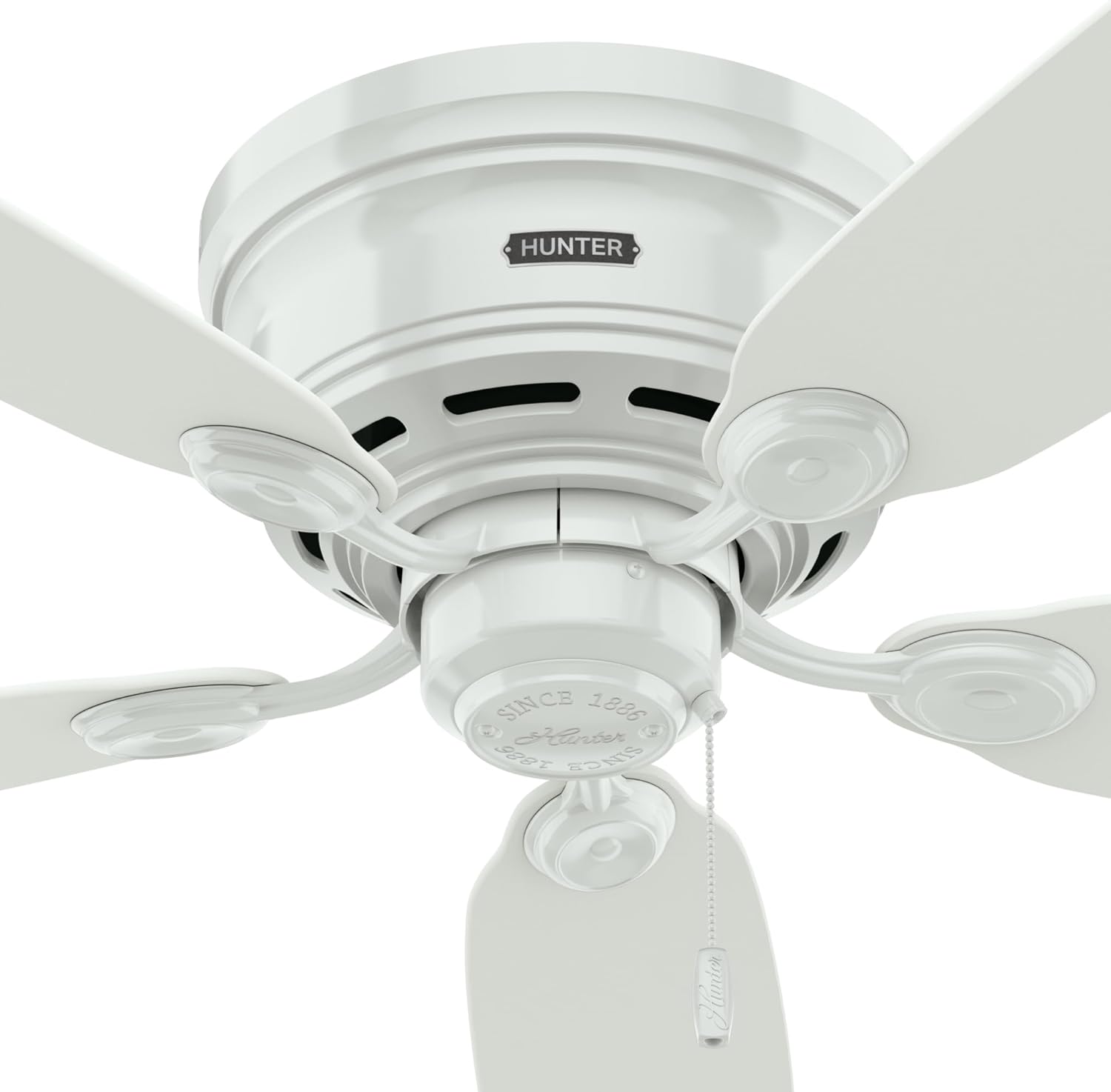
Figure 1: Components of the Hunter Low Profile IV Ceiling Fan, including the motor, five reversible blades, and pull chain control.
Setup and Installation
The Hunter Low Profile IV is designed for flush mounting, making it suitable for rooms with ceilings under 9 feet. For detailed, step-by-step installation guidance, refer to the interactive 3D guide available online. This guide provides visual instructions to simplify the setup process.

Figure 2: Scan the QR code or visit interactiveguide.hunterfan.com for the 3D Interactive Installation Guide.

Figure 3: The Hunter Low Profile IV 51059 fan installed, showcasing its flush mount design and five white blades.
Operating Instructions
Your Hunter Low Profile IV fan is equipped with a pull chain for convenient control of fan speeds and a reversible motor for year-round comfort.
Fan Speed Control
The fan features a 3-speed WhisperWind motor. To adjust the fan speed, pull the chain located at the bottom of the motor housing. Each pull cycles through the available speeds (Low, Medium, High) and then to Off.

Figure 4: The pull chain allows for easy adjustment of the fan's three speed settings.
Reversible Motor for Seasonal Use
The WhisperWind motor is reversible, allowing you to change the direction of the blades for optimal comfort in both summer and winter. A small switch on the motor housing controls the direction.
- Summer Mode (Downdraft): Set the switch to make the blades rotate counter-clockwise, pushing cool air down. This creates a wind-chill effect, making you feel cooler.
- Winter Mode (Updraft): Set the switch to make the blades rotate clockwise, drawing cool air up and pushing warm air down from the ceiling. This helps distribute heat more evenly.
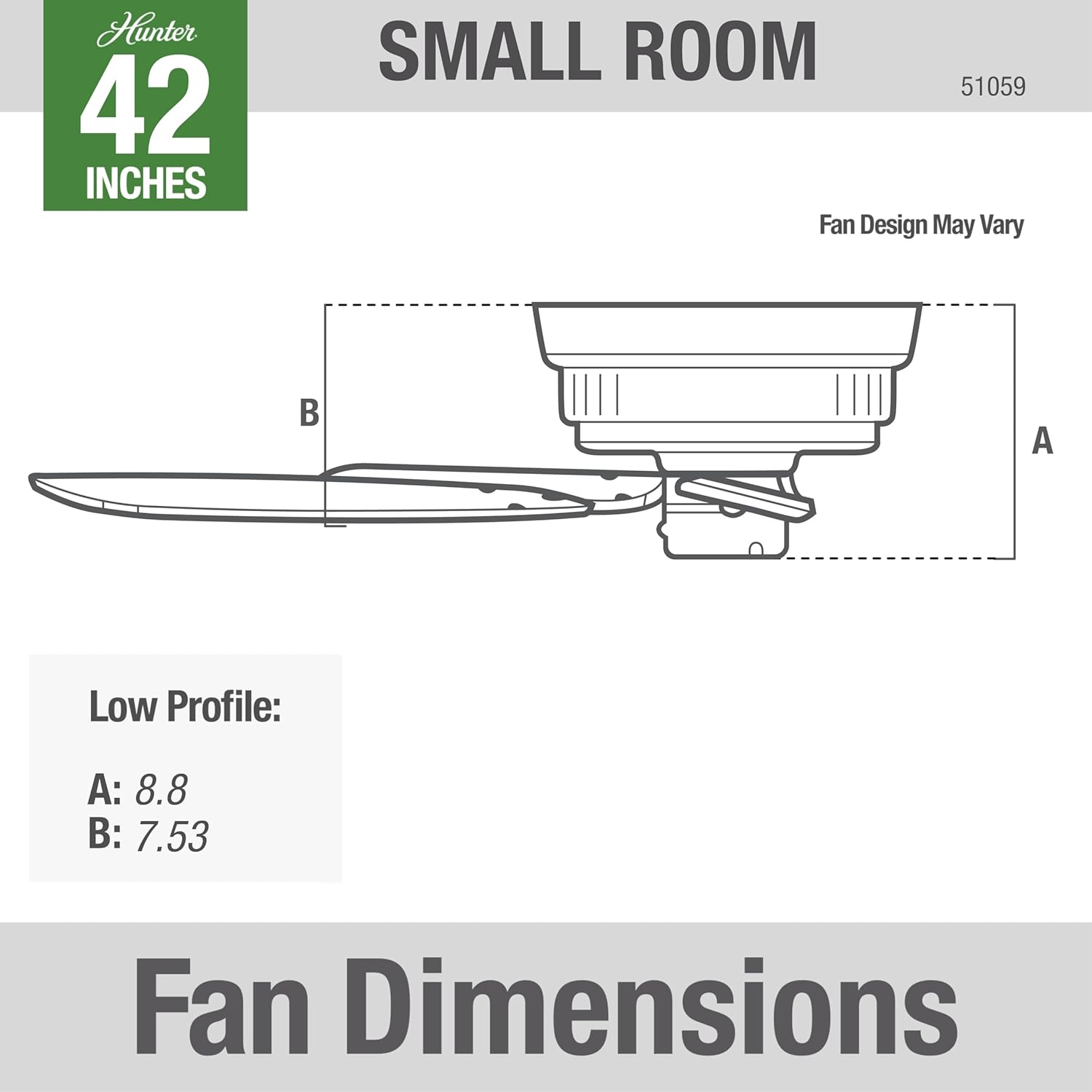
Figure 5: Locate the reversible switch on the motor housing to change blade direction for seasonal comfort.

Figure 6: Using your ceiling fan effectively can help save energy by allowing you to adjust your thermostat by 4°F for consistent comfort.
Maintenance
Regular maintenance ensures the longevity and efficient operation of your Hunter ceiling fan.
- Cleaning: To avoid scratching the finish, clean the fan with a soft brush or lint-free cloth. Do not use abrasive cleaners or harsh chemicals.
- Blade Inspection: Periodically check the blade attachments for tightness. Loose blades can cause wobbling and noise.
- Motor Lubrication: The fan's motor is permanently lubricated and does not require additional oiling.
Troubleshooting
If your fan is not operating correctly, consult the following common issues before contacting support:
- Fan Does Not Start: Check that the circuit breaker is on and the wall switch (if applicable) is in the ON position. Ensure all wire connections are secure.
- Noisy Operation: Verify that all screws in the motor housing and blade attachments are tight. Check if the blades are properly balanced.
- Excessive Wobbling: Ensure the fan is securely mounted to the ceiling support. Check that all blade screws are tightened. Use a balancing kit (not included) if necessary.
Specifications
| Feature | Detail |
|---|---|
| Brand | Hunter |
| Model Name | Hunter Indoor Low Profile IV |
| Model Number | 51059 |
| Size | 42 inches |
| Color | White |
| Number of Blades | 5 |
| Mounting Type | Low Profile (Flush Mount) |
| Control Type | Pull Chain Control |
| Number of Speeds | 3 |
| Motor Type | AC Motor (WhisperWind) |
| Air Flow Capacity | 2902 Cubic Feet Per Minute |
| Noise Level | 14 Decibels |
| Product Dimensions | 44"D x 44"W x 8.8"H |
| Item Weight | 13 Pounds |
| Indoor Outdoor Usage | Indoor |

Figure 7: Fan Dimensions for the Hunter Low Profile IV. A: 8.8 inches, B: 7.53 inches.
Warranty and Support
Hunter provides a lifetime limited warranty on the fan motor and a 1-year limited warranty on parts. For support or warranty claims, please refer to the contact information provided with your purchase documentation or visit the official Hunter website.
Video 1: Hunter - A Leader in Quality Through Testing & Certification. This video highlights Hunter's rigorous testing processes, including blade iron shake tests, accelerated life tests, CFM tests, and rain tests, ensuring product safety and reliability.


