
Introduction
This manual provides essential information for the safe and effective use of your Empire replacement battery, designed for Sierra Wireless 754S and 753S Wifi Hotspot devices. Please read this manual thoroughly before installation and operation to ensure optimal performance and safety.
Important Safety Information
CAUTION: WARRANTY VOID IF LABEL IS REMOVED
- DO NOT ATTEMPT TO DISASSEMBLE, OPEN OR SERVICE THE BATTERY PACK.
- REPLACE ONLY WITH THE BATTERY PACK DESIGNATED FOR THIS PRODUCT.
- DO NOT CRUSH, PUNCTURE, SHORT EXTERNAL CONTACTS OR DISPOSE OF IN FIRE OR WATER.
- DO NOT STORE ABOVE 60°C (140°F).
ATTENTION!
NEW BATTERY PACK MUST BE FULLY CHARGED BEFORE USE TO REDUCE RISK OF FIRE OR BURNS. READ INSTRUCTIONS IN OPERATING GUIDE BEFORE USING THE BATTERY.
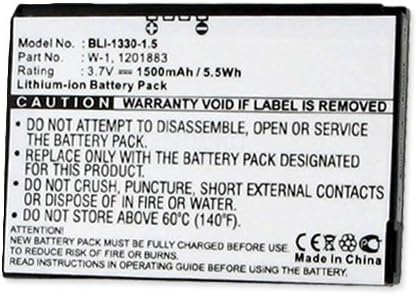
Image: Front view of the Empire replacement battery, showing model number BLI-1330-1.5, part number W-1, 1201883, rating 3.7V 1500mAh/5.5Wh, and critical safety warnings regarding disassembly, replacement, handling, storage temperature, and initial charging.
Setup and Installation
Follow these steps to properly install your new replacement battery:
- Power Off Device: Ensure your Sierra Wireless Wifi Hotspot (754S or 753S) is completely powered off before proceeding.
- Remove Old Battery: Locate the battery compartment on your Wifi Hotspot. Open the cover and carefully remove the old battery.
- Insert New Battery: Align the contacts of the new Empire replacement battery with the terminals inside the compartment. Gently press the battery into place until it is securely seated.
- Close Compartment: Replace the battery compartment cover, ensuring it clicks into place.
- Initial Charge: As per safety instructions, fully charge the new battery before its first use. Connect your Wifi Hotspot to its original charger and allow it to charge until the device indicates a full charge.
Operating Instructions
Once installed and fully charged, your replacement battery operates seamlessly with your Sierra Wireless Wifi Hotspot.
- Power On: Press and hold the power button on your Wifi Hotspot to turn it on.
- Charging: To recharge the battery, connect your Wifi Hotspot to its standard charging cable and power adapter. The device's indicator lights will show charging status.
- Battery Life: Battery life will vary depending on usage patterns, network conditions, and device settings.
Maintenance and Care
Proper maintenance extends the life of your battery:
- Temperature: Avoid exposing the battery to extreme temperatures, both hot and cold. Do not store above 60°C (140°F).
- Storage: If storing the battery for an extended period, store it in a cool, dry place at approximately 50% charge.
- Cleaning: Keep battery contacts clean and dry. Use a soft, dry cloth if cleaning is necessary.
- Disposal: Dispose of old or damaged batteries responsibly according to local regulations. Do not dispose of in fire or water.
Troubleshooting
| Problem | Possible Cause | Solution |
|---|---|---|
| Battery not charging | Incorrect installation, faulty charger, or battery not fully seated. | Ensure battery is correctly installed. Try a different charger. Re-seat the battery. |
| Short battery life | High device usage, poor network signal, or battery degradation over time. | Reduce device usage. Optimize device settings. Consider replacing battery if significantly degraded. |
| Device not powering on | Battery not charged, battery not installed, or device issue. | Charge the battery fully. Ensure battery is installed correctly. Test device with another known good battery if possible. |
Specifications
| Feature | Detail |
|---|---|
| Model Number | BLI-1330-1.5 |
| Part Number | W-1, 1201883 |
| Battery Type | Lithium-ion (Li-Ion) |
| Voltage | 3.7V |
| Capacity | 1500mAh / 5.5Wh |
| Reusability | Rechargeable |
| Manufacturer | Empire |
| Country of Origin | Made in China |
Warranty Information
The manufacturer's warranty for this battery is void if the product label is removed. Please retain the original label for any warranty claims. For specific warranty terms and conditions, refer to the documentation provided at the time of purchase or contact the seller.
Customer Support
For further assistance or inquiries regarding your Empire replacement battery, please contact the seller or manufacturer directly. Refer to your purchase documentation for contact details.