
1. Introduction
Thank you for purchasing the HoMedics BPA-2000-EU Arm Blood Pressure Monitor. This device is designed for accurate and convenient measurement of blood pressure and pulse rate at home. Please read this manual thoroughly before use to ensure correct operation and to understand all safety precautions.
2. Important Safety Information
- Consult your physician before using this device if you have any medical conditions.
- Do not use this device for diagnosis or treatment of any health problem or disease. Always consult your doctor.
- Keep the device out of reach of children.
- Do not use the cuff on an injured arm or an arm undergoing medical treatment.
- Avoid taking measurements in a moving vehicle or during physical activity.
- This device is intended for adult use only.
3. Product Overview
The HoMedics BPA-2000-EU is a digital arm blood pressure monitor designed for ease of use and accurate readings. Key features include:
- Digital arm blood pressure monitor.
- Measures hypertension, hypotension, and pulse rate.
- Irregular heartbeat (arrhythmia) indicator.
- Fully automatic with auto-off function.
- Standard cuff for arm circumference 22-32 cm.
- WHO (World Health Organization) indicator for easy reading.
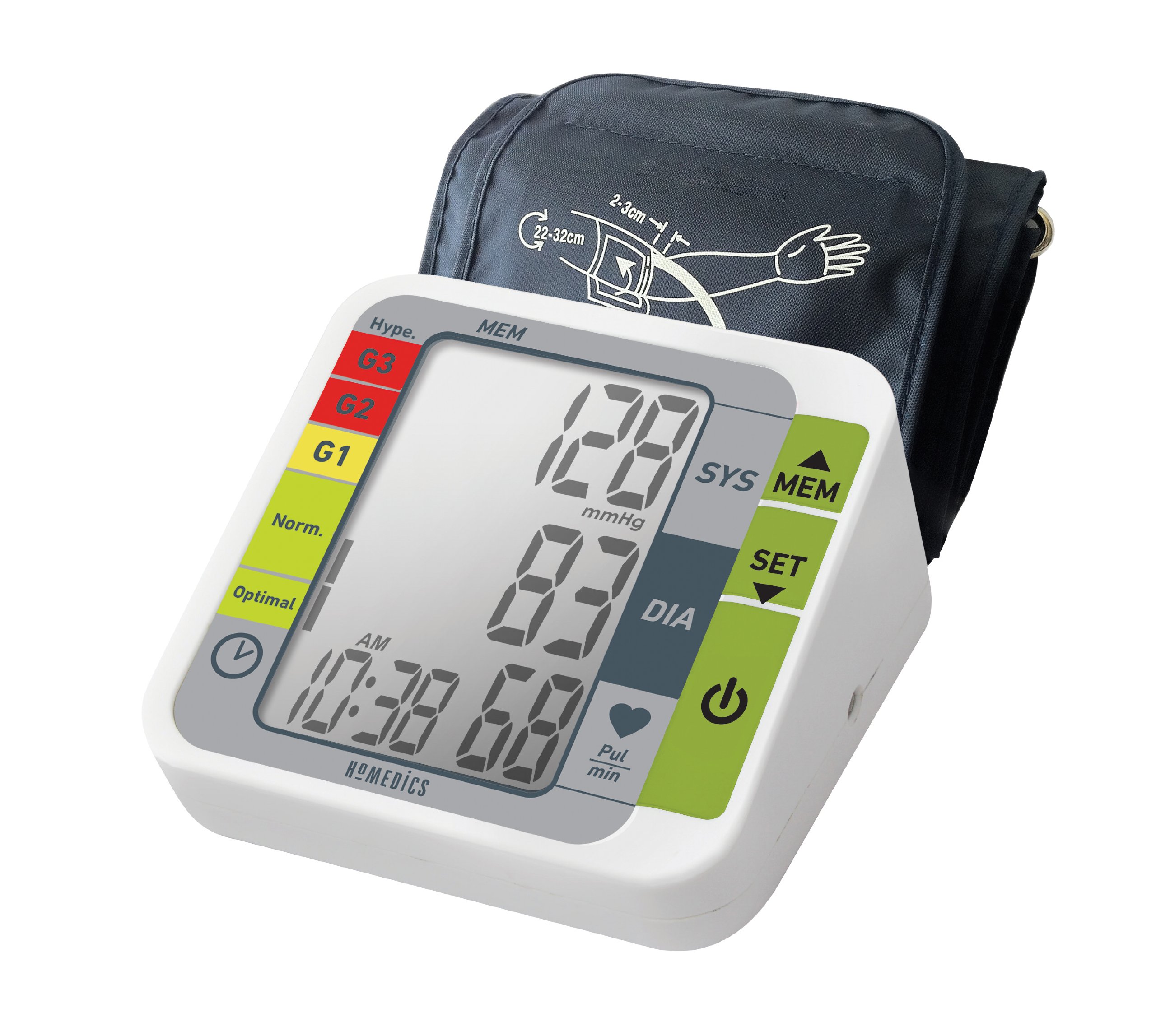
Figure 1: HoMedics BPA-2000-EU Arm Blood Pressure Monitor in use. The image shows the main unit with a digital display indicating blood pressure (128 SYS, 83 DIA), pulse rate (68), and time (10:38 AM). A color-coded scale (Hype, G3, G2, G1, Norm, Optimal) is visible on the left side of the display. The cuff is correctly placed on an arm, with markings indicating proper positioning and size (2-3 cm above the elbow). A hand is pressing the power button on the monitor.
4. Setup
4.1. Battery Installation
- Open the battery compartment cover on the back of the monitor.
- Insert 4 AA batteries, ensuring correct polarity (+ and -).
- Close the battery compartment cover securely.
4.2. Attaching the Arm Cuff
- Insert the air plug of the cuff into the air jack on the side of the monitor.
- Ensure the connection is secure.
5. Operating Instructions
5.1. Before Taking a Measurement
- Avoid eating, drinking alcohol, smoking, and exercising for at least 30 minutes before measurement.
- Rest for at least 15 minutes before taking a measurement.
- Sit in a comfortable position with your feet flat on the floor and your arm supported at heart level.
5.2. Applying the Arm Cuff
- Slide your left arm through the cuff loop. The air tube should run down the inside of your arm.
- Position the cuff so that the bottom edge is approximately 2-3 cm above your elbow joint.
- Wrap the cuff snugly around your upper arm, ensuring it is not too tight or too loose. The indicator arrow on the cuff should be centered over the brachial artery (inner side of the arm).
5.3. Taking a Measurement
- Press the START/STOP button to turn on the monitor. The cuff will automatically inflate.
- Remain still and silent during the measurement.
- Once the measurement is complete, the systolic pressure (SYS), diastolic pressure (DIA), and pulse rate will be displayed on the screen.
- The monitor will automatically store the reading and shut off after a period of inactivity.
6. Memory Function
The HoMedics BPA-2000-EU monitor can store up to 120 measurements. To review past readings:
- With the monitor off, press the MEM button.
- The most recent reading will be displayed first.
- Press the MEM button repeatedly to scroll through previous readings.
7. Troubleshooting
| Problem | Possible Cause | Solution |
|---|---|---|
| No display when powered on. | Batteries are dead or incorrectly inserted. | Replace batteries or check polarity. |
| Error message on display. | Cuff not applied correctly, movement during measurement, or air leakage. | Reapply cuff, remain still, check cuff connection. |
| Inaccurate readings. | Incorrect cuff placement, talking during measurement, or not resting before measurement. | Follow operating instructions carefully. Ensure proper cuff fit and position. |
8. Maintenance and Storage
- Clean the monitor and cuff with a soft, dry cloth. Do not use abrasive cleaners or immerse in water.
- Store the device in a cool, dry place, away from direct sunlight and extreme temperatures.
- Remove batteries if the device will not be used for an extended period.
9. Specifications
- Model Number: BPA-2000-EU
- Power Source: 4 AA batteries (included)
- Display Type: Digital
- Cuff Size: Standard, for arm circumference 22-32 cm
- Product Dimensions: 22.5 x 12.5 x 16 cm
- Product Weight: 1.04 kg
- Special Feature: 120 memories
10. Warranty and Support
This HoMedics product comes with a 2-year warranty from the date of purchase. For warranty claims or technical support, please contact HoMedics customer service. Keep your proof of purchase for warranty validation.
For further assistance, please visit the official HoMedics website or contact their customer support line.


