
Nitecore EA8
NiteCore EA8 Caveman 900 Lumens LED Searchlight User Manual
Model: EA8
Introduction
The NiteCore EA8 Caveman is a high-performance LED searchlight designed for various outdoor activities, caving, search and rescue missions, and general illumination needs. It utilizes a CREE XM-L U2 LED to deliver a maximum output of 900 lumens, offering exceptional brightness and a long throw distance. This manual provides essential information for the safe and effective operation, maintenance, and troubleshooting of your EA8 Caveman searchlight.

Image: The NiteCore EA8 Caveman 900 Lumens LED Searchlight, showcasing its robust black aluminum body and large reflector head.
Safety Information
- Do not look directly into the light beam. The high intensity light can cause temporary vision impairment or permanent eye damage.
- Keep the device out of reach of children.
- Ensure batteries are inserted with correct polarity to prevent damage to the device.
- Remove batteries if the device will not be used for an extended period to prevent battery leakage and potential damage.
- Avoid exposing the flashlight to extreme temperatures or direct sunlight for prolonged periods.
- Do not attempt to disassemble or modify the flashlight, as this will void the warranty and may cause damage.
Product Features
- Utilizes a CREE XM-L U2 LED for superior illumination.
- Maximum output of up to 900 lumens.
- Integrated precision Digital Optics Technology™ for extreme reflector performance.
- Boasts a peak beam intensity of 60,000cd and a throw distance of up to 490 meters.
- Innovative single button two-stage switch for user-friendly interface.
- Eight rapidly switchable brightness modes, including Micro (2 lumens), Low (50 lumens), Mid (180 lumens), High (590 lumens), and Turbo (900 lumens).
- High efficiency circuit board provides up to 800 hours runtime (in Micro mode).
- Integrated power indicator light displays remaining battery power and voltage (accurate to 0.1V).
- Reverse polarity protection prevents damage from incorrectly inserted batteries.
- Constructed from aero grade aluminum alloy with HAIII military grade hard-anodized finish.
- Waterproof in accordance with IPX-8 (two meters submersible).
- Impact resistant to 1.5 meters.
- Tail stand capability for hands-free use.
- Powered by 8 x AA batteries.
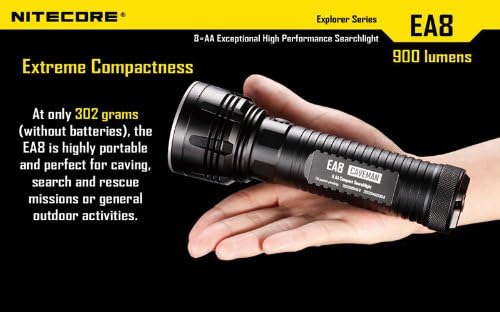
Image: The NiteCore EA8 Caveman held in a hand, illustrating its compact size for portability despite its power.

Image: Visual representation of the five selectable brightness levels (Micro, Low, Mid, High, Turbo) and their corresponding lumen outputs and runtimes.
Setup
Battery Installation
- Unscrew the tailcap of the flashlight by turning it counter-clockwise.
- Insert eight (8) AA batteries into the battery compartment. The inner body features four small tunnels, with two batteries sliding into each tunnel. Ensure correct polarity (+/-) as indicated inside the compartment. The flashlight has reverse polarity protection, but correct insertion is always recommended.
- Screw the tailcap back on clockwise until it is securely tightened. This ensures proper electrical contact and maintains the waterproof seal.
Upon initial battery insertion, the integrated power indicator light will blink to display the battery voltage. For example, five blinks followed by a one-second pause and then three blinks indicates 5.3V.
Operating Instructions
Power On/Off
- To turn the flashlight ON, press the two-stage side switch until it clicks.
- To turn the flashlight OFF, press and hold the two-stage side switch for several seconds until the light extinguishes. Alternatively, you can slightly unscrew the tailcap to break the circuit and prevent parasitic drain, especially for long-term storage.
Brightness Modes Selection
The EA8 features a two-stage side switch for mode selection. From the ON state:
- To cycle through brightness levels (Micro, Low, Mid, High, Turbo): With the light on, lightly press the switch (half-click) repeatedly to cycle through the modes in ascending order.
- Direct access to Turbo: From OFF, press and hold the switch for approximately one second to directly activate Turbo mode.
- Direct access to Micro: From OFF, press the switch briefly (full click) to activate Micro mode.
Special Modes (SOS, Strobe, Beacon)
From the ON state, quickly double-press the switch to activate special modes. Continue to double-press to cycle through Strobe, SOS, and Beacon modes. Press the switch once to return to the previously used brightness level.
Battery Power Indicator
The integrated blue indicator light on the side switch serves multiple functions:
- Location Beacon: When the flashlight is off, the blue light will blink every 1.5 seconds, indicating its position in the dark.
- Low Voltage Warning: The indicator will flash rapidly when battery power is low, signaling that batteries need replacement.
- Battery Voltage Display: As mentioned in the Setup section, it displays battery voltage upon insertion.
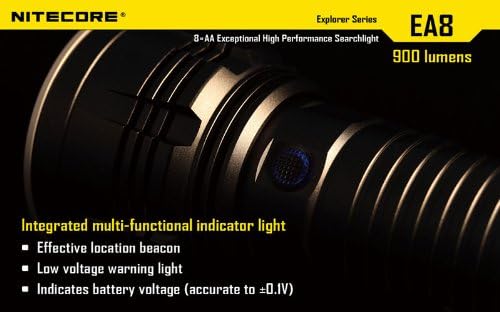
Image: A close-up view of the NiteCore EA8's integrated multi-functional blue indicator light on the side switch.
Maintenance
- Cleaning: Wipe the flashlight body with a clean, soft cloth. For optical surfaces, use lens cleaning solution and a soft cloth to avoid scratching.
- O-Ring Lubrication: Periodically lubricate the O-rings with silicone grease to maintain the waterproof seal. The tailcap threadings come pre-lubricated from the factory.
- Battery Storage: If the flashlight will not be used for an extended period (e.g., several months), remove the batteries to prevent leakage and parasitic drain. Even when off, the flashlight may draw a small amount of current. Alternatively, slightly unscrew the tailcap to ensure no contact is made with the batteries.
- Battery Type: For optimal performance and reduced risk of leakage during long-term storage, consider using high-quality rechargeable Ni-MH AA batteries (e.g., Panasonic Eneloops) or non-rechargeable lithium AA batteries (e.g., Energizer Ultimate Lithium L91).
Troubleshooting
| Problem | Possible Cause | Solution |
|---|---|---|
| Flashlight does not turn on or is dim. |
|
|
| Flashlight drains batteries quickly when off. |
|
|
| Flashlight overheats during use. |
|
|
Specifications
| Feature | Detail |
|---|---|
| Model Name | EA8 Caveman |
| LED Type | CREE XM-L U2 LED |
| Maximum Output | 900 Lumens |
| Peak Beam Intensity | 60,000cd |
| Throw Distance | 490 Meters |
| Impact Resistance | 1.5 Meters |
| Waterproof Rating | IPX-8 (2 meters submersible) |
| Power Source | 8 x AA Batteries |
| Material | Aero Grade Aluminum Alloy |
| Finish | HAIII Military Grade Hard-Anodized |
| Color | Black |
| Item Weight | 0.7 Pounds (without batteries) |
| Dimensions (LxWxH) | 7 x 2.5 x 2.5 inches (approx.) |
| UPC | 097914391812 |

Image: A graphic displaying key specifications of the NiteCore EA8, including lumen output, beam distance, impact resistance, and waterproof rating.
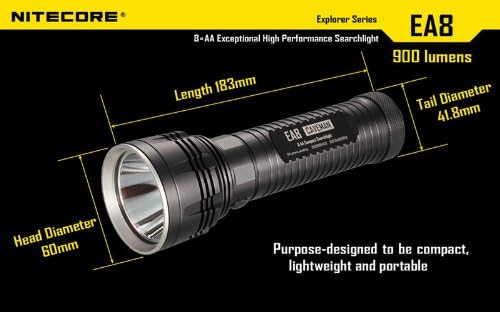
Image: A diagram illustrating the physical dimensions of the NiteCore EA8, including length, head diameter, and tail diameter.
Warranty and Support
For warranty information and technical support, please refer to the official Nitecore website or contact your authorized Nitecore dealer. Keep your purchase receipt as proof of purchase for any warranty claims.
Nitecore is committed to delivering high-quality products and user experience. For further assistance, please visit the Nitecore Store on Amazon.
Related documentsEA8


Ask a question about this manual
Ask about setup, troubleshooting, compatibility, parts, safety, or missing instructions. Manuals+ will review the question and use this page’s manual context to help answer it.