
Important Safety Information
Please read this entire instruction manual before installation and assembly. If you do not understand these instructions, or have doubts about the safety of the installation, please contact a qualified installer. Ensure that the mounting surface can safely support the combined weight of the equipment and all attached hardware.
- Weight Capacity: Do not exceed the maximum load capacity of 20 kg (44 lbs). Exceeding this weight can result in serious injury or property damage.
- VESA Compatibility: This mount is compatible with VESA patterns 75x75, 100x75, and 100x100. Verify your TV's VESA pattern before installation.
- Ceiling Structure: The ceiling must be capable of supporting five times the weight of the TV and mount combined. If mounting to wood studs, ensure the studs are solid and free of defects. For concrete ceilings, use appropriate anchors (not always included).
- Tools: Always use appropriate tools for installation. Professional installation is recommended for optimal safety.
- Children: Keep children away during installation. Small parts may be a choking hazard.
Package Contents
Verify that all components are present and undamaged before proceeding with installation. If any parts are missing or defective, contact PureMounts customer support.

This diagram illustrates the various components and features of the PureMounts PM-SLOPE-23 mount, including the ceiling plate, adjustable arm, VESA plate, and locking mechanism.
The package typically includes:
- Ceiling Mounting Plate
- Adjustable Extension Arm
- TV VESA Mounting Plate
- Mounting Hardware (screws, washers, spacers for TV and ceiling attachment)
- Instruction Manual
Specifications
| Model Number | PM-SLOPE-23 |
| Brand | PureMounts |
| Mounting Type | Ceiling Mount |
| Material | Aluminum, Plastic |
| Color | Black / Silver |
| Max Load Capacity | 20 kg (44 lbs) |
| Compatible Screen Size | Up to 23 inches (depending on VESA) |
| VESA Compatibility | 75x75, 100x75, 100x100 |
| Movement Type | Tilt |
| Max Tilt Angle | Up to 105° (for slanted ceilings) |
| Height Adjustment Range | Approx. 0mm - 130mm |
| Product Dimensions (folded) | 4.72 x 6.69 x 11.42 inches (approx.) |
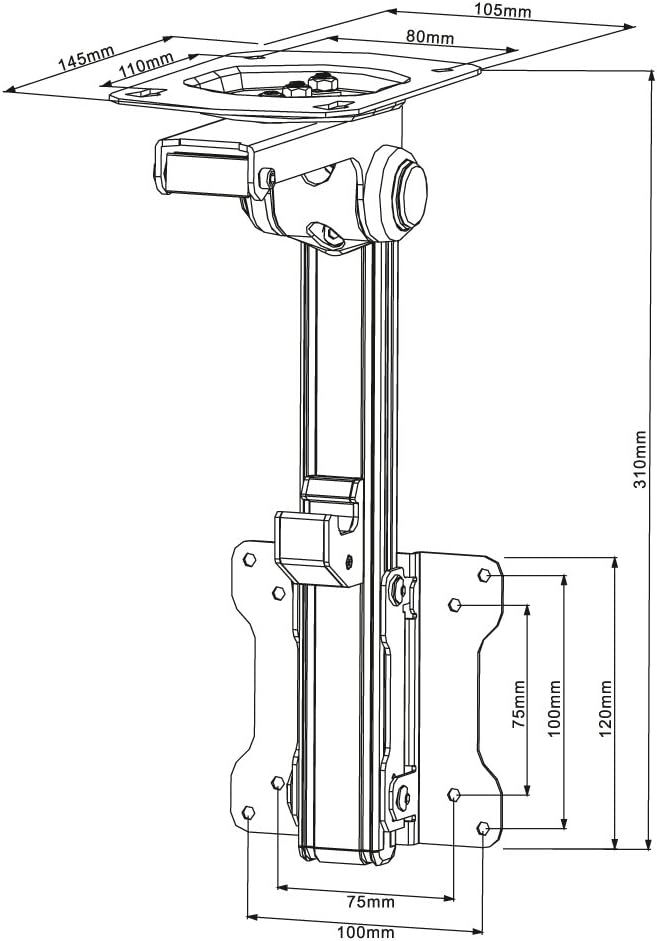
Detailed technical drawing showing the dimensions of the PureMounts PM-SLOPE-23 mount.
Setup and Installation
Installation typically requires two people. Ensure you have all necessary tools, including a drill, stud finder, level, screwdriver, and pencil.
1. Before You Begin
- Locate Mounting Point: Use a stud finder to locate a solid wood joist or beam in your ceiling. Mark the center of the joist. For concrete ceilings, ensure you have appropriate concrete anchors (not always included).
- Check for Obstructions: Ensure there are no electrical wires, water pipes, or other obstructions in the drilling area.
2. Mounting the Ceiling Plate
- Position the ceiling plate against the ceiling at your desired location.
- Mark the drill holes through the plate onto the ceiling.
- Drill pilot holes into the ceiling. The size of the drill bit will depend on your ceiling material and the mounting hardware provided.
- Secure the ceiling plate to the ceiling using the appropriate screws and washers. Ensure it is firmly attached and level.

Close-up view of the ceiling mounting plate, showing attachment points.
3. Attaching the TV Plate to Your TV
- Carefully place your TV face down on a soft, clean surface to prevent scratches.
- Align the VESA mounting plate with the mounting holes on the back of your TV.
- Select the correct screws, washers, and spacers (if needed) from the provided hardware kit that fit your TV's mounting holes.
- Attach the VESA plate securely to the back of your TV. Do not overtighten.

Front view of the mount, highlighting the VESA plate for TV attachment.
4. Assembling the Mount and Attaching TV
- Connect the adjustable extension arm to the ceiling plate. Ensure all bolts are tightened.
- With assistance, carefully lift the TV (with the VESA plate attached) and hook it onto the extension arm's mounting bracket.
- Secure the TV to the mount using the provided locking mechanism or safety screws. Refer to the diagram for the specific locking system.

The PureMounts PM-SLOPE-23 TV ceiling mount in its folded position after assembly.
Operating Instructions
Adjusting Tilt for Slanted Ceilings
The PM-SLOPE-23 is designed to accommodate slanted ceilings with a tilt adjustment of up to 105 degrees. Loosen the adjustment knob(s) on the arm, position the TV to the desired angle parallel to the floor, and then securely tighten the knob(s) to lock the position.
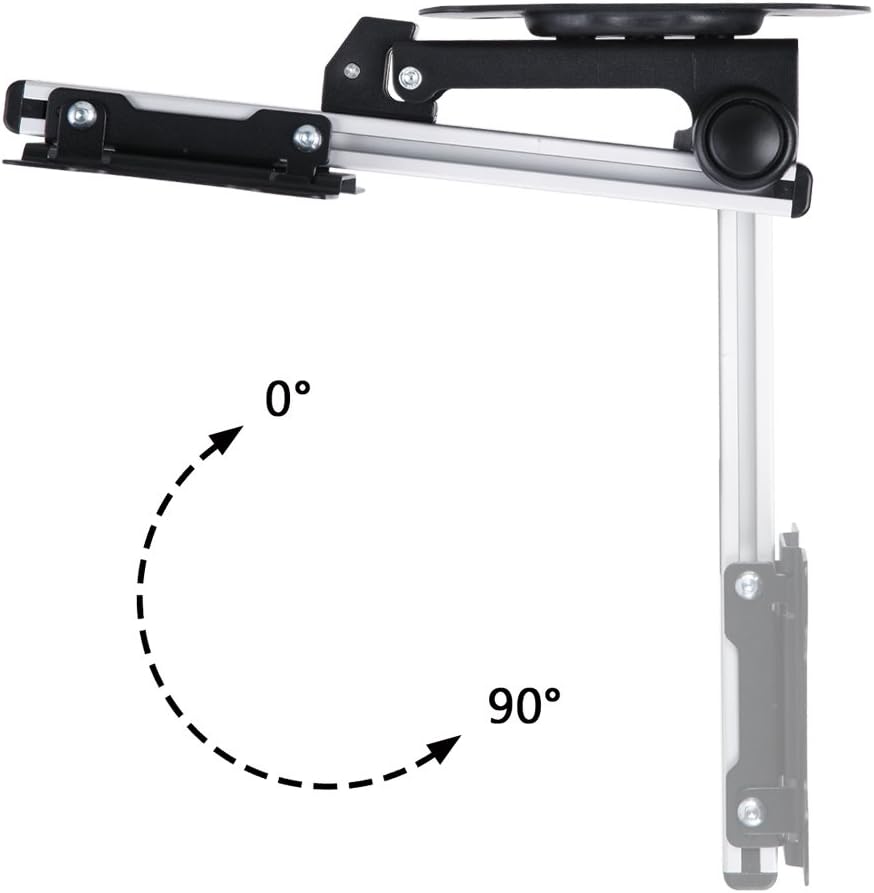
Illustration of the tilt adjustment range, allowing the TV to be leveled under a slanted ceiling. The mount supports up to 105 degrees of tilt.
Adjusting Height
The mount features a height adjustment mechanism, allowing the TV to be positioned vertically along the extension arm. Loosen the height adjustment screws/levers, slide the TV to the desired height, and then firmly tighten the screws/levers to secure it.

Demonstration of the height adjustment feature, showing the vertical movement of the VESA plate.

This image illustrates the minimum and maximum extension range of the mount, approximately 0mm to 130mm.
Maintenance
Regular maintenance ensures the longevity and safety of your TV mount.
- Periodic Checks: Every few months, check all screws and connections to ensure they remain tight and secure. Retighten if necessary.
- Cleaning: Wipe the mount with a soft, dry cloth. Avoid using abrasive cleaners or solvents, as they may damage the finish.
- Inspect for Damage: Periodically inspect the mount for any signs of wear, corrosion, or damage. If any damage is found, discontinue use and contact customer support.
Troubleshooting
If you encounter issues with your PureMounts PM-SLOPE-23, refer to the following common problems and solutions:
- TV is not level: Ensure the ceiling plate is level during installation. Use the tilt adjustment feature to fine-tune the TV's horizontal alignment.
- Mount feels unstable: Double-check all mounting screws on both the ceiling plate and the TV VESA plate. Ensure they are securely tightened. Verify that the ceiling structure is adequate for the weight.
- Difficulty adjusting tilt/height: Loosen the adjustment knobs/screws slightly before attempting to reposition the TV. Ensure no cables are obstructing movement.
- Missing parts: If any parts were missing from the package, contact PureMounts customer support immediately for replacements.
Warranty and Support
PureMounts products are manufactured with quality and durability in mind. For specific warranty information, please refer to the warranty card included with your product or visit the official PureMounts website.
For technical support, replacement parts, or any inquiries, please visit the PureMounts website or contact their customer service department.
Online Support: www.puremounts.de