
Greenworks 29482
Greenworks 40V Lithium-Ion Battery Charger Model 29482 User Manual
Model: 29482 | Brand: Greenworks
1. Introduction

Image: Greenworks 40V Lithium-Ion Battery Charger, Model 29482.
This manual provides essential information for the safe and efficient operation, maintenance, and troubleshooting of your Greenworks 40V Lithium-Ion Battery Charger, Model 29482. Please read this manual thoroughly before use and retain it for future reference.
Product Features:
- High Performance G-MAX 40V Lithium-Ion Battery Charger.
- Energy Star Rated for eco-friendly operation.
- Quick battery charge times: approximately 60 minutes for 2 Ah batteries and 120 minutes for 4 Ah batteries.
- Compact design for easy storage and wall mounting.
- Compatible only with Greenworks G-MAX 40V Battery Models 29462 and 29472.
2. Safety Information
WARNING:
- Always read and understand all instructions before using the charger.
- Do not charge batteries in damp or wet conditions.
- Use only Greenworks G-MAX 40V batteries with this charger. Using other batteries may result in fire, explosion, or injury.
- Do not disassemble the charger. Refer to qualified service personnel for repairs.
- Keep the charger away from children.
- Ensure proper ventilation during charging to prevent overheating.
- This product may contain chemicals known to the State of California to cause cancer and birth defects or other reproductive harm.
Integrated Safety Features:
The Greenworks 40V Battery Charger is equipped with multiple protection features to ensure safe operation:
- Over Temperature Protection
- Over Current Protection
- Short Circuit Protection
- Over Voltage Protection
- Over Load Protection

Image: Visual representation of the charger's built-in safety protections.
3. Setup
The Greenworks 40V Lithium-Ion Battery Charger is designed for convenient use and can be placed on a flat surface or mounted on a wall.
Wall Mounting:
The charger features a wall-mountable design to help organize your workspace. Ensure the mounting surface is sturdy and capable of supporting the charger and battery weight.

Image: Greenworks 40V Battery Charger with wall mounting details.
Connecting the Charger:
Plug the charger's power cord into a standard electrical outlet. The power indicator light on the charger will illuminate.
4. Operating Instructions
Inserting and Removing the Battery:
To insert a battery, align the battery with the charger slot and slide it down until it clicks into place. To remove, press the release button on the battery and slide it upwards.
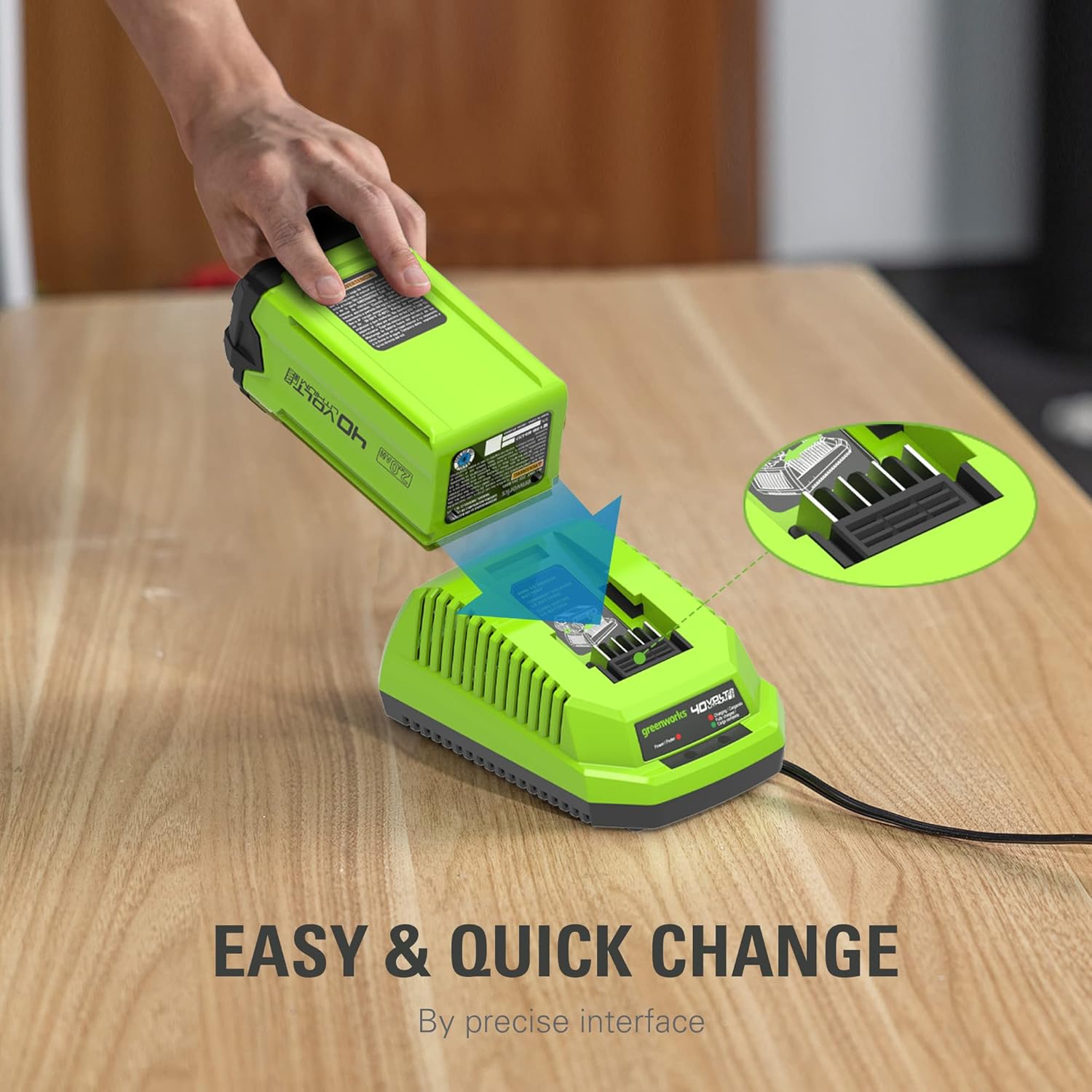
Image: Proper method for inserting a Greenworks 40V battery into the charger.
Charging the Battery:
Once the battery is correctly inserted, the charger's LED indicator will show the charging status.

Image: On-board LED indicator for charging status.
LED Indicator Status:
- Red Light (Power): Indicates the charger is connected to power.
- Flashing Green Light (Charging): Indicates the battery is currently charging.
- Solid Green Light (Fully Charged): Indicates the battery is fully charged and ready for use.
- Flashing Red Light: Indicates an error or fault with the battery or charger.
Approximate Charge Times:
| Battery Capacity | Approximate Charge Time |
|---|---|
| 2.0 Ah | 60 minutes |
| 4.0 Ah | 120 minutes |
| 2.5 Ah | 75 minutes |
| 5.0 Ah | 150 minutes |
Table: Approximate charging durations for various Greenworks 40V battery capacities.
Product in Action:
Video: A demonstration of the Greenworks 40V battery charger in use, showing battery insertion and LED indicators.
5. Maintenance
- Keep the charger clean and free from debris. Use a dry cloth to wipe surfaces.
- Store the charger in a dry, indoor location away from direct sunlight and extreme temperatures.
- Do not immerse the charger in water or any other liquid.
6. Troubleshooting
| Problem | Possible Cause | Solution |
|---|---|---|
| Charger not powering on (no red light) | Not plugged in, faulty outlet, damaged cord. | Check power connection, try a different outlet, inspect cord for damage. |
| Battery not charging (no flashing green light) | Battery not properly seated, battery too hot/cold, faulty battery. | Re-seat battery, allow battery to reach room temperature, try a different battery. |
| Flashing red light indicator | Battery error, charger malfunction, extreme temperature. | Remove and re-insert battery. If error persists, contact customer support. Ensure battery/charger are within operating temperature range. |
Table: Common issues and solutions for the Greenworks 40V Battery Charger.
7. Specifications
| Feature | Detail |
|---|---|
| Brand | Greenworks |
| Model Number | 29482 |
| Product Dimensions | 5"D x 7.75"W x 3.5"H |
| Item Weight | 1.2 Pounds |
| Output Voltage | 40 Volts |
| Input Voltage | 40 Volts |
| Battery Charge Time (2 Ah) | 60 minutes |
| Battery Charge Time (4 Ah) | 120 minutes |
| Specification Met | Energy Star |
| UPC | 841821010249 |
8. Warranty and Support
Warranty Information:
This Greenworks battery charger comes with a 1-year warranty. Please retain your proof of purchase for warranty claims.
Customer Support:
For technical assistance, warranty claims, or general inquiries, please visit the official Greenworks website or contact their customer service department. Refer to the product packaging or the Greenworks website for the most current contact information.
9. Compatible Products
This charger is designed for use with Greenworks G-MAX 40V batteries, which power a wide range of Greenworks outdoor power equipment. Below is a video showcasing some of the Greenworks 40V tool family.
Video: Overview of the Greenworks 40V tool family, demonstrating the versatility of the battery system.
Related documents29482


Ask a question about this manual
Ask about setup, troubleshooting, compatibility, parts, safety, or missing instructions. Manuals+ will review the question and use this page’s manual context to help answer it.