
Introduction
The Marantz MM8077 is a high-performance 7-channel power amplifier designed to enhance both music and movie surround sound experiences. It delivers robust power and detailed audio reproduction, making it suitable for advanced home theater and audio systems. This manual provides essential information for the proper setup, operation, and maintenance of your MM8077 amplifier.
Key Features
- 7-Channel Amplification: Provides 150 watts per channel into 8 ohms and 180 watts per channel into 6 ohms, ensuring ample power for dynamic audio.
- High-Resolution Audio Support: Equipped with current feedback discrete power amp output stages and multiple high-current discrete power transistors to accurately reproduce the intricacies of high-resolution audio formats.
- Advanced Cooling System: Features massive dual extruded heat sinks in a tunnel arrangement with ultra-quiet fan cooling to manage heat effectively during operation.
- Flexible Connectivity: Offers both balanced (XLR) and unbalanced (RCA) inputs for each channel, allowing for versatile system configurations.
- System Integration: Designed to complement Marantz A/V pre-amplifiers, such as the AV8801, with remote power on/off control compatibility.
Setup
Unpacking and Placement
Carefully remove the amplifier from its packaging. Place the MM8077 on a stable, level surface with adequate ventilation. Ensure there is sufficient space around the unit for airflow, especially around the top and sides where heat is dissipated. Avoid placing the amplifier in direct sunlight or near heat sources.
Connecting Speakers
Connect your speakers to the corresponding speaker terminals on the rear panel of the MM8077. Ensure correct polarity (+ to + and - to -) for each speaker. The amplifier supports a wide range of speaker impedances.
Connecting Audio Sources (Pre-Amplifier)
The MM8077 can be connected to a pre-amplifier or A/V processor using either balanced (XLR) or unbalanced (RCA) cables. For optimal performance, use balanced connections if your pre-amplifier supports them. Connect the output of your pre-amplifier to the corresponding input channels on the MM8077. You can configure each channel to use either XLR or RCA inputs via the input selector switches on the rear panel.
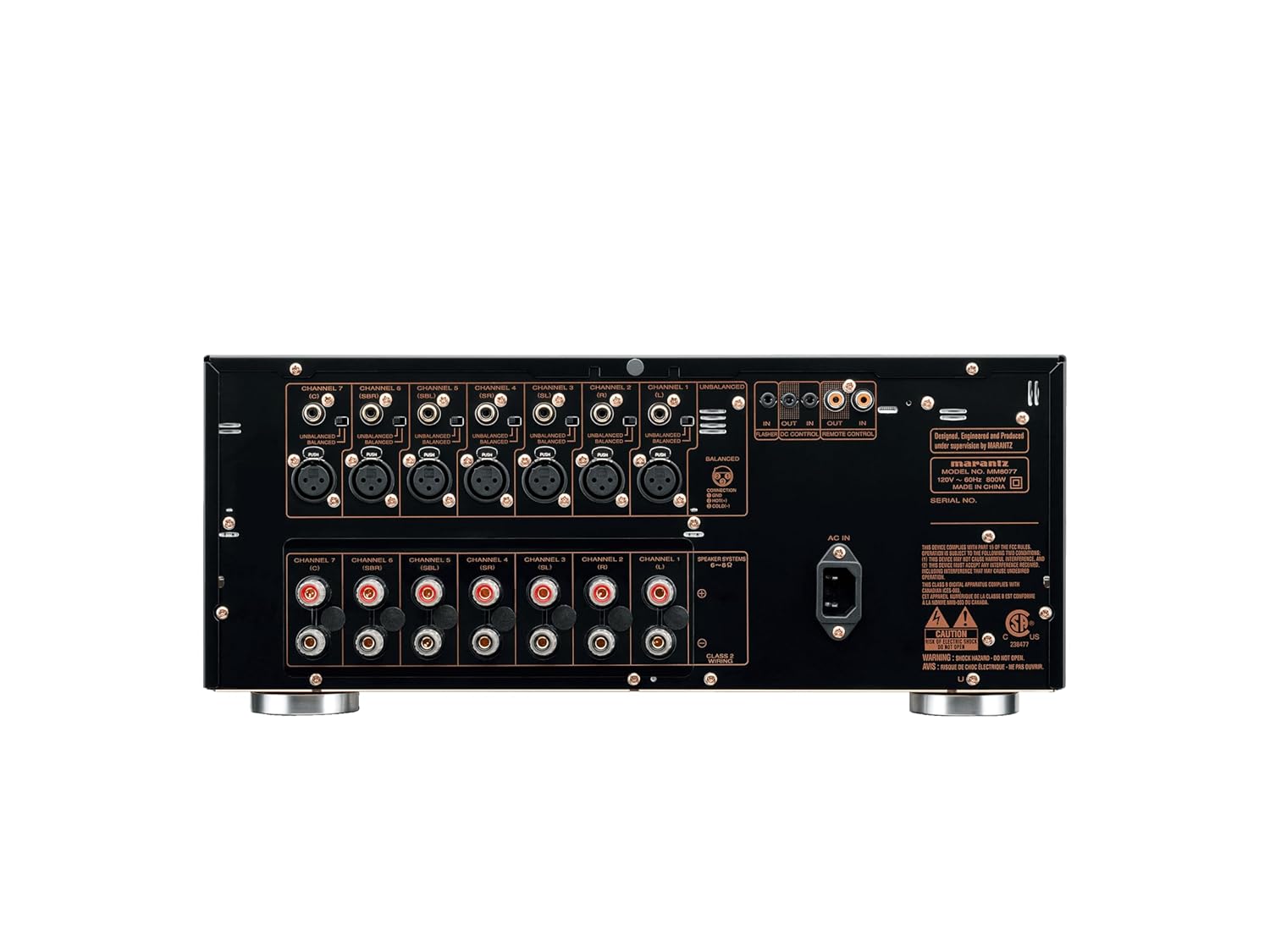
Image: Rear panel of the Marantz MM8077 amplifier. This view displays the seven sets of balanced (XLR) and unbalanced (RCA) audio inputs, speaker output terminals, and the AC power inlet. Input selector switches are visible above each channel's RCA input, allowing selection between balanced and unbalanced connections. Remote control ports are also present.
Power Connection
Once all audio connections are made, connect the supplied AC power cord to the AC inlet on the rear panel of the MM8077 and then to a suitable wall outlet. For integrated control with a Marantz pre-amplifier, utilize the remote power control features if available.
Operating Instructions
Power On/Off
Press the power button on the front panel to turn the amplifier on or off. The indicator light will illuminate when the unit is powered on. If connected to a compatible Marantz pre-amplifier, the MM8077 may power on/off automatically with the pre-amplifier.

Image: Front view of the Marantz MM8077 amplifier. The central circular display and power button are visible, indicating the unit's operational status. The sleek design features a brushed aluminum finish.
Input Selection
Input selection is typically managed by the connected pre-amplifier. Ensure the correct input type (XLR or RCA) is selected for each channel using the switches on the rear panel of the MM8077, matching the connections from your pre-amplifier.
Maintenance
Cleaning
To clean the exterior of the amplifier, use a soft, dry cloth. Avoid using abrasive cleaners, solvents, or chemical sprays, as these can damage the finish. Ensure the unit is powered off and unplugged before cleaning.
Ventilation
Maintain proper ventilation around the amplifier to prevent overheating. Do not block the ventilation openings on the top, sides, or rear of the unit. Avoid placing the amplifier in an enclosed cabinet without adequate airflow.
Troubleshooting
- No Power:
- Check if the power cord is securely connected to both the amplifier and the wall outlet.
- Verify that the wall outlet is functional.
- Ensure the power button on the front panel is pressed.
- No Sound:
- Confirm that the pre-amplifier is powered on and sending an audio signal.
- Check all audio cables (XLR/RCA) between the pre-amplifier and the MM8077 for secure connections.
- Ensure the correct input type (XLR or RCA) is selected for each channel on the MM8077's rear panel.
- Verify that speaker cables are correctly connected and not short-circuited.
- Distorted Sound:
- Check all cable connections for looseness or damage.
- Ensure speaker impedance is compatible with the amplifier.
- Reduce the volume level from the pre-amplifier to prevent clipping.
- Overheating:
- Ensure adequate ventilation around the amplifier.
- Remove any obstructions from the ventilation openings.
- If the issue persists, power off the unit and allow it to cool before resuming operation.
Specifications
| Brand | Marantz |
| Model Number | MM8077 |
| Number of Channels | 7 |
| Output Power | 150 Watts (into 8 ohms) |
| Product Dimensions (L x W x H) | 15.1 x 17.32 x 7.29 inches |
| Item Weight | 40 pounds |
| Material | Copper, Aluminum |
| Mounting Type | Freestanding |
| Minimum Supply Voltage | 11.46 Volts |
| Maximum Supply Voltage | 11.46 Volts |
| UPC | 699927150051, 779177775201 |
Official Product Video
Video: "Marantz. Born in New York". This video provides a historical and philosophical overview of the Marantz brand, showcasing its dedication to high-fidelity audio and the craftsmanship involved in its products. It highlights the brand's origins and its ongoing commitment to musical sound reproduction.
Warranty and Support
For information regarding warranty coverage, service, or technical support, please refer to the official Marantz website or contact Marantz customer service directly. Keep your purchase receipt for warranty claims.


