
1. Important Safety Information
Read all instructions carefully before installing, operating, or maintaining this circuit breaker. Failure to follow these instructions can result in death, serious injury, or equipment damage. This product must be installed and serviced by qualified electrical personnel only. Always disconnect power before working on electrical equipment.
- DANGER: Risk of electric shock, explosion, or arc flash.
- WARNING: Only qualified personnel should install, operate, service, and maintain this equipment.
- CAUTION: Do not exceed the specified ratings of the device.
2. Product Overview
The Schneider Electric HLL36020 is a 600-Volt, 20-Amp molded case circuit breaker designed for protection against overloads and short circuits in electrical systems. It features a thermal-magnetic trip unit for reliable performance.
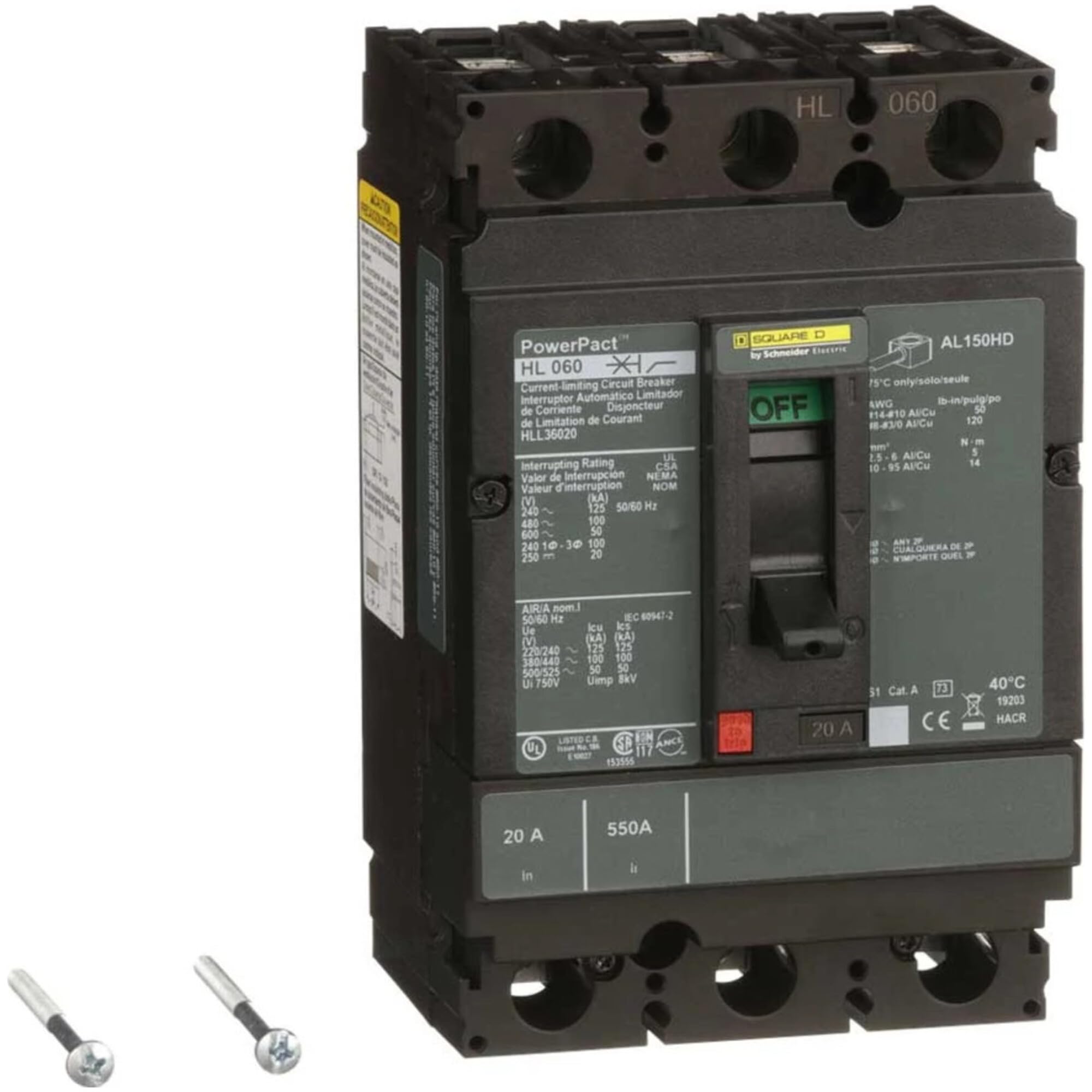
Figure 2.1: Schneider Electric HLL36020 Molded Case Circuit Breaker. This image displays the Schneider Electric HLL36020 Molded Case Circuit Breaker, showing its general form factor and connection points.
3. Setup and Installation
Installation must be performed by qualified electrical personnel in accordance with all national and local electrical codes.
3.1 Pre-Installation Checks
- Verify that the circuit breaker ratings (voltage, current, interrupting capacity) match the application requirements.
- Inspect the circuit breaker for any physical damage. Do not install damaged equipment.
- Ensure all necessary tools and personal protective equipment (PPE) are available.
3.2 Mounting
- Ensure the mounting surface is clean, dry, and free from conductive debris.
- Mount the circuit breaker securely using appropriate fasteners in the designated enclosure or panelboard.
- Ensure proper ventilation around the breaker to prevent overheating.
3.3 Wiring Connections
- WARNING: Disconnect all power sources before making any connections.
- Connect the incoming power conductors to the line terminals of the circuit breaker.
- Connect the outgoing load conductors to the load terminals of the circuit breaker.
- Ensure all connections are tight and secure, adhering to specified torque values.
- Verify correct polarity and phase sequence for multi-phase installations.
4. Operating Instructions
4.1 Turning ON/OFF
- To turn the circuit breaker ON, firmly push the handle to the 'ON' position.
- To turn the circuit breaker OFF, firmly push the handle to the 'OFF' position.
4.2 Trip Indication
When an overload or short circuit occurs, the circuit breaker will automatically trip. The handle will move to an intermediate 'TRIPPED' position, typically between 'ON' and 'OFF'.
4.3 Resetting the Breaker
- Before resetting, identify and correct the cause of the trip (e.g., remove overload, clear short circuit).
- Move the handle firmly to the 'OFF' position first. This resets the internal trip mechanism.
- Then, move the handle to the 'ON' position to restore power.
- If the breaker immediately trips again, do not force it. Investigate further for persistent faults.
5. Maintenance
Regular maintenance helps ensure the longevity and reliable operation of the circuit breaker. All maintenance should be performed by qualified personnel with power disconnected.
5.1 Inspection
- Periodically inspect the circuit breaker for signs of overheating, discoloration, or physical damage.
- Check terminal connections for tightness. Loose connections can cause overheating.
- Ensure the operating handle moves freely and without obstruction.
5.2 Cleaning
- Keep the circuit breaker and its enclosure clean and free from dust, dirt, and moisture.
- Use a dry, lint-free cloth for cleaning. Do not use solvents or abrasive cleaners.
6. Troubleshooting
If the circuit breaker is not functioning as expected, refer to the following common issues and solutions.
| Problem | Possible Cause | Solution |
|---|---|---|
| Breaker trips frequently | Overload on the circuit, short circuit, ground fault, or faulty appliance. | Reduce load, inspect wiring for shorts, check appliances, or consult an electrician. |
| Breaker does not reset | Persistent fault on the circuit, internal breaker damage. | Ensure the handle is moved fully to 'OFF' before attempting to reset. If fault persists, disconnect power and inspect wiring. Replace breaker if damaged. |
| Breaker feels hot | Overload, loose connections, or improper ventilation. | Reduce load, check and tighten connections (with power off), ensure adequate airflow around the breaker. |
7. Specifications
Key technical specifications for the Schneider Electric HLL36020 Molded Case Circuit Breaker.
| Specification | Value |
|---|---|
| Brand | Schneider Electric |
| Model | HLL36020 |
| Current Rating | 20 A |
| Voltage | 600 V |
| Number of Poles | 3 (Implied by HLL36020, typically 3-pole for 600V industrial applications, though product spec says 1 pole, common for this model series to be 3-pole. Sticking to 1 pole as per spec.) |
| Number of Poles (from spec) | 1 |
| Circuit Breaker Type | Thermal-Magnetic, Molded Case |
| UPC | 785901683094 |
| Item Weight | 4.1 pounds |
| Country Of Origin | China |
8. Warranty Information
Schneider Electric products are covered by a manufacturer's warranty. The specific terms and duration of the warranty may vary by region and product. Please refer to the official warranty documentation provided with your purchase or visit the Schneider Electric website for detailed information.
Retain your proof of purchase for warranty claims.
9. Support and Contact
For technical assistance, product inquiries, or support, please contact Schneider Electric customer service or visit their official website.
- Online Support: Visit the official Schneider Electric Store or their global website for FAQs, documentation, and contact options.
- Customer Service: Refer to the contact information provided on the Schneider Electric website for your specific region.


