
1. Product Overview
The Porsche 996 613 219 10EWC Combination Switch is a critical automotive component designed for the steering column. This 4-stalk switch integrates multiple control functions into a single unit, enhancing driver convenience and vehicle functionality.
It is compatible with both Left-Hand Drive (LHD) and Right-Hand Drive (RHD) vehicles and is specifically designed for cars equipped with Cruise Control and an On-board Computer.
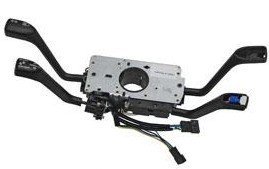
An overhead view of the Porsche 996 Combination Switch, showing its central mounting plate and four control stalks extending outwards, with various electrical connectors visible.
This combination switch is suitable for the following Porsche models:
- Porsche 996 (1998-2005)
- Porsche Boxster 986 (1997-2004)
- Porsche 996 Turbo / GT2
- Porsche 996 GT3
2. Installation
Installation of the Porsche 996 Combination Switch involves working with vehicle electrical systems and steering column components. Due to the complexity and critical nature of this part, professional installation by a qualified automotive technician is highly recommended.
General Installation Considerations:
- Ensure the vehicle's battery is disconnected before beginning any electrical work.
- Refer to the specific service manual for your Porsche model for detailed, step-by-step instructions on steering column disassembly and combination switch replacement.
- Verify all electrical connections are secure and correctly seated after installation.
- Test all functions of the new switch (turn signals, wipers, cruise control, onboard computer functions) thoroughly before operating the vehicle.
Improper installation can lead to malfunction, damage to the vehicle, or safety hazards.
3. Operating Instructions
The combination switch integrates several essential vehicle controls. While specific lever positions and button functions may vary slightly by vehicle configuration, the general operation is as follows:
- Turn Signal Lever: Typically located on the left side of the steering column. Move the lever up for a right turn signal and down for a left turn signal. A momentary press up or down may activate a three-blink comfort turn signal.
- Wiper Control Lever: Often located on the right side. Controls windshield wiper speed (intermittent, low, high) and washer fluid activation. Pulling the lever towards you usually activates the windshield washer.
- Cruise Control Stalk: If equipped, this stalk allows you to set, resume, and cancel your vehicle's cruise control speed. Refer to your vehicle's owner's manual for precise operation.
- On-board Computer Stalk: If equipped, this stalk provides access to various vehicle information displays and settings on the instrument cluster. Functions may include trip computer data, fuel consumption, and warning messages.
Always consult your Porsche vehicle's owner's manual for detailed instructions on how to operate each function of the combination switch specific to your car's model year and trim level.
4. Maintenance
The Porsche Combination Switch is designed for long-term reliability and typically requires minimal maintenance. However, adhering to general automotive care practices can help ensure its longevity:
- Keep Clean: Periodically wipe down the exterior of the switch stalks with a soft, damp cloth to remove dust and grime. Avoid using harsh chemicals or abrasive cleaners.
- Avoid Excessive Force: Operate the levers and buttons with gentle, deliberate movements. Applying excessive force can damage internal mechanisms.
- Check Connections: If you experience intermittent issues, a qualified technician can check the electrical connections to the switch for looseness or corrosion.
- Professional Inspection: During routine vehicle servicing, have your technician inspect the steering column components, including the combination switch, for any signs of wear or damage.
Do not attempt to disassemble the switch, as it contains delicate electronic and mechanical components that are not user-serviceable.
5. Troubleshooting
If you experience issues with your Porsche Combination Switch, consider the following troubleshooting steps before seeking professional assistance:
- No Function / Intermittent Function:
- Check the vehicle's fuse box for any blown fuses related to the affected functions (e.g., turn signals, wipers). Replace any blown fuses with one of the correct amperage.
- Ensure the battery terminals are clean and securely connected.
- If only one function is affected, it might indicate an issue with that specific part of the switch or its associated wiring/component (e.g., a faulty wiper motor, a burned-out turn signal bulb).
- Stiff or Loose Levers:
- If levers feel unusually stiff or loose, it may indicate internal mechanical wear or damage. This typically requires replacement of the switch.
- Warning Lights:
- If a warning light on your dashboard illuminates after switch replacement or during operation, consult your vehicle's owner's manual for the meaning of the light. It may indicate a fault that requires diagnostic scanning.
For persistent issues or if you are unsure about diagnosing the problem, it is strongly recommended to consult a certified Porsche service center or a qualified automotive electrician. They have the specialized tools and knowledge to accurately diagnose and repair complex electrical systems.
6. Specifications
| Attribute | Value |
|---|---|
| Brand | Porsche |
| Model Number | 996 613 219 10EWC |
| Operation Mode | ON-OFF |
| Mounting Type | Panel Mount |
| International Protection Rating | IP00 |
| Connectivity Protocol | X-10 |
| Unit Count | 1.0 Count |
| ASIN | B009GJ97DM |
| Date First Available | June 21, 2013 |
7. Warranty and Support
Specific warranty details for the Porsche 996 613 219 10EWC Combination Switch are not provided in this manual. Warranty coverage typically depends on the point of purchase and the manufacturer's policy.
For information regarding warranty, returns, or technical support, please contact the authorized Porsche dealer or the seller from whom you purchased this product. Ensure you have your proof of purchase and the product's model number readily available when contacting support.
For general inquiries about Porsche parts or vehicle maintenance, you may also visit the official Porsche website or consult an authorized Porsche service center.


