
1. Introduction
This manual provides essential information for the safe and effective use of your Fujifilm XF1 Digital Camera. The Fujifilm XF1 is a compact, high-quality digital camera featuring a 12-megapixel EXR CMOS sensor, a 4x manual zoom lens, and a 3-inch LCD screen. Please read these instructions carefully before using your camera.
2. Getting Started
2.1. Package Contents
- Fujifilm XF1 Digital Camera
- Battery
- Instruction Manual
2.2. Battery and Memory Card Installation
Insert the supplied battery into the battery compartment, ensuring correct orientation. Close the battery compartment cover securely. Insert a compatible SD/SDHC/SDXC memory card into the card slot until it clicks into place. Ensure the card is correctly oriented to avoid damage.
2.3. Intelligent Retractable Lens System (Power On/Off)
The Fujifilm XF1 features an intelligent retractable lens system that also functions as the camera's power switch. Follow these steps to operate the lens and power the camera:
- To Power On and Enter Standby Mode: Rotate the zoom ring until it stops, then pull it out until it clicks. The camera is now in standby mode, ready for quick activation.
- To Enter Shooting Mode: From standby mode, rotate the zoom ring again. The lens cover will open, and the camera will be ready to shoot.
- To Power Off and Enter Standby Mode: Rotate the zoom ring back to the standby position.
- To Fully Retract Lens (Portable Mode): From standby mode, push the zoom ring until it clicks, then rotate it until it stops. The lens will retract fully into the camera body for maximum portability.
Video: This video demonstrates the intelligent retractable lens system of the Fujifilm XF1, showing how to power on, enter shooting mode, and power off/retract the lens for portability.
2.4. Initial Settings
Upon first power-on, you may be prompted to set the date, time, and language. Follow the on-screen instructions to configure these basic settings.
3. Operating the Camera
3.1. Basic Photography
The Fujifilm XF1 offers various shooting modes to suit different photographic needs:
- EXR Auto: Automatically detects the scene type (58 types) and optimizes settings for exposure, white balance, and sensor mode (high resolution, wide dynamic range, or high sensitivity/low noise).
- Program (P), Shutter-Priority (S), Aperture-Priority (A), Manual (M): Provides full control over exposure settings for experienced users.
- Focusing: The camera features fast autofocus, even in low light. Manual focus is also available for precise control.
- Flash Modes: Select from Auto, On, Off, or Continuous/Burst flash modes depending on your lighting conditions.

Image: Front view of the Fujifilm XF1 Digital Camera in black, showcasing its compact design and lens.
3.2. Advanced Features
Leverage the XF1's advanced capabilities for enhanced image creation:
- EXR CMOS Sensor: The 2/3-inch 12MP EXR CMOS sensor provides excellent image quality, offering options for extended dynamic range or reduced noise in challenging lighting.
- Film Simulations: Choose from various film simulation modes (e.g., Provia, Velvia) to replicate the look of classic Fujifilm films.
- Advanced Filters: Apply creative effects directly in-camera, such as Toy Camera, Miniature, Pop Color, and more.
- Multiple Exposure: Superimpose two different exposures into a single frame for artistic results.
- Motion Panorama 360: Capture expansive panoramic images by sweeping the camera across a scene.
- 3D Shooting: Create 3D images by taking two slightly offset photos, which can be viewed on compatible 3D displays.
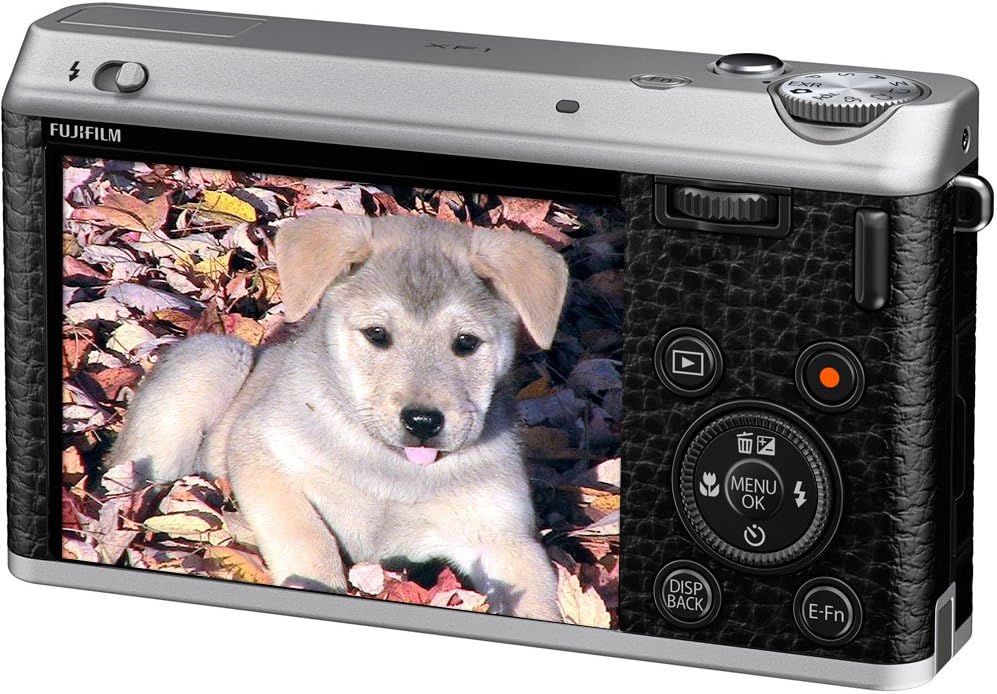
Image: Rear view of the Fujifilm XF1 Digital Camera, displaying the 3-inch LCD screen and control buttons.
3.3. Video Recording
The XF1 supports Full HD (1080p) video recording with stereo sound. The movie scene recognition function automatically optimizes settings for clear and colorful video capture.
Video: This official product video highlights the design, key features, and various shooting modes of the Fujifilm XF1 Digital Camera, including EXR Auto, film simulations, and advanced filters.
4. Maintenance
Proper care ensures the longevity and performance of your camera:
- Cleaning the Lens: Use a soft, lint-free cloth specifically designed for camera lenses. Avoid touching the lens surface with your fingers.
- Cleaning the Body: Wipe the camera body with a soft, dry cloth. For stubborn dirt, a slightly damp cloth can be used, followed by a dry one.
- Battery Care: Store batteries in a cool, dry place. Remove the battery if the camera will not be used for an extended period.
- Storage: When not in use, store the camera in a dry, dust-free environment, preferably in a camera bag to protect it from impacts.
5. Troubleshooting
If you encounter issues with your Fujifilm XF1, consider the following:
- "Lens Control Error": Some users have reported a "Lens Control Error." If this occurs, try powering the camera off and on again by fully retracting and extending the lens. If the error persists, it may indicate a mechanical issue with the lens mechanism.
- Poor Image Quality: Check your shooting mode and settings. Ensure the lens is clean and free from smudges. In low light, consider using EXR mode for high sensitivity or adjusting ISO settings.
- Short Battery Life: Ensure the battery is fully charged. Reduce screen brightness or disable features like Wi-Fi when not in use to conserve power.
For persistent issues or technical support, please contact Fujifilm customer service.
6. Specifications
| Feature | Specification |
|---|---|
| Photo Sensor Resolution | 12 MP |
| Photo Sensor Size | 2/3-inch |
| Optical Zoom | 4x |
| Maximum Aperture | F1.8 |
| Minimum Focal Length | 25 Millimeters |
| Maximum Focal Length | 100 Millimeters |
| Screen Size | 3 Inches |
| Video Resolution | FHD 1080p |
| Image Stabilization | Optical |
| Supported File Format | JPEG (Exif 2.3), RAW (RAF format), RAW+JPEG |
| Connectivity Technology | HDMI, USB, Wireless |
| Flash Memory Type | SD/SDHC/SDXC |
| Item Weight | 0.56 Pounds |
7. Warranty and Support
For information regarding your product's warranty, please refer to the warranty card included with your purchase or visit the official Fujifilm website. For technical assistance, spare parts, or service, please contact Fujifilm customer support. Contact details can typically be found on the Fujifilm website or in your product documentation.


